Realtime Database Polling
State normalization and its backend code keep the UI up to date while the user works with the app through HTTP requests. They also cover the AI features, Text Chat AI and Voice AI, explained in later articles. The rule of thumb: data always goes through the entity registry.
Other users or third-party services can also change the database. One way to keep the UI in sync with the backend in real time is database polling over JSON Lines. The server sends updates to clients whenever the database changes, and the client reconnects automatically when the connection closes.
The component below is a polling example. It gets an update from the server every second. After 10 updates, the server closes the connection, and the client reconnects automatically. Database updates work the same way.
Poll Ticker
0
Expect a short delay (up to half a second) for the CORS preflight. The Network tab in DevTools shows it.
The video below shows polling at work. Browser tabs stand in for several users, but updates from any source, third-party services included, work the same way.
Redis DB as event bus
Polling the main Postgres database for changes would be inefficient. The app uses Redis as an event bus instead: each change to the main database writes a small event to Redis. The polling service reads these events every second and sends them to the clients that have the app open.
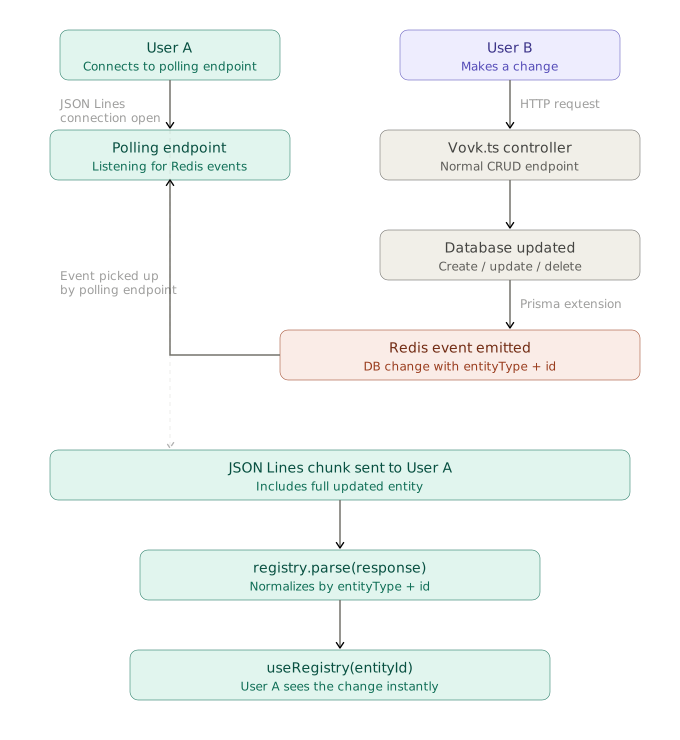
The app uses Prisma as its ORM, so Prisma Extensions can hook into database operations and write the events to Redis. This is the job of the DatabaseService from the Endpoints article.
The implementation has these limits:
- Deletions must be explicit, even when the database deletes rows by cascade. See the
UserService.deleteUsermethod. - Every write operation must select the
updatedAtfield, or change detection fails. - To keep it simple, the only supported write operations are
create,update,upsert, anddelete. Read operations such asfind...andcountpass through unchanged and record no change. More complex operations need extra handling.
import { PrismaNeon } from '@prisma/adapter-neon';
import { Prisma, PrismaClient } from '@prisma/client';
import { HttpException, HttpStatus } from 'vovk';
import type { BaseEntity } from '@/types';
import DatabaseEventsService, {
  type DBChange,
} from './database-events-service';
import './neon-local'; // Setup Neon for local development

export default class DatabaseService {
  static get prisma() {
    DatabaseService.#prisma ??= DatabaseService.getClient();
    return DatabaseService.#prisma;
  }
  static #prisma: ReturnType<typeof DatabaseService.getClient> | null = null;

  private static getClient() {
    const prisma = new PrismaClient({
      adapter: new PrismaNeon({
        connectionString: `${process.env.DATABASE_URL}`,
      }),
    });

    DatabaseEventsService.beginEmitting();

    return prisma
      .$extends({
        name: 'timestamps',
        // Ensure createdAt and updatedAt are always ISO strings to match the generated Zod schemas
        result: {
          $allModels: {
            createdAt: {
              compute: (data: { createdAt: Date }) =>
                data.createdAt.toISOString(),
            },
            updatedAt: {
              compute: (data: { updatedAt: Date }) =>
                data.updatedAt.toISOString(),
            },
          },
        },
      })
      .$extends({
        name: 'events',
        // Emit database change events for create, update, and delete operations
        query: {
          $allModels: {
            async $allOperations({ model, operation, args, query }) {
              const allowedOperations = [
                'create',
                'update',
                'delete',
                'upsert',
                'findMany',
                'findUnique',
                'findFirst',
                'findUniqueOrThrow',
                'findFirstOrThrow',
                'count',
                'aggregate',
                'groupBy',
              ] as const;
              type AllowedOperation = (typeof allowedOperations)[number];
              if (!allowedOperations.includes(operation as AllowedOperation)) {
                throw new Error(
                  `Unsupported database operation "${operation}" on model "${model}"`,
                );
              }
              let result: BaseEntity | BaseEntity[];
              try {
                result = (await query(args)) as BaseEntity | BaseEntity[];
              } catch (error) {
                throw DatabaseService.toHttpException(error, model);
              }

              const now = new Date().toISOString();
              let change: DBChange | null = null;

              const makeChange = (
                entity: BaseEntity,
                type: DBChange['type'],
              ) => ({
                id: entity.id,
                entityType: entity.entityType,
                date:
                  type === 'delete'
                    ? now
                    : entity.updatedAt
                      ? new Date(entity.updatedAt).toISOString()
                      : now,
                type,
              });

              switch (operation as AllowedOperation) {
                case 'create':
                  if ('entityType' in result)
                    change = makeChange(result, 'create');
                  break;

                case 'update':
                case 'upsert':
                  if ('entityType' in result)
                    change = makeChange(result, 'update');
                  break;

                case 'delete':
                  if ('entityType' in result) {
                    change = makeChange(result, 'delete');
                    // Automatically add __isDeleted flag to deletion results
                    Object.assign(result, { __isDeleted: true });
                  }
                  break;

                case 'findMany':
                case 'findUnique':
                case 'findFirst':
                case 'findUniqueOrThrow':
                case 'findFirstOrThrow':
                case 'count':
                case 'aggregate':
                case 'groupBy':
                  // no events
                  break;

                default:
                  console.warn(
                    `Unhandled Prisma operation: ${operation} for model: ${model}`,
                  );
                  break;
              }

              if (change) {
                await DatabaseEventsService.createChanges([change]);
              }

              return result;
            },
          },
        },
      });
  }

  // a missing record, a taken unique value or a missing related record is the caller's error, not a 500
  private static toHttpException(error: unknown, model: string) {
    if (!(error instanceof Prisma.PrismaClientKnownRequestError)) return error;
    switch (error.code) {
      case 'P2025':
        return new HttpException(HttpStatus.NOT_FOUND, `${model} not found`);
      case 'P2002':
        return new HttpException(
          HttpStatus.CONFLICT,
          `${model} with the same unique field already exists`,
        );
      case 'P2003':
        return new HttpException(
          HttpStatus.BAD_REQUEST,
          `${model} refers to a record that doesn't exist`,
        );
      default:
        return error;
    }
  }
}
The code above is fetched from GitHub repository.
- The
getClientmethod callsDatabaseEventsService.beginEmitting()to start emitting events.beginEmittingruns asetIntervalthat connects to Redis and checks for new events. It emits each new event with mitt . prisma.$extendshooks into some of the Prisma model operations. When an operation changes data, it callsawait DatabaseEventsService.createChanges([change]), which stores a change entry in Redis. A change records a create, an update, or a delete:
export type DBChange = {
  id: string;
  entityType: EntityType;
  date: string;
  type: 'create' | 'update' | 'delete';
};
The date field holds the time of the change, so clients fetch only the latest changes.
- For
create,update, andupsert, it is theupdatedAtfield of the row (so every write operation must select this field). - For
delete, it is the current time.
The delete operation also adds an __isDeleted property. The frontend uses it to hide the entity: the registry item gets enumerable: false (see the State page).
Besides beginEmitting and createChanges, DatabaseEventsService has an emitter (a mitt instance). The polling service (DatabasePollService, below) listens to it for new events. A private connect method opens the Redis connection.
import type { EntityType } from '@prisma/client';
import mitt from 'mitt';
import { createClient } from 'redis';

export type DBChange = {
  id: string;
  entityType: EntityType;
  date: string;
  type: 'create' | 'update' | 'delete';
};

export default class DatabaseEventsService {
  public static readonly DB_KEY = 'db_updates';

  private static readonly INTERVAL = 1_000;
  private static lastTimestamp = Date.now();

  private static redisClient = createClient({
    url: process.env.REDIS_URL,
  });

  public static emitter = mitt<{
    [DatabaseEventsService.DB_KEY]: DBChange[];
  }>();

  // ensure Redis is connected
  private static async connect() {
    if (!DatabaseEventsService.redisClient.isOpen) {
      await DatabaseEventsService.redisClient.connect();
      DatabaseEventsService.redisClient.on('error', (err) => {
        console.error('Redis Client Error', err);
      });
    }
  }

  // push one update into our ZSET, with score = timestamp
  public static async createChanges(changes: DBChange[]) {
    if (changes.length === 0) return;

    await DatabaseEventsService.connect();

    // build array of { score, value } objects
    const entries = changes.map(({ id, entityType, type, date }) => ({
      score: Date.now(),
      value: JSON.stringify({ id, entityType, date, type }),
    }));

    // one multi(): batch ZADD, drop the entries older than the key's lifetime, EXPIRE
    await DatabaseEventsService.redisClient
      .multi()
      .zAdd(DatabaseEventsService.DB_KEY, entries)
      .zRemRangeByScore(
        DatabaseEventsService.DB_KEY,
        '-inf',
        Date.now() - DatabaseEventsService.INTERVAL * 60,
      )
      .expire(
        DatabaseEventsService.DB_KEY,
        (DatabaseEventsService.INTERVAL * 60) / 1000,
      )
      .exec();
  }

  public static beginEmitting() {
    setInterval(async () => {
      await DatabaseEventsService.connect();

      const now = Date.now();

      // get everything with score ∈ (lastTimestamp, now]
      const raw = await DatabaseEventsService.redisClient.zRangeByScore(
        DatabaseEventsService.DB_KEY,
        DatabaseEventsService.lastTimestamp + 1,
        now,
      );

      DatabaseEventsService.lastTimestamp = now;

      if (raw.length > 0) {
        const updates = raw.map((s) => JSON.parse(s) as DBChange);
        DatabaseEventsService.emitter.emit(
          DatabaseEventsService.DB_KEY,
          updates,
        );
      }
    }, DatabaseEventsService.INTERVAL);
  }
}
The code above is fetched from GitHub repository.
Polling controller and service
With the change entries in Redis and the emitter in place, a polling procedure can stream updates to clients in real time. DatabasePollController has a single JSON Lines procedure. DatabasePollService gets a JSONLinesResponder instance from the controller and sends data to clients through it. The service closes the connection after 30 seconds, so clients must reconnect. It removes its change listener then, or at the first change after the client has left.
database-poll-service.ts
import { forEach, groupBy } from 'lodash';
import type { JSONLinesResponder, VovkIteration } from 'vovk';
import DatabaseEventsService, {
  type DBChange,
} from './database-events-service';
import type DatabasePollController from './database-poll-controller';
import DatabaseService from './database-service';

export default class PollService {
  static poll(
    responder: JSONLinesResponder<
      VovkIteration<typeof DatabasePollController.poll>
    >,
  ) {
    let asOldAs = new Date();
    // 10 minutes ago; TODO: use latest update date from registry
    asOldAs.setMinutes(asOldAs.getMinutes() - 10);

    const onChanges = (changes: DBChange[]) => {
      // the client left before the timeout
      if (responder.isClosed) {
        DatabaseEventsService.emitter.off(
          DatabaseEventsService.DB_KEY,
          onChanges,
        );
        return;
      }
      const deleted = changes.filter((change) => change.type === 'delete');
      const createdOrUpdated = changes.filter(
        (change) => change.type === 'create' || change.type === 'update',
      );

      for (const deletedEntity of deleted) {
        void responder.send({
          id: deletedEntity.id,
          entityType: deletedEntity.entityType,
          __isDeleted: true,
        });
      }
      // group by entityType and date, so the date is maximum date for the given entity: { entityType: string, date: string }[]
      forEach(groupBy(createdOrUpdated, 'entityType'), (changes) => {
        const maxDateItem = changes.reduce(
          (max, change) => {
            const changeDate = new Date(change.date);
            return changeDate.getTime() > new Date(max.date).getTime()
              ? change
              : max;
          },
          { date: new Date(0) } as unknown as DBChange,
        );

        if (new Date(maxDateItem.date).getTime() > asOldAs.getTime()) {
          void DatabaseService.prisma[maxDateItem.entityType as 'user']
            .findMany({
              where: {
                updatedAt: {
                  gt: asOldAs,
                },
              },
            })
            .then((entities) => {
              for (const entity of entities) {
                void responder.send(entity);
              }
            });
          asOldAs = new Date(maxDateItem.date);
        }
      });
    };

    DatabaseEventsService.emitter.on(DatabaseEventsService.DB_KEY, onChanges);

    setTimeout(() => {
      DatabaseEventsService.emitter.off(
        DatabaseEventsService.DB_KEY,
        onChanges,
      );
      responder.close();
    }, 30_000);
  }
}- When
DatabaseEventsService.emitteremits adeletechange, the service sends an event withid,entityType, and__isDeleted: true, and the registry hides the entity. - For an
updateorcreatechange, the service fetches the full entity from Postgres (Redis stores only metadata) and sends it to clients.
Client-side logic
On the client, for example in a React component, call DatabasePollRPC.poll() to get a stream of database events. Like any JSON Lines RPC method, it returns an async iterable that you read in a for await loop. The server may close the connection, or the network may fail, so wrap the logic in a retry loop. The fetcher is already configured, so the loop body can be empty: you don’t handle the data yourself.
The frontend code also has an on/off switch, saved in localStorage, so users can turn polling on or off.
The useDatabasePolling hook implements this logic and returns the [isPollingEnabled, setIsPollingEnabled, hasError] state tuple:
import { useEffect, useRef, useState } from 'react';
import { DatabasePollRPC } from '@/client';

/**
 * Hook to manage database polling state.
 * @example const [isPollingEnabled, setIsPollingEnabled, hasError] = useDatabasePolling(false);
 */
export default function useDatabasePolling(initialValue = false) {
  const MAX_RETRIES = 5;
  const [isPollingEnabled, setIsPollingEnabled] = useState(initialValue);
  const [hasError, setHasError] = useState(false);
  const abortRef = useRef<() => void>(null);

  useEffect(() => {
    const isEnabled = localStorage.getItem('isPollingEnabled');
    setIsPollingEnabled(isEnabled === 'true');
  }, []);

  useEffect(() => {
    localStorage.setItem('isPollingEnabled', isPollingEnabled.toString());
    async function poll(retries = 0) {
      setHasError(false);
      if (!isPollingEnabled) {
        abortRef.current?.();
        return;
      }
      try {
        while (true) {
          console.log('Polling database for updates...');
          const iterable = await DatabasePollRPC.poll();
          abortRef.current = iterable.abortSilently;

          for await (const iteration of iterable) {
            console.log('New DB update:', iteration);
          }

          if (iterable.abortController.signal.aborted) {
            console.log('Polling aborted with abortSilently');
            break;
          }
        }
      } catch (error) {
        if (retries < MAX_RETRIES) {
          console.error('Polling failed, retrying...', error);
          await new Promise((resolve) => setTimeout(resolve, 2000));
          return poll(retries + 1);
        } else {
          console.error(
            'Max polling retries reached. Stopping polling.',
            error,
          );
          setHasError(true);
        }
      }
    }

    void poll();

    return () => {
      abortRef.current?.();
    };
  }, [isPollingEnabled]);

  return [isPollingEnabled, setIsPollingEnabled, hasError] as const;
}
The code above is fetched from GitHub repository.
Usage:
const [isPollingEnabled, setIsPollingEnabled, hasError] = useDatabasePolling(false);