Telegram Bot with OpenAPI Mixins
Together, State Normalization, Database Polling, and Tool derivation let any third-party source update the database and the UI in real time: API calls, MCP clients, bots, other users, and so on.
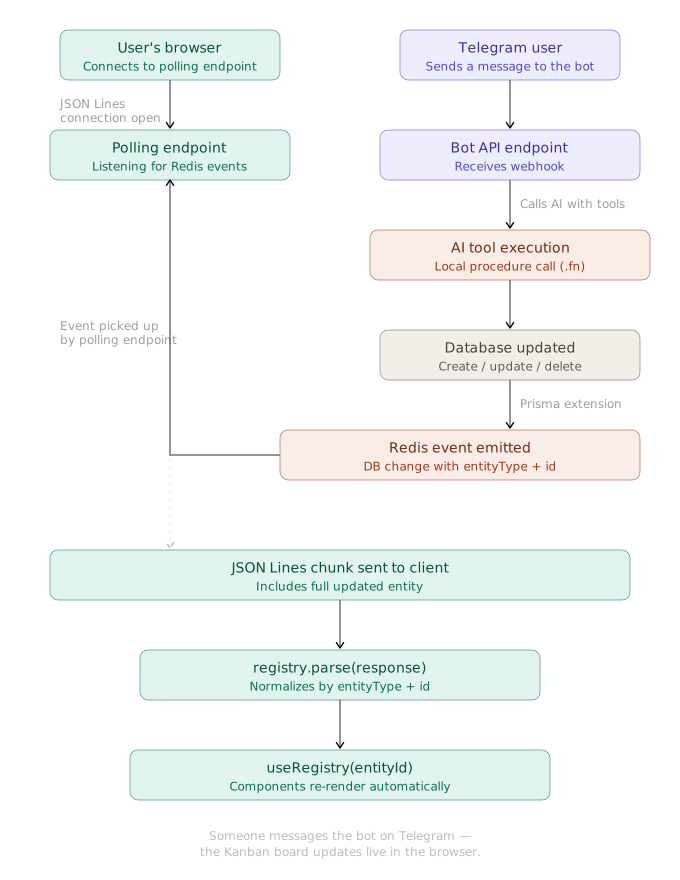
As a proof of concept, this article describes the Telegram bot. Users send it text or voice messages to create tasks and assign them to team members.
Telegram API Mixin
The Telegram API client is built with OpenAPI mixins. It is a module with the fixed name TelegramAPI in the telegram pseudo-segment.
// @ts-check
/** @type {import('vovk').VovkConfig} */
const config = {
  // ...
  outputConfig: {
    // ...
    segments: {
      telegram: {
        openAPIMixin: {
          source: {
            url: 'https://raw.githubusercontent.com/sys-001/telegram-bot-api-versions/refs/heads/main/files/openapi/yaml/v183.yaml',
            fallback: '.openapi-cache/telegram.yaml',
          },
          getModuleName: 'TelegramAPI',
          getMethodName: ({ path }) => path.replace(/^\//, ''),
          errorMessageKey: 'description',
        },
      },
    },
  },
};

export default config;
After vovk dev or vovk generate, you can import the TelegramAPI module from the generated client.
import { TelegramAPI } from '@/client';

await TelegramAPI.sendMessage({
  body: {
    chat_id: 123456789,
    text: 'Hello from Realtime Kanban Telegram bot!',
  },
  apiRoot: 'https://api.telegram.org/bot<YOUR_BOT_TOKEN>',
});
The Telegram Bot API takes the bot token in the URL, so recreate the module with the withDefaults method to set the apiRoot once.
import { TelegramAPI as TelegramRawAPI } from '@/client';

const TelegramAPI = TelegramRawAPI.withDefaults({
  apiRoot: 'https://api.telegram.org/bot<YOUR_BOT_TOKEN>',
});
Segment, Controller and Procedure
A new segment, bots, holds the TelegramController under the TelegramBot key. The client doesn’t need its schema, so the segment emits none: emitSchema: false in the initSegment call. With no schema emitted, the controller key can be any string.
import { initSegment } from 'vovk';
import TelegramController from '../../../../modules/telegram/telegram-controller';

const controllers = {
  TelegramBot: TelegramController,
};

export type Controllers = typeof controllers;

export const { GET, POST, PATCH, PUT, HEAD, OPTIONS, DELETE } = initSegment({
  segmentName: 'bots',
  emitSchema: false, // Disable schema emission for bot endpoints
  controllers,
});
The code above is fetched from GitHub repository.
The TelegramController class has a single handle procedure. It serves the /api/bots/telegram/bot endpoint, which the Telegram webhook calls for each incoming message.
import { post, prefix } from 'vovk';
import { telegramGuard } from '@/decorators/telegram-guard';
import TelegramService from './telegram-service';

@prefix('telegram')
export default class TelegramController {
  @post('bot')
  @telegramGuard()
  static handle = TelegramService.handle.bind(TelegramService);
}
The code above is fetched from GitHub repository.
The app’s PASSWORD doesn’t cover this endpoint, because Telegram sends no session cookie. The telegramGuard decorator checks the X-Telegram-Bot-Api-Secret-Token header instead. The endpoint answers 404 until both TELEGRAM_BOT_TOKEN and TELEGRAM_WEBHOOK_SECRET are set, and 401 to a request whose header doesn’t hold the secret.
import { timingSafeEqual } from 'node:crypto';
import { createDecorator, HttpException, HttpStatus } from 'vovk';

// Telegram sends the secret_token given to setWebhook in this header with every update
export const telegramGuard = createDecorator(async (req, next) => {
  const secret = process.env.TELEGRAM_WEBHOOK_SECRET;
  if (!process.env.TELEGRAM_BOT_TOKEN || !secret) {
    throw new HttpException(HttpStatus.NOT_FOUND, 'Not found');
  }
  const given = Buffer.from(
    req.headers.get('x-telegram-bot-api-secret-token') ?? '',
  );
  const expected = Buffer.from(secret);
  if (given.length !== expected.length || !timingSafeEqual(given, expected)) {
    throw new HttpException(HttpStatus.UNAUTHORIZED, 'Unauthorized');
  }
  return next();
});
The code above is fetched from GitHub repository.
Telegram sends the header once you register the webhook with the same secret as secret_token. The secret can hold 1 to 256 characters: A-Z, a-z, 0-9, _ and -.
curl "https://api.telegram.org/bot$TELEGRAM_BOT_TOKEN/setWebhook" \
  -d "url=https://your-app.example.com/api/bots/telegram/bot" \
  -d "secret_token=$TELEGRAM_WEBHOOK_SECRET"
Service
The TelegramService class holds the main logic: it handles incoming messages, generates AI responses with the Vercel AI SDK, updates the database through derived tools, and sends text or voice messages back to the user.
// ...
export default class TelegramService {
  // ...
  private static async generateAIResponse(
    chatId: number,
    userMessage: string,
    systemPrompt: string
  ): Promise<{ botResponse: string; messages: ModelMessage[] }> {
    // Get chat history
    const history = await this.getChatHistory(chatId);
    const messages = [...this.formatHistoryForVercelAI(history), { role: 'user', content: userMessage } as const];
    const tools = deriveTools({
      modules: {
        UserController,
        TaskController,
      },
    });

    // Generate a response using Vercel AI SDK
    const { text } = await generateText({
      model: vercelOpenAI('gpt-5'),
      instructions: systemPrompt,
      messages,
      stopWhen: stepCountIs(16),
      tools: {
        ...Object.fromEntries(
          tools.map(({ name, execute, description, inputSchema }) => [
            name,
            tool({
              execute,
              description,
              // the SDK takes Standard Schema as is; a procedure without input has no schema
              inputSchema: inputSchema ?? z.object({}),
            }),
          ])
        ),
      },
    });

    const botResponse = text || "I couldn't generate a response.";

    // Add user message to history
    await this.addToHistory(chatId, 'user', userMessage);
    // Add assistant response to history
    await this.addToHistory(chatId, 'assistant', botResponse);

    messages.push({
      role: 'assistant',
      content: botResponse,
    });

    return { botResponse, messages };
  }

  private static async sendTextMessage(chatId: number, text: string): Promise<void> {
    await TelegramAPI.sendMessage({
      body: {
        chat_id: chatId,
        text: text,
        parse_mode: 'html',
      },
    });
  }

  private static async sendVoiceMessage(chatId: number, text: string): Promise<void> {
    // ...
  }
  // ...
}
The full TelegramService is too long for this page. See it in the GitHub repository .