vovk new
npx vovk-cli new --help
Usage: vovk new|n [options] [components...]

Create new components. "vovk new [...components] [segmentName/]moduleName" to create a new module or "vovk
new segment [segmentName]" to create a new segment

Options:
  -o, --overwrite                         overwrite existing files
  --static                                (new segment only) if the segment is static
  --template, --templates <templates...>  (new module only) override config template; accepts an array of
                                          strings that correspond to the order of the components
  --out, --out-dir <dirname>              (new module only) override outDir in template file; relative to the
                                          root of the project
  --no-segment-update                     (new module only) do not update segment files when creating a new
                                          module
  --empty                                 (new module only) create an empty module
  --dry-run                               do not write files to disk
  --log-level <level>                     set the log level
  -h, --help                              display help for command
vovk new creates segments and modules, such as controllers, services or custom modules. It uses the moduleTemplates option of the config, where you can add your own templates. It has two forms: vovk new segment [segment_name] and vovk new [module] [module_name_singular]
vovk new segment
Root Segment
npx vovk new segmentWithout an argument, vovk new segment creates the root segment at /src/app/api/[[…vovk]]/route.ts. The segmentName option of initSegment is an empty string for the root segment, so the file leaves it out:
import { initSegment } from 'vovk';

const controllers = {};

export type Controllers = typeof controllers;

export const { GET, POST, PATCH, PUT, HEAD, OPTIONS, DELETE } = initSegment({
  emitSchema: true,
  controllers,
});
With vovk dev running, the segment emits its schema to .vovk-schema/root.json.
Its API is at /api/….
The root segment can sit next to nested segments of any depth.
Nested Segment
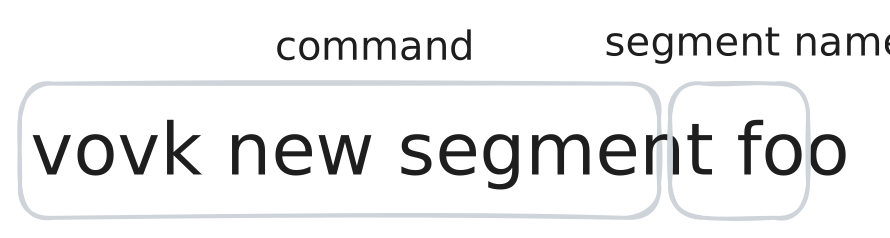
npx vovk new segment foovovk new segment foo creates /src/app/api/foo/[[…vovk]]/route.ts with:
// ...
export const { GET, POST, PATCH, PUT, HEAD, OPTIONS, DELETE } = initSegment({
  segmentName: 'foo',
  emitSchema: true,
  controllers,
});
With vovk dev running, the segment emits its schema to .vovk-schema/foo.json.
Its API is at /api/foo/….
vovk new segment foo/bar/baz creates a nested segment at /src/app/api/foo/bar/baz/[[…vovk]]/route.ts, served at /api/foo/bar/baz/…. Its segmentName is "foo/bar/baz".
vovk new [module] [name]

npx vovk new controller service foo/uservovk new with anything other than segment creates modules in /src/modules.
The parts of the command:
npx vovk new— the command.- Components — the module types to create:
controller,serviceor a custom module. - The module name, singular, with an optional segment prefix:
foo/usercreates a module in /src/modules/foo/user/ and updates thefoosegment. Without a segment, the module goes to the root segment:
npx vovk new controller service userFor a new controller, vovk new adds it to the controllers object in the route.ts of the segment, editing the file through its AST .
If one of the module’s files already exists, vovk new writes none of them, unless you pass --overwrite. The module name has to start with a letter, since the templates turn it into class and method names.
The moduleTemplates option of the config sets the template paths:
/** @type {import('vovk').VovkConfig} */
const config = {
  moduleTemplates: {
    controller: 'vovk-cli/module-templates/type/controller.ts.ejs',
    service: 'vovk-cli/module-templates/type/service.ts.ejs',
    state: './my-templates/state.ts.ejs',
  },
};

export default config;
npx vovk new controller state user creates user-controller.ts and user-state.ts in /src/modules/user and adds the controller to the root segment.
Built-in Module Templates
The built-in controller and service templates have the CRUD methods: list, get one, create, update and delete.
vovk init puts the matching templates in the config:
- Zod controller template: vovk-cli/module-templates/zod/controller.ts.ejs
- Arktype controller template: vovk-cli/module-templates/arktype/controller.ts.ejs
- Valibot controller template: vovk-cli/module-templates/valibot/controller.ts.ejs
- Without a validation library, it uses the validation-agnostic template vovk-cli/module-templates/type/controller.ts.ejs .
- The service template is the same for every validation library: vovk-cli/module-templates/type/service.ts.ejs .
The controller and the service these templates write infer types from each other, which needs TypeScript 5.5+.
Shortcuts
c and s are short for controller and service:
npx vovk n c s userThis is the same as:
npx vovk new controller service userCustom Module Templates
A module template is a .ts.ejs file. It uses EJS to generate the code and YAML front matter for its metadata.
Module Template Metadata
The metadata fields:
outDir: string— the output folder, relative to the project root. The EJS variablet.defaultOutDirholds /src/modules/[segmentName/]moduleName/.fileName: string— the output file name.sourceName: string— the controller name (controllers only), added to thecontrollersobject of the segment file.compiledName: string— the RPC module name (controllers only): the name of the module in the generated client.
Module Template Variables
The EJS template gets these variables in the t object:
t.defaultOutDir: string— the default output folder of the module.t.relativePathToSourceRoot: string— the path fromt.defaultOutDirto the source root (srcwhen the app is insrc/app, otherwise the project root), such as../...t.config: VovkConfig— the Vovk.ts config.t.segmentName: string— the segment name (an empty string for the root segment).t.withService: boolean— whether a service is created together with the controller.t.nodeNextResolutionExt: { ts: string; js: string; mjs: string; cjs: string }— the import file extensions for themoduleResolutionoftsconfig.json, or formodulewhenmoduleResolutionisn’t set. For'node16','node18','node20'and'nodenext', the keys hold.ts/.js/.mjs/.cjs; in other cases, empty strings.tsis.tsonly withallowImportingTsExtensionsorrewriteRelativeImportExtensions; otherwise it’s.js, the name TypeScript resolves to the.tsfile.t.moduleName: string— the module name as given, without the segment, such asuserCart.t.TheThing,t.TheThings— the module name and its plural in PascalCase, such asUserCartandUserCarts.t.theThing,t.theThings— the module name and its plural in camelCase, such asuserCartanduserCarts.t['the-thing'],t['the-things']— the module name and its plural in kebab-case, such asuser-cartanduser-carts.t.the_thing,t.the_things— the module name and its plural in snake_case, such asuser_cartanduser_carts.t.THE_THING,t.THE_THINGS— the module name and its plural in SCREAMING_SNAKE_CASE, such asUSER_CARTandUSER_CARTS.t._— the Lodash library.t.pluralize— thepluralizefunction of thepluralizepackage.
Controller & Service Template Example
A module template for an ArkType controller and service. For readability, the template keeps its own variables in a vars object.
controller.ts.ejs
<% const vars = {
  ModuleName: t.TheThing + 'Controller',
  ServiceName: t.TheThing + 'Service',
}; %>
---
outDir: <%= t.defaultOutDir %>
fileName: <%= t['the-thing'] + '-controller.ts' %>
sourceName: <%= vars.ModuleName %>
compiledName: <%= t.TheThing + 'RPC' %>
---

import { procedure, prefix, get, put, post, del, operation } from 'vovk';
import { type } from 'arktype';
<%_ if (t.withService) { -%>
import <%= vars.ServiceName %> from './<%= t['the-thing'] %>-service<%= t.nodeNextResolutionExt.ts %>';
<%_ } -%>

@prefix('<%= t['the-things'] %>')
export default class <%= vars.ModuleName %> {
  @operation({ summary: 'Get <%= t.theThings %>' })
  @get()
  static get<%= t.TheThings %> = procedure().handle(() => {
    <%_ if (t.withService) { -%>
    return <%= vars.ServiceName %>.get<%= t.TheThings %>();
    <%_ } else { -%>
    return { message: 'TODO: get <%= t.theThings %>' };
    <%_ } -%>
  });

  @operation({ summary: 'Get single <%= t.theThing %>' })
  @get('{id}')
  static getSingle<%= t.TheThing %> = procedure({
    params: type({ id: type('string') }),
  }).handle((_req, { id }) => {
    <%_ if (t.withService) { -%>
    return <%= vars.ServiceName %>.getSingle<%= t.TheThing %>(id);
    <%_ } else { -%>
    return { message: 'TODO: get single <%= t.theThing %>', id };
    <%_ } -%>
  });

  @operation({ summary: 'Update <%= t.theThing %>' })
  @put('{id}')
  static update<%= t.TheThing %> = procedure({
    body: type({ todo: type('true') }),
    params: type({ id: type('string') }),
  }).handle(async (req, { id }) => {
    const body = await req.vovk.body();
    <%_ if (t.withService) { -%>
    return <%= vars.ServiceName %>.update<%= t.TheThing %>(id, body);
    <%_ } else { -%>
    return { message: 'TODO: update <%= t.theThing %>', id, body };
    <%_ } -%>
  });

  @operation({ summary: 'Create <%= t.theThing %>' })
  @post()
  static create<%= t.TheThing %> = procedure({
    body: type({ todo: type('true') }),
  }).handle(async (req) => {
    const body = await req.vovk.body();
    <%_ if (t.withService) { -%>
    return <%= vars.ServiceName %>.create<%= t.TheThing %>(body);
    <%_ } else { -%>
    return { message: 'TODO: create <%= t.theThing %>', body };
    <%_ } -%>
  });

  @operation({ summary: 'Delete <%= t.theThing %>' })
  @del('{id}')
  static delete<%= t.TheThing %> = procedure({
    params: type({ id: type('string') }),
  }).handle((_req, { id }) => {
    <%_ if (t.withService) { -%>
    return <%= vars.ServiceName %>.delete<%= t.TheThing %>(id);
    <%_ } else { -%>
    return { message: 'TODO: delete <%= t.theThing %>', id };
    <%_ } -%>
  });
}When you run:
npx vovk new controller service userCartIt creates user-cart-controller.ts and user-cart-service.ts in /src/modules/user-cart/ and adds the controller to the root segment.
user-cart-controller.ts
import { procedure, prefix, get, put, post, del, operation } from 'vovk';
import { type } from 'arktype';
import UserCartService from './user-cart-service';

@prefix('user-carts')
export default class UserCartController {
  @operation({
    summary: 'Get userCarts',
  })
  @get()
  static getUserCarts = procedure().handle(() => {
    return UserCartService.getUserCarts();
  });
  @operation({
    summary: 'Get single userCart',
  })
  @get('{id}')
  static getSingleUserCart = procedure({
    params: type({ id: type('string') }),
  }).handle((_req, { id }) => {
    return UserCartService.getSingleUserCart(id);
  });
  @operation({
    summary: 'Update userCart',
  })
  @put('{id}')
  static updateUserCart = procedure({
    body: type({ todo: type('true') }),
    params: type({ id: type('string') }),
  }).handle(async (req, { id }) => {
    const body = await req.vovk.body();
    return UserCartService.updateUserCart(id, body);
  });
  @operation({
    summary: 'Create userCart',
  })
  @post()
  static createUserCart = procedure({
    body: type({ todo: type('true') }),
  }).handle(async (req) => {
    const body = await req.vovk.body();
    return UserCartService.createUserCart(body);
  });
  @operation({
    summary: 'Delete userCart',
  })
  @del('{id}')
  static deleteUserCart = procedure({
    params: type({ id: type('string') }),
  }).handle((_req, { id }) => {
    return UserCartService.deleteUserCart(id);
  });
}