Text Chat AI Interface
The previous articles keep the component state in sync with the backend data, whatever method fetches it, while the user works with the UI. This page adds an AI chat, so users can work with the app in plain language.
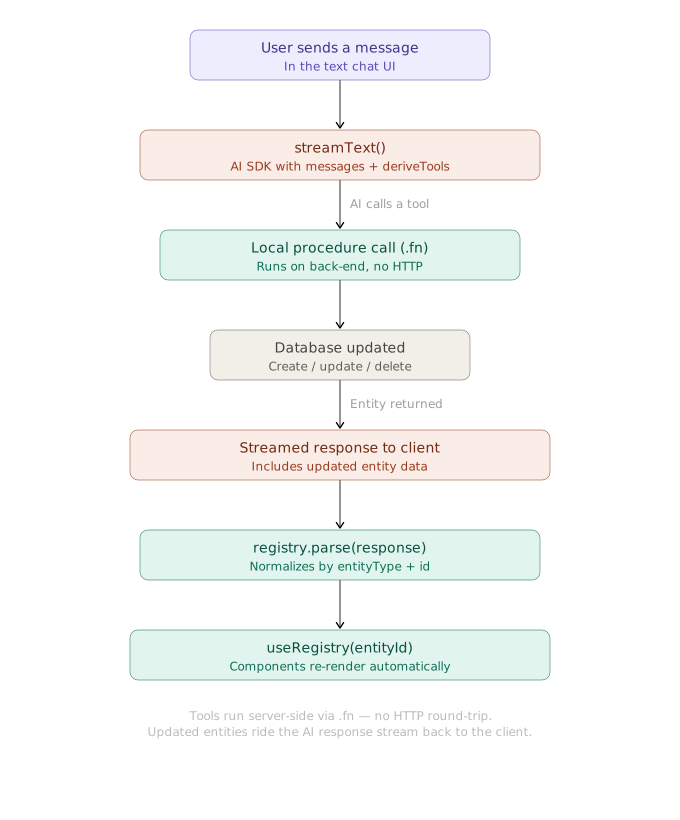
The chat uses the AI SDK with function calling. The deriveTools function derives the AI tools from the backend controllers.
Backend Setup
On the backend, a procedure calls the AI SDK’s streamText function with the tools and stopWhen options.
The procedures already follow the rules of locally called procedures: their handlers use only the vovk property of the request, for example async ({ vovk }) => UserService.createUser(await vovk.body()) (see the API Endpoints page). So deriveTools can turn the controllers into AI tools that run in the current backend context, without HTTP requests.
import { openai } from '@ai-sdk/openai';
import {
  convertToModelMessages,
  createUIMessageStreamResponse,
  stepCountIs,
  streamText,
  tool,
  toUIMessageStream,
  type UIMessage,
} from 'ai';
import { z } from 'zod';
import { deriveTools, operation, post, prefix, type VovkRequest } from 'vovk';
import { sessionGuard } from '@/decorators/session-guard';
import TaskController from '../task/task-controller';
import UserController from '../user/user-controller';

@prefix('ai-sdk')
export default class AiSdkController {
  @operation({
    summary: 'Function Calling',
    description:
      'Uses [@ai-sdk/openai](https://www.npmjs.com/package/@ai-sdk/openai) and ai packages to call UserController and TaskController functions based on the provided messages.',
  })
  @post('function-calling')
  @sessionGuard()
  static async functionCalling(req: VovkRequest<{ messages: UIMessage[] }>) {
    const { messages } = await req.json();
    const tools = deriveTools({
      modules: {
        UserController,
        TaskController,
      },
    });

    const toolSet = Object.fromEntries(
      tools.map(({ name, execute, description, inputSchema }) => [
        name,
        tool({
          execute,
          description,
          // the SDK takes Standard Schema as is; a procedure without input has no schema
          inputSchema: inputSchema ?? z.object({}),
        }),
      ]),
    );

    const result = streamText({
      model: openai('gpt-5'),
      instructions: 'You execute functions sequentially, one by one.',
      messages: await convertToModelMessages(messages),
      tools: toolSet,
      stopWhen: stepCountIs(16),
      onError: (e) => console.error('streamText error', e),
      onFinish: ({ finishReason, toolCalls }) => {
        if (finishReason === 'tool-calls') {
          console.log('Tool calls finished', toolCalls);
        }
      },
    });

    // pass toolSet so tool parts keep the dynamic flag the old method set for us
    return createUIMessageStreamResponse({
      stream: toUIMessageStream({ stream: result.stream, tools: toolSet }),
    });
  }
}
The code above is fetched from GitHub repository.
The endpoint is /api/ai-sdk/function-calling.
Frontend Setup
The frontend uses the AI SDK packages ai and @ai-sdk/react , and the AI Elements library. AI Elements has ready-made React components for AI interfaces, built on shadcn/ui .
'use client';
// ...
import { useChat } from '@ai-sdk/react';
import { useState } from 'react';
import { DefaultChatTransport } from 'ai';
import { AiSdkRPC } from '@/client';
import { Conversation, ConversationContent, ConversationEmptyState } from '@/components/ai-elements/conversation';
import useParseSDKToolCallOutputs from '@/hooks/use-parse-sdk-tool-call-outputs';

export function ExpandableChatDemo() {
  const [input, setInput] = useState('');

  const { messages, sendMessage, status } = useChat({
    transport: new DefaultChatTransport({
      api: AiSdkRPC.functionCalling.getURL(), // or "/api/ai-sdk/function-calling",
    }),
    onToolCall: (toolCall) => {
      console.log('Tool call initiated:', toolCall);
    },
  });

  const handleSubmit = (e: React.FormEvent) => {
    // ...
  };

  useParseSDKToolCallOutputs(messages);

  return (
    // ...
    <Conversation>
      <ConversationContent>{/* ... */}</ConversationContent>
    </Conversation>
    // ...
  );
}
See the full code of the component
The main part is the useParseSDKToolCallOutputs hook. It takes the tool call outputs from the assistant messages and passes them to the registry’s parse method, which updates the UI. The hook parses each tool call output only once: it keeps the parsed tool call IDs in a Set.
import type { ToolUIPart, UIMessage } from 'ai';
import { useEffect, useRef } from 'react';
import { useRegistryStore } from '@/hooks/use-registry';

export default function useParseSDKToolCallOutputs(messages: UIMessage[]) {
  const store = useRegistryStore();
  const parsedToolCallIdsSetRef = useRef<Set<string>>(new Set());

  useEffect(() => {
    const partsToParse = messages.flatMap((msg) =>
      msg.parts.filter((part) => {
        return (
          msg.role === 'assistant' &&
          part.type.startsWith('tool-') &&
          (part as ToolUIPart).state === 'output-available' &&
          'toolCallId' in part &&
          !parsedToolCallIdsSetRef.current.has(part.toolCallId)
        );
      }),
    ) as ToolUIPart[];

    partsToParse.forEach((part) => {
      parsedToolCallIdsSetRef.current.add(part.toolCallId);
    });

    if (partsToParse.length) {
      store.getState().parse(partsToParse.map((part) => part.output));
    }
  }, [messages, store]);
}
The code above is fetched from GitHub repository.
Without the optimizations, the hook comes down to this:
// ...
const store = useRegistryStore();

useEffect(() => {
  store.getState().parse(messages);
}, [messages, store]);
// ...
The chat can now call your backend functions and update the UI from the results: the procedures return the updated data with its id and entityType fields, and the __isDeleted field for soft deletions.