WebRTC-based Realtime Voice AI
This page sets up a voice AI interface. It uses the OpenAI Realtime API with WebRTC to send and receive audio in real time. This time the tools don’t come from controller methods that the AI SDK runs on the backend. They are derived from the generated RPC modules and make authorized requests from the browser.
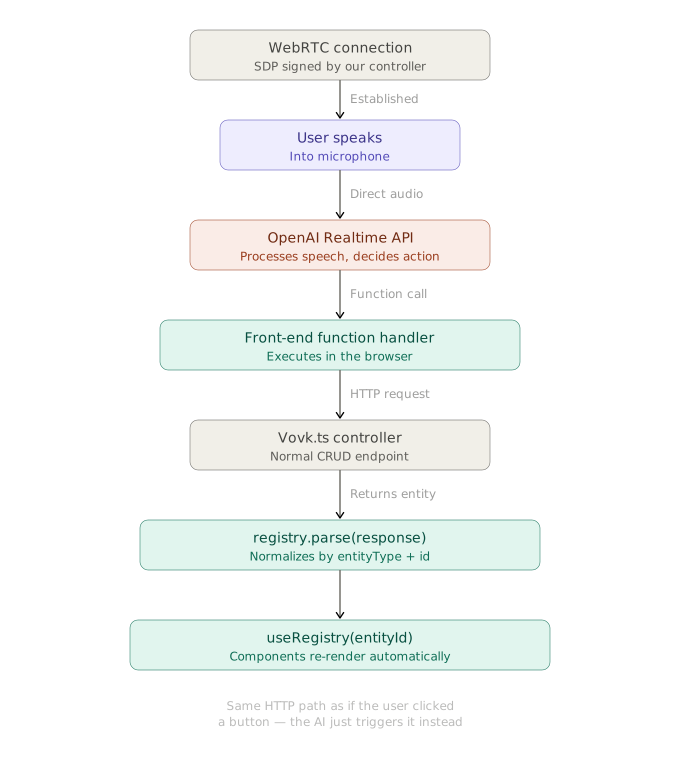
With WebRTC, audio goes directly between the client and the OpenAI Realtime API, not through your backend server. This keeps tool execution latency low.
Backend Setup
The backend has a session endpoint, based on the official OpenAI article Realtime API with WebRTC . It takes the client’s SDP offer and a voice query parameter, and returns the SDP answer from the OpenAI Realtime API.
import { HttpException, HttpStatus, post, prefix, procedure } from 'vovk';
import { z } from 'zod';
import { sessionGuard } from '@/decorators/session-guard';

@prefix('realtime')
export default class RealtimeController {
  @post('session')
  @sessionGuard()
  static session = procedure({
    query: z.object({
      voice: z.enum(['ash', 'ballad', 'coral', 'sage', 'verse']),
    }),
    body: z.object({ sdp: z.string() }),
    output: z.object({ sdp: z.string() }),
  }).handle(async ({ vovk }) => {
    const { voice } = vovk.query();
    const { sdp: sdpOffer } = await vovk.body();
    const sessionConfig = JSON.stringify({
      type: 'realtime',
      model: 'gpt-realtime',
      audio: { output: { voice } },
    });

    const fd = new FormData();
    fd.set('sdp', sdpOffer);
    fd.set('session', sessionConfig);

    try {
      const r = await fetch('https://api.openai.com/v1/realtime/calls', {
        method: 'POST',
        headers: {
          Authorization: `Bearer ${process.env.OPENAI_API_KEY}`,
        },
        body: fd,
      });
      // Send back the SDP we received from the OpenAI REST API
      const sdp = await r.text();
      return { sdp };
    } catch (error) {
      throw new HttpException(
        HttpStatus.INTERNAL_SERVER_ERROR,
        `Failed to generate token. ${String(error)}`,
      );
    }
  });
}
The code above is fetched from GitHub repository.
Frontend Setup
WebRTC Audio Session Hook
The custom hook useWebRTCAudioSession manages the WebRTC session: it starts and stops it, handles the audio streams, and manages the data channel for function calling.
The hook takes the selected voice and the list of tools. It returns the session state (isActive, isTalking) and a function that turns the session on and off (toggleSession).
The main parts of the hook:
- the data channel’s
onopenhandler, which sends asession.updatemessage with the list of tools, so the OpenAI Realtime API knows which tools exist; - the
onmessagehandler, which waits for function calls from the model (theresponse.function_call_arguments.doneevent), runs the matching tool, and sends back the result.
onmessage also sends the response.create message so the Realtime API answers, unless the result of the tool’s execute function has the __preventResponseCreate flag set to true.
'use client';
import { useCallback, useEffect, useRef, useState } from 'react';
import type { StandardToolV0 } from 'standard-tool';
import { RealtimeRPC } from '@/client';

/**
 * Hook to manage a real-time session with OpenAI's Realtime endpoints.
 * @example const { isActive, isTalking, toggleSession } = useWebRTCAudioSession(voice, tools);
 */
export default function useWebRTCAudioSession(
  voice: 'ash' | 'ballad' | 'coral' | 'sage' | 'verse',
  tools: StandardToolV0[],
) {
  const audioElement = useRef<HTMLAudioElement | null>(null);
  const [isActive, setIsActive] = useState(false);
  // Data channel ref
  const dcRef = useRef<RTCDataChannel | null>(null);
  // Media stream ref for microphone
  const mcRef = useRef<MediaStream | null>(null);
  // talking state + refs
  const [isTalking, setIsTalking] = useState(false);
  const remoteAnalyserRef = useRef<AnalyserNode | null>(null);
  const remoteMonitorIntervalRef = useRef<number | null>(null);
  const remoteAudioContextRef = useRef<AudioContext | null>(null);

  const startSession = useCallback(async () => {
    // Create a peer connection
    const pc = new RTCPeerConnection();

    // Set up to play remote audio from the model
    audioElement.current = document.createElement('audio');
    audioElement.current.autoplay = true;
    pc.ontrack = (e) => {
      if (!audioElement.current) return;
      audioElement.current.srcObject = e.streams[0];
      // Simple audio activity monitor
      try {
        const audioCtx = new AudioContext();
        remoteAudioContextRef.current = audioCtx;
        const source = audioCtx.createMediaStreamSource(e.streams[0]);
        const analyser = audioCtx.createAnalyser();
        analyser.fftSize = 256;
        source.connect(analyser);
        remoteAnalyserRef.current = analyser;
        remoteMonitorIntervalRef.current = window.setInterval(() => {
          if (!remoteAnalyserRef.current) return;
          const a = remoteAnalyserRef.current;
          const data = new Uint8Array(a.fftSize);
          a.getByteTimeDomainData(data);
          let sum = 0;
          for (let i = 0; i < data.length; i++) {
            const v = (data[i] - 128) / 128;
            sum += v * v;
          }
          const rms = Math.sqrt(sum / data.length);
          setIsTalking(rms > 0.02); // simple threshold
        }, 200);
      } catch {
        // ignore audio activity errors
      }
    };

    // Add local audio track for microphone input in the browser
    const ms = await navigator.mediaDevices.getUserMedia({
      audio: true,
    });
    mcRef.current = ms;
    pc.addTrack(ms.getTracks()[0]);

    // Set up data channel for sending and receiving events
    const dc = pc.createDataChannel('oai-events');
    dcRef.current = dc;

    // Start the session using the Session Description Protocol (SDP)
    const offer = await pc.createOffer();
    await pc.setLocalDescription(offer);

    const { sdp } = await RealtimeRPC.session({
      body: { sdp: offer.sdp ?? '' },
      query: { voice },
    });

    await pc.setRemoteDescription({
      type: 'answer',
      sdp,
    });
    dc.onopen = () => {
      const sessionUpdate = {
        type: 'session.update',
        session: {
          type: 'realtime',
          tools: tools.map(({ name, description, inputSchema }) => {
            // OpenAI wants bare JSON schema, drop the $schema marker zod adds
            const { $schema, ...parameters } =
              inputSchema?.['~standard'].jsonSchema.input({
                target: 'draft-2020-12',
              }) ?? {};
            return {
              name,
              description,
              parameters: inputSchema ? parameters : undefined,
              type: 'function',
            };
          }),
        },
      };
      dc.send(JSON.stringify(sessionUpdate));
    };
    dc.onmessage = async (event) => {
      const msg = JSON.parse(event.data);
      // Handle function call completions
      if (msg.type === 'response.function_call_arguments.done') {
        const execute = tools.find((tool) => tool.name === msg.name)?.execute;
        if (execute) {
          const args = JSON.parse(msg.arguments);
          const result = (await execute(args)) as {
            __preventResponseCreate?: boolean;
          };

          // Respond with function output
          const response = {
            type: 'conversation.item.create',
            item: {
              type: 'function_call_output',
              call_id: msg.call_id,
              output: JSON.stringify(result),
            },
          };
          dcRef.current?.send(JSON.stringify(response));

          if (!result?.__preventResponseCreate) {
            const responseCreate = {
              type: 'response.create',
            };
            dcRef.current?.send(JSON.stringify(responseCreate));
          }
        }
      }
    };
    setIsActive(true);
  }, [tools, voice]);

  const stopSession = useCallback(() => {
    // Close data channel and peer connection
    dcRef.current?.close();
    dcRef.current = null;
    // Stop microphone tracks
    mcRef.current?.getTracks().forEach((track) => {
      track.stop();
    });
    mcRef.current = null;
    // Close remote audio context
    remoteAudioContextRef.current?.close();
    remoteAudioContextRef.current = null;
    remoteAnalyserRef.current = null;
    // Stop the audio immediately
    if (audioElement.current) {
      audioElement.current.srcObject = null;
      audioElement.current = null;
    }
    // Clear monitoring interval
    if (remoteMonitorIntervalRef.current) {
      clearInterval(remoteMonitorIntervalRef.current);
      remoteMonitorIntervalRef.current = null;
    }
    setIsTalking(false);
    setIsActive(false);
  }, []);

  const toggleSession = useCallback(() => {
    if (isActive) {
      stopSession();
    } else {
      startSession();
    }
  }, [isActive, startSession, stopSession]);

  // Cleanup on unmount
  useEffect(() => {
    return () => stopSession();
  }, [stopSession]);

  return {
    startSession,
    stopSession,
    toggleSession,
    isActive,
    isTalking,
  };
}
The code above is fetched from GitHub repository.
Client-side Tools
useWebRTCAudioSession gets the tools derived with deriveTools({ modules: { UserRPC, TaskRPC } }), plus custom client-side tools made with standardTool from the standard-tool package, for navigation, scrolling, and other UI actions. The getCurrentTime and partyMode tools come from this repository , which inspired this demo.
The component is mounted in layout.tsx , so its state and the WebRTC connection stay alive when you move between pages within this route. That is why you can move around the app by voice with the navigateTo tool, which uses the Next.js useRouter hook.
The functions of the client-side tools are in the lib/tools folder.
'use client';
import { useRouter } from 'next/navigation';
import { standardTool } from 'standard-tool';
import { deriveTools } from 'vovk';
import { TaskRPC, UserRPC } from '@/client';
import z from 'zod';
import useWebRTCAudioSession from '@/hooks/use-web-rtc-audio-session';
import { getCurrentTime } from '@/lib/tools/get-current-time';
import { getVisiblePageSection } from '@/lib/tools/get-visible-page-section';
import { partyMode } from '@/lib/tools/party-mode';
import { scroll } from '@/lib/tools/scroll';
import Floaty from './floaty';
import { useMemo } from 'react';

const RealTimeDemo = () => {
  const router = useRouter();

  const tools = useMemo(
    () => [
      ...deriveTools({
        modules: { TaskRPC, UserRPC },
      }),
      standardTool({
        name: 'getCurrentTime',
        description: "Gets the current time in the user's timezone",
        outputSchema: z
          .object({
            time: z.string(),
            timezone: z.string(),
            message: z.string(),
          })
          .meta({ description: 'Current time info.' }),
        execute: getCurrentTime,
      }),
      standardTool({
        name: 'partyMode',
        description: 'Triggers a confetti animation on the page',
        execute: partyMode,
      }),
      standardTool({
        name: 'navigateTo',
        description:
          'Navigates the user to a specified URL within the application.',
        inputSchema: z.object({
          url: z
            .enum(['/', '/openapi'])
            .meta({ description: 'The URL to navigate to.' }),
        }),
        outputSchema: z
          .string()
          .meta({ description: 'Navigation confirmation message.' }),
        execute: async ({ url }: { url: string }) => {
          router.push(url);
          return `Navigating to ${url}`;
        },
      }),
      standardTool({
        name: 'scroll',
        description: 'Scrolls the page up or down.',
        inputSchema: z.object({
          direction: z
            .enum(['up', 'down'])
            .meta({ description: 'The direction to scroll' }),
          px: z.number().optional().meta({
            description:
              'The number of pixels to scroll. If not provided, scrolls by one viewport height.',
          }),
        }),
        outputSchema: z.object({
          message: z
            .string()
            .meta({ description: 'Scroll action confirmation message.' }),
          __preventResponseCreate: z
            .boolean()
            .meta({ description: 'Flag to prevent response creation.' }),
        }),
        execute: scroll,
      }),
      standardTool({
        name: 'getVisiblePageSection',
        description: 'Gets the currently visible section of the page',
        outputSchema: z
          .string()
          .meta({ description: 'Visible text content from the page.' }),
        execute: getVisiblePageSection,
      }),
    ],
    [router.push],
  );

  const { isActive, isTalking, toggleSession } = useWebRTCAudioSession(
    'ash',
    tools,
  );

  return (
    <Floaty
      isActive={isActive}
      isTalking={isTalking}
      handleClick={toggleSession}
    />
  );
};

export default RealTimeDemo;
The code above is fetched from GitHub repository.
The code of the Floaty component is in the repository .