Segment
Overview
A segment is the part of the back end where controllers are initialized. Segments are built on Next.js Optional Catch-All Segments . They split the back end into smaller serverless functions, each with its own configuration (the Next.js constants it exports, such as runtime or maxDuration).
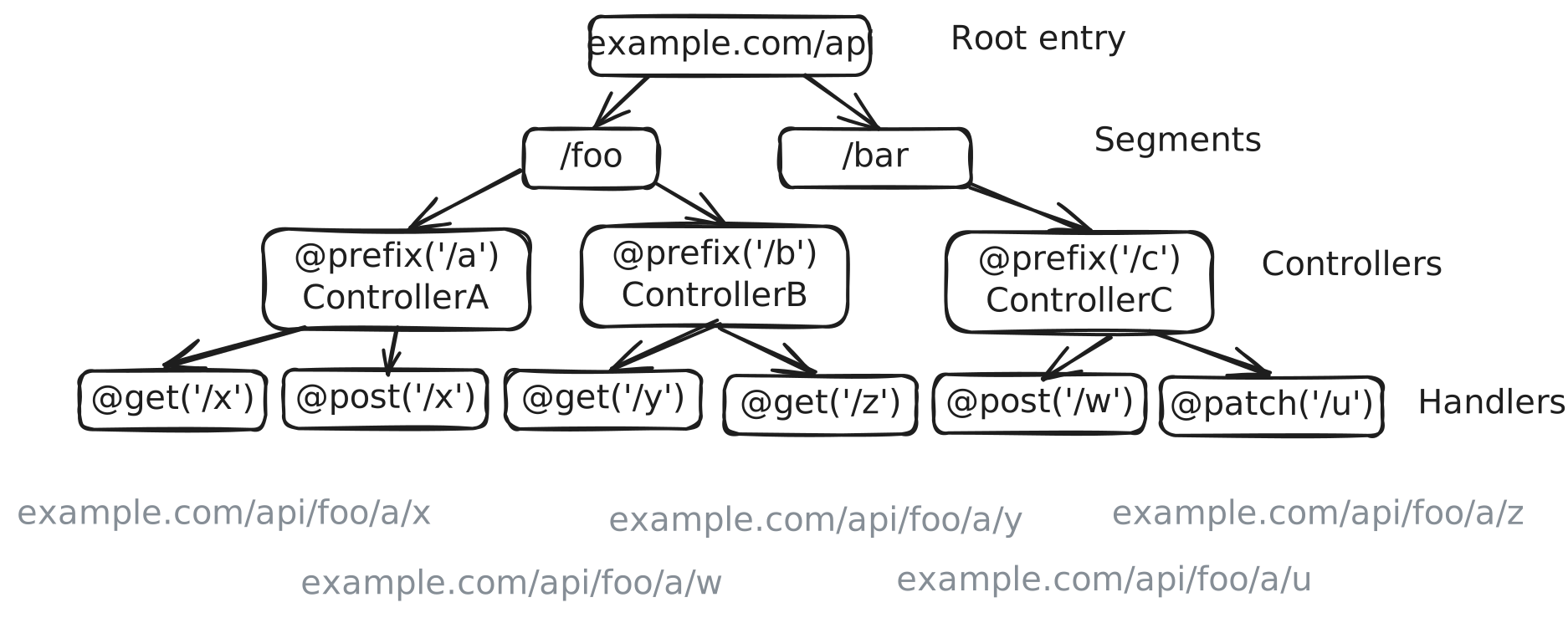
Each segment owns a path, such as /api/foo or /api/bar, and is a small back end of its own. Segments split the back end as pages split the front end in Next.js. To initialize a segment, call initSegment in the route.ts file of a [[…slug]] folder. It returns the Next.js route handlers (GET, POST and so on) of the segment. Vovk.ts names the slug vovk, but any valid name works.
When NODE_ENV is "development" (as with next dev), each segment serves its schema at a _schema_ endpoint. The dev CLI reads it and writes the JSON files in .vovk-schema/. This way, Next.js code imports no Node.js modules, and the schema tooling stays simple.
Vovk.ts uses Optional Catch-All Segments instead of Catch-All Segments , so a segment can have a root endpoint.
Creating Segments
Call initSegment in route.ts and export the route handlers it returns: GET, POST, PATCH, PUT, HEAD, OPTIONS and DELETE. A method the file doesn’t export never reaches Vovk.ts: Next.js answers PATCH with 405, and a CORS preflight (OPTIONS) without CORS headers. initSegment takes:
controllers— the controllers of the segment. The object keys are the names of the generated RPC modules (any name works ifemitSchemaisfalse), and the values are the controllers.segmentName— the segment name. Defaults to an empty string, the root segment.emitSchema— whether to emit the segment schema. Defaults totrue.exposeValidation— whether to expose validation data. Defaults totrue.onError— a function called on errors with:error: Error— the error.request: VovkRequest— the incoming request (headers, URL and so on).
onBefore— a function called with the request before the decorators and the handler run; an error it throws becomes the response.onSuccess— a function called with the handler’s result and the request once the handler returns; for a stream, that is when the stream starts, not when it ends.
route.ts also exports type Controllers = typeof controllers, which the RPC client infers its types from.
The Root Segment
npx vovk new segmentA simple single-page app needs only the root segment. It deploys the back end as one serverless function.
Example route.ts for a single-segment app:
import { initSegment } from 'vovk';
import UserController from '../../../modules/user/user-controller';
import PostController from '../../../modules/post/post-controller';

export const maxDuration = 300; // Next.js route handler option

const controllers = {
  UserRPC: UserController,
  PostRPC: PostController,
};

// the client code uses this type
export type Controllers = typeof controllers;

// export the Next.js route handlers
export const { GET, POST, PATCH, PUT, HEAD, OPTIONS, DELETE } = initSegment({
  controllers,
});
The schema of the root segment is in .vovk-schema/root.json.
The name root is only for the file name. In the config and elsewhere, the root segment’s name is an empty string.
Multiple Segments
Create more segments to split the back end into separate serverless functions. Reasons include:
- Using different Next.js route handler options or
initSegmentoptions. - Reducing bundle size by splitting code.
- Separating areas of the app, such as root,
admin,customerandcustomer/public. - Serving several API versions, such as
v1andv2. - Creating a static segment for OpenAPI specs, historical data and so on.
The folder of a segment sets both its API path and its name. For example, /src/app/api/segment-name/[[…slug]]/ is served at /api/segment-name. Segments can nest to any depth.
For a segment other than the root, pass segmentName to initSegment:
// ...

export const { GET, POST, PATCH, PUT, HEAD, OPTIONS, DELETE } = initSegment({
  segmentName: 'foo',
  controllers,
});
The schema of foo is in .vovk-schema/foo.json.
For a deeper folder, such as /src/app/api/foo/bar/baz/[[…slug]]/, set segmentName to "foo/bar/baz". Its schema is in .vovk-schema/foo/bar/baz.json.
Segment Priority
With several segments, the most specific (deepest) one wins. For example:
- /src/app/api/[[…slug]]/ — the root segment
- /src/app/api/foo/[[…slug]]/ — the
foosegment - /src/app/api/foo/bar/[[…slug]]/ — the
foo/barsegment
The foo/bar segment handles a request to /api/foo/bar. A request it doesn’t match goes to foo if foo matches it, and to the root segment otherwise.
The rootEntry config option changes the API folder name from api to any other name. An empty string serves the API from the app root. The root segment then takes /, so it can’t sit next to a root page.tsx: Next.js refuses the two routes.
RPC Client
The same RPC client, with client-side validation and type inference, calls a static or a dynamic API.
const resp = await StaticParamsRPC.getStaticParams({
  params: {
    section: 'a',
    page: '1',
  },
});

console.log(resp); // { section: 'a', page: '1' }