---
title: "Vovk.ts Realtime Kanban Context"
description: "Walkthrough of the Realtime Kanban example app — a live-updating UI with Vovk.ts and AI features."
see_also:
label: "Vovk.ts Docs Context"
url: https://vovk.dev/llms-full.txt
chars: 109288
est_tokens: 27322
---
Page: https://vovk.dev/realtime-ui
# Realtime Kanban — AI-native UI updates with Vovk.ts
**Realtime Kanban** is an example app. It keeps a Next.js UI in sync with the backend and adds several AI features: an MCP server, OpenAI function calling, a voice interface, embeddings, and a Telegram bot.
This series shows how it is built. Users, bots, AI agents, and MCP clients all update the same board in real time, with little extra code. It is an example to learn from and copy, not a framework or a required architecture. Take the parts you need.
All articles in this series are also in one text file for AI tools: realtime-ui.txt.
## See it in action
### AI agent managing the board via MCP
Claude connects to the board through an [MCP server](https://vovk.dev/realtime-ui/mcp) and creates, moves, and deletes cards on its own.
Video: https://vovk.dev/video/kanban_mcp.mp4
### Multi-user collaboration with live polling
Several users edit the same board at once. Changes reach everyone in real time through [database polling](https://vovk.dev/realtime-ui/polling) and [normalized state](https://vovk.dev/realtime-ui/state).
Video: https://vovk.dev/video/kanban_polling.mp4
### Chat-driven board updates with function calling
A [text chat](https://vovk.dev/realtime-ui/text-ai) lets users manage cards in plain language. It uses OpenAI function calling.
Video: https://vovk.dev/video/kanban_text_chat.mp4
---
Page: https://vovk.dev/realtime-ui/overview
# Realtime Kanban Overview
This series walks through **Realtime Kanban**, a full-stack example app. It shows one way to keep a Next.js UI up to date with Vovk.ts. The app works like a normal web app. It is also built so that **AI agents** (by text or voice) and **MCP clients** can operate it, including navigation and workflow automation. The frontend and backend code stay short.
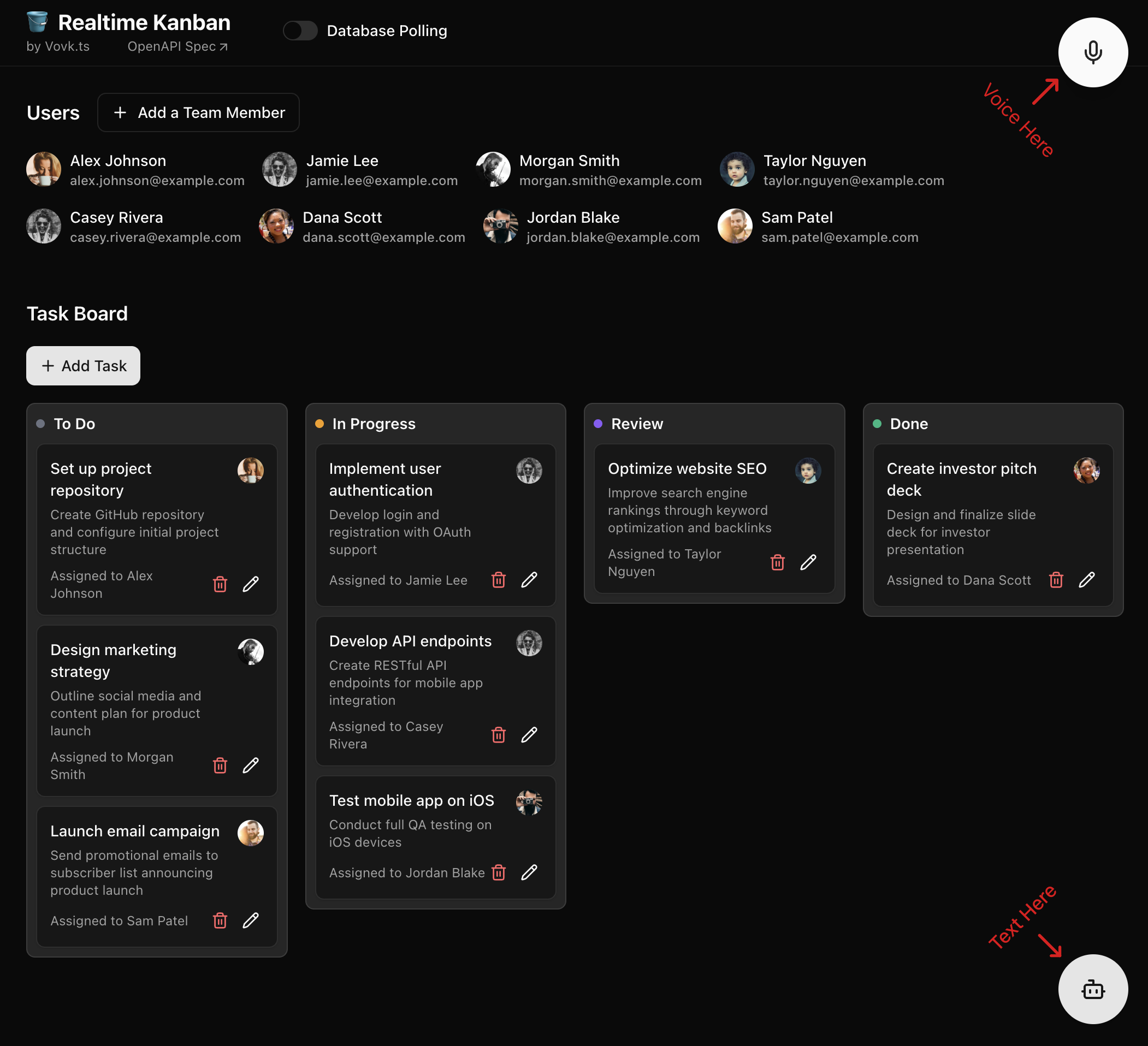
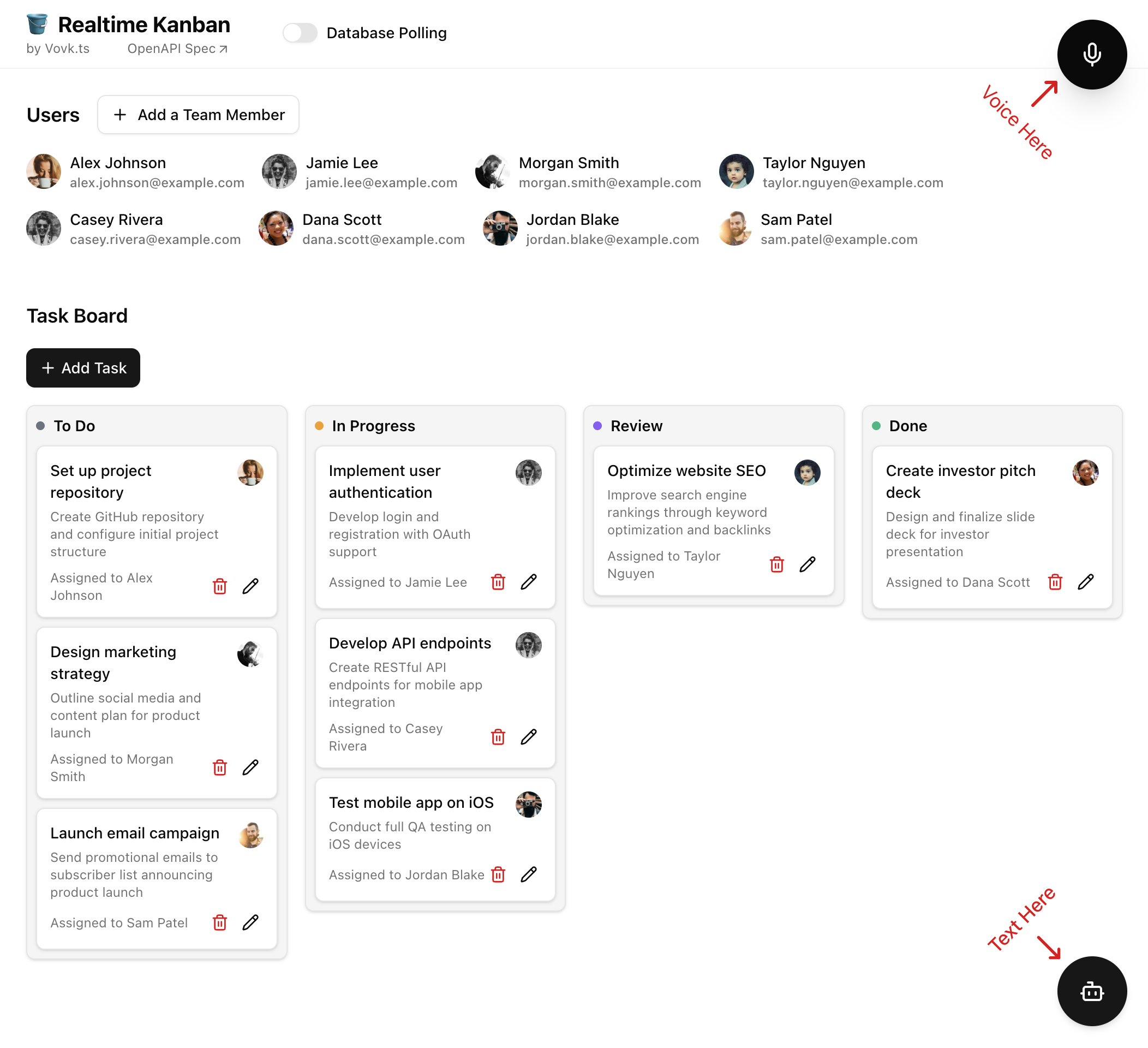
The app is small on purpose, so you can reproduce, study, and adapt it: only **Users** and **Tasks**, and a simple password instead of full auth management.
Building blocks:
- **Entity-driven state normalization (frontend)** with [Zustand](https://github.com/pmndrs/zustand): an entity registry parses backend responses and updates a normalized store. Components read entities by ID and re-render with little wiring.
- **Database schema as the source of truth**: Postgres and Prisma define the structure, and [prisma-zod-generator](https://www.npmjs.com/package/prisma-zod-generator) turns it into Zod schemas. The same schemas validate procedure inputs on the backend, so nothing is defined twice.
- **Database polling events** through Redis, served as [JSON Lines](https://vovk.dev/jsonlines) streaming endpoints: changes from users, MCP clients, or bots reach the UI without a manual refresh.
- **Text AI chat** with the Vercel [AI SDK](https://ai-sdk.dev/docs/introduction) and [AI Elements](https://ai-sdk.dev/elements): the existing controllers become AI tools, and the results go back through the entity registry.
- **Voice interface** with the [OpenAI Realtime API](https://platform.openai.com/docs/guides/realtime) and WebRTC: the agent makes authorized HTTP requests through the generated RPC modules, and the responses update the UI through the same entity registry. Client-side tools handle navigation inside the app.
- **MCP server**: procedures run locally on the backend and trigger polling events, which update the frontend state through the entity registry.
- **External updates** (Telegram bot): manage tasks by text or voice in Telegram. The same app is controlled from more than one place.
You can [run the app locally](./run) with Docker Compose or deploy it to any Node.js platform, such as [Vercel](./deploy).
---
Page: https://vovk.dev/realtime-ui/run
# Running the Project Locally
The Realtime Kanban app is in the [GitHub repository](https://github.com/finom/vovk/tree/main/examples/realtime-kanban).
Copy the app. This also installs the dependencies:
```bash copy
npx create-next-app@latest --example https://github.com/finom/vovk/tree/main/examples/realtime-kanban realtime-kanban && cd realtime-kanban
```
Create a `.env` file in the project root with your OpenAI API key and the database connection strings:
```env filename=".env"
OPENAI_API_KEY=change_me
DATABASE_URL="postgresql://postgres:password@localhost:5432/realtime-kanban-db?schema=public"
DATABASE_URL_UNPOOLED="postgresql://postgres:password@localhost:5432/realtime-kanban-db?schema=public"
REDIS_URL=redis://localhost:6379
```
Start the Docker containers:
```bash copy
docker-compose up -d
```
Start the development server. It first generates the Prisma client, the Zod schemas and the Vovk.ts client, and creates the database tables:
```sh
npm run dev
```
Open [http://localhost:3000](http://localhost:3000) in your browser. Create users and tasks in the UI (click “+ Add a Team Member” and so on), or with one of the floating AI buttons: Text or Voice.
The variables in `.env`:
- `OPENAI_API_KEY` – your OpenAI API key, needed for the AI features. Creating or updating a user or a task also calls the embeddings API. Without a working key, the row is saved without an embedding, and search skips it until an update adds one.
- `DATABASE_URL` – the database connection string. [database-service.ts](https://github.com/finom/vovk/blob/main/examples/realtime-kanban/src/modules/database/database-service.ts) creates the Prisma client with it.
- `DATABASE_URL_UNPOOLED` – the connection string for direct connections. [prisma.config.ts](https://github.com/finom/vovk/blob/main/examples/realtime-kanban/prisma.config.ts) uses it for migrations.
- `REDIS_URL` – the Redis connection string for the realtime features. See the [Polling](./polling) article.
Optional variables:
- `PASSWORD` – password protection for the app's pages and API. It doesn't cover the MCP server or the Telegram webhook, which have their own keys below. See the [Authentication](./authentication) article.
- `SESSION_SECRET` – the key that signs the session cookie. Set it whenever you set `PASSWORD`. Without it, the app uses a default key from the public repository. Generate one with `openssl rand -base64 32`.
- `MCP_ACCESS_KEY` – an authorization key for the MCP server, sent in the `?mcp_access_key=your_key` query parameter. If it isn't set, the MCP server needs no key. See the [MCP](./mcp) article.
- `TELEGRAM_BOT_TOKEN` – turns on the Telegram bot. See the [Telegram Integration](./telegram) article.
- `TELEGRAM_WEBHOOK_SECRET` – the secret Telegram sends with each webhook call. The webhook answers only when both Telegram variables are set.
---
Page: https://vovk.dev/realtime-ui/deploy
# Deploying to Vercel
Any host that runs Node.js apps works. This page uses [Vercel](https://vercel.com/), because a quick demo deploy there needs little setup. It uses two Vercel integrations: [Neon](https://vercel.com/integrations/neon) hosts the Postgres/PGVector database, and [Redis](https://vercel.com/integrations/redis) hosts Redis. Neon is the main database. Redis is the database event bus for the real-time features in the [Polling](./polling) article, and temporary storage for the messages of the demo [Telegram bot](./telegram).
**Note:** Vovk.ts is not affiliated with Vercel, Telegram, or Neon.
To deploy, create a project in Vercel, link it to a fork of the GitHub repository, and add both integrations. Both are on the free plan.
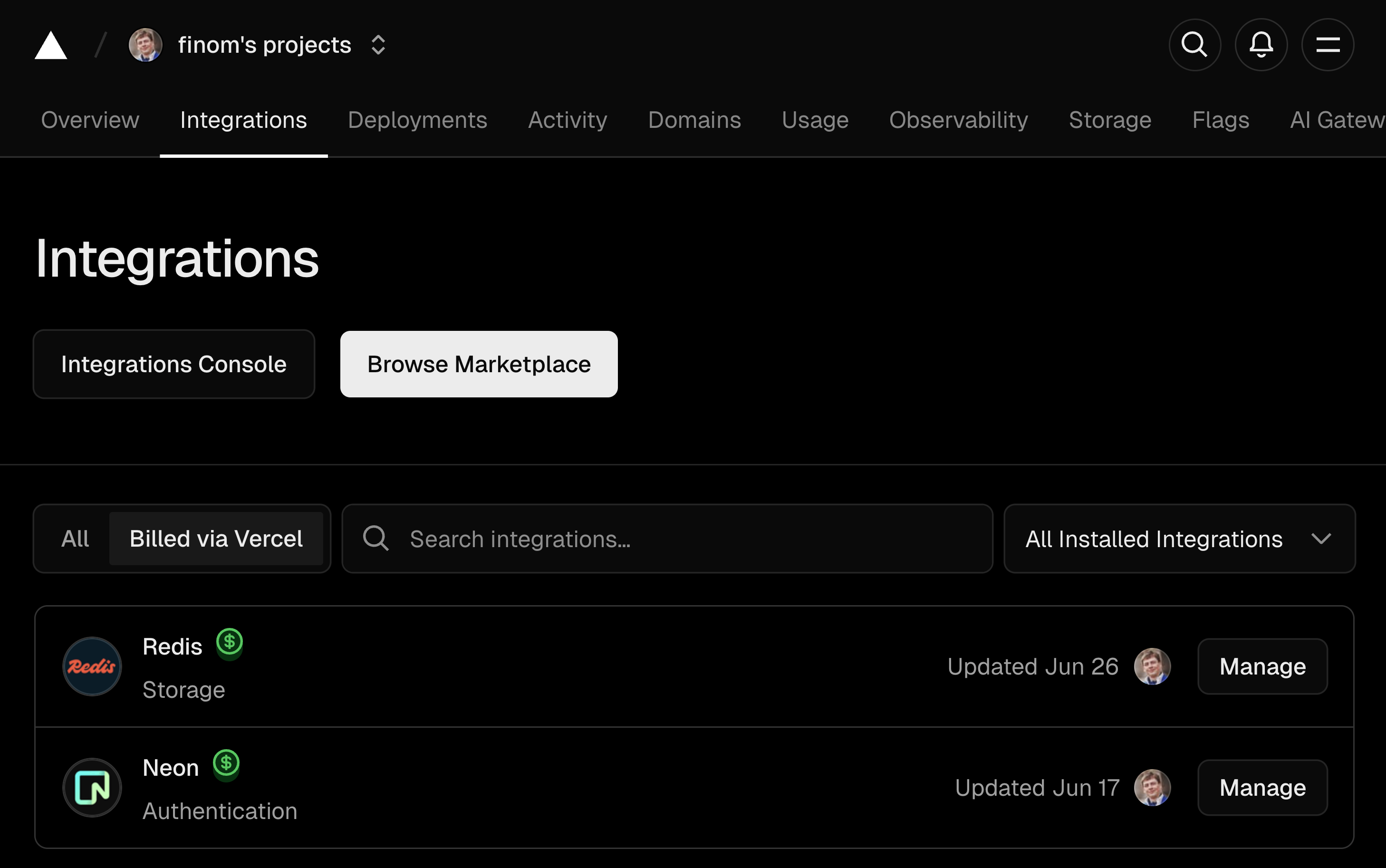
Add `OPENAI_API_KEY` to the project's environment variables. The integrations create the others, such as `DATABASE_URL` and `REDIS_URL`.
A `PASSWORD` variable is also recommended. It adds free password protection to the app's pages and API, with any value you choose. It doesn't cover the MCP server or the Telegram webhook.
With `PASSWORD`, also add `SESSION_SECRET`, the key that signs the session cookie. Without it, the app uses a default key from the public repository. Generate one with `openssl rand -base64 32`.
To protect the MCP server, add `MCP_ACCESS_KEY`. Clients then send the key in the `?mcp_access_key=your_key` query parameter. If it isn't set, the MCP server needs no key.
For the Telegram bot, add `TELEGRAM_BOT_TOKEN` and `TELEGRAM_WEBHOOK_SECRET`. The webhook answers only when both are set. See the [Telegram integration](./telegram) article.
If something doesn't work, compare your variables with the [.env.template](https://github.com/finom/vovk/blob/main/examples/realtime-kanban/.env.template) file.
---
Page: https://vovk.dev/realtime-ui/state
# Entity-driven state normalization with Zustand registry
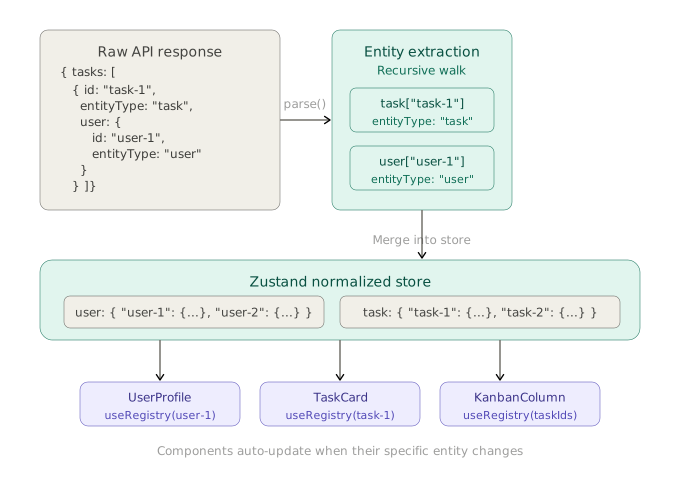
Entity-driven state normalization suits apps with a lot of connected data. Instead of passing raw data to components or storing responses as they are, you extract the entities and store them in one central registry. This gives you a single source of truth, O(1) lookups by ID, and updates everywhere an entity is used. Components subscribe to entities by ID. When an entity changes, every component that uses it re-renders.
The demo above shows one user entity in four places: the header greeting, the sidebar, the page title, and the form input. Change the name and click Save: every component shows the change at once, because they all read the same entity from the registry.
How it works: a `parse` method takes each raw API response, extracts the entities recursively, normalizes them into flat dictionaries keyed by ID, and merges them into a Zustand store. A component re-renders only when its own data changes.
Any component can read an item from the registry:
```tsx showLineNumbers copy
export const UserProfile = ({ userId }: { userId: User['id'] }) => {
const userProfile = useRegistry(useShallow(state => state.user[userId]));
return {userProfile.fullName}
}
```
To get an array of entities, map over the IDs:
```tsx showLineNumbers copy
export const UserList = ({ userIds }: { userIds: User['id'][] }) => {
const users = useRegistry(
useShallow((state) => userIds.map((id) => state.user[id])),
);
return {users.map((u) => - {u.fullName}
)}
}
```
The implementation below also handles soft deletions: a deleted entity is marked non-enumerable but stays in the state. This prevents errors in components that still reference it.
```tsx showLineNumbers copy
export const UserList = ({ userIds }: { userIds: User['id'][] }) => {
const users = useRegistry(
useShallow(({ user: { ...userReg } }) => userIds.filter((id) => id in userReg).map((id) => userReg[id]))
);
return {users.map((u) => - {u.fullName}
)}
}
```
## Prior art and portability
Normalizing frontend state into flat entity maps comes from the Redux ecosystem. [`normalizr`](https://github.com/paularmstrong/normalizr) (first created by Dan Abramov) added declarative, schema-based normalization of nested JSON. Later, Redux Toolkit's [`createEntityAdapter`](https://redux-toolkit.js.org/api/createEntityAdapter) added built-in CRUD reducers and selectors for normalized state. This page uses the same idea, flat entity dictionaries keyed by ID, but relies on a convention (`id` + `entityType`) instead of schemas defined up front.
This article uses [Zustand](https://github.com/pmndrs/zustand), but the pattern doesn't depend on it. A state library needs three things: a central store of plain objects, a way to update the state and re-render only some components, and subscriptions, so a component re-renders only when its own entity changes. Any library with these can host the registry, for example [Jotai](https://jotai.org/) (each entity map could be an atom) or [Valtio](https://valtio.dev/) (proxy-based reactivity gives automatic fine-grained subscriptions). The `getEntitiesFromData` function and the `parse` logic work with any library. Only the store creation and the subscription code change.
## Defining entity types
The pattern relies on one rule: every entity in your data has an `id` field and an `entityType` field that says what kind of entity it is. In a real project, `EntityType` can come from `@prisma/client`, be generated from your schema, or be imported from wherever your source of truth lives. This page writes it out by hand:
```ts showLineNumbers copy filename="src/types.ts"
enum EntityType {
user = 'user',
task = 'task',
}
interface BaseEntity {
id: string;
entityType: EntityType;
}
```
Entity IDs should be **branded strings**, not plain `string` types. Then you can't pass a user ID where a task ID is expected, a common bug in apps with many entity types. With Zod, define a branded ID schema per entity:
```ts showLineNumbers copy
import { z } from 'zod';
const UserIdSchema = z.string().brand<'user'>();
const TaskIdSchema = z.string().brand<'task'>();
type UserId = z.infer; // string & { __brand: 'user' }
type TaskId = z.infer; // string & { __brand: 'task' }
```
Without Zod, a TypeScript utility type does the same:
```ts showLineNumbers copy
type BrandedId = string & { readonly __brand: T };
type UserId = BrandedId<'user'>;
type TaskId = BrandedId<'task'>;
```
Either way, your entity interfaces use the branded type for `id` instead of `string`, so mixing up IDs of different entity types is a compile-time error.
> In Realtime Kanban, `EntityType` comes from `@prisma/client`, and a Zod generator creates the entity types, branded IDs included. See the [Database](./database) article.
## Setting up the fetcher
First, set up the [fetcher](https://vovk.dev/imports#fetcher): the function that every generated RPC method uses to make HTTP requests. Its `onSuccess` event lets other code run on every successful response. The registry subscribes to this event to parse all incoming data.
```ts showLineNumbers copy filename="src/lib/fetcher.ts"
import { HttpStatus } from 'vovk';
import { createFetcher } from 'vovk/fetcher';
export const fetcher = createFetcher<{ bypassRegistry?: boolean }>({
onError: (error) => {
if (
error.statusCode === HttpStatus.UNAUTHORIZED &&
typeof document !== 'undefined'
) {
document.location.href = '/login';
}
},
});
```
In the browser, the `onError` handler sends the user to the login page when authentication fails. The Telegram mixin calls the same fetcher on the server, where there is no `document`, so there the error is thrown as it is. The `bypassRegistry` type parameter adds a typed option that callers can pass, for example `await UserRPC.getUsers({ bypassRegistry: true }){:ts}`, to skip the registry for one request when you only need the raw response.
Set the fetcher in the [config](https://vovk.dev/config), so the generated [client](https://vovk.dev/typescript) imports it instead of the default one:
```ts showLineNumbers copy filename="vovk.config.mjs"
// @ts-check
/** @type {import('vovk').VovkConfig} */
const config = {
outputConfig: {
imports: {
// ...
fetcher: './src/lib/fetcher.ts',
},
},
};
export default config;
```
## Implementing the registry
The registry is built on Zustand. A `Registry` interface describes the state: entity maps keyed by `EntityType`, and a `parse` method. The file exports a `RegistryProvider`, a `useRegistry` selector hook, and a `useRegistryStore` hook for imperative access.
```tsx showLineNumbers copy filename="src/hooks/use-registry.tsx" source="examples/realtime-kanban"
'use client';
import { EntityType } from '@prisma/client';
import type { TaskType } from '@schemas/models/Task.schema';
import type { UserType } from '@schemas/models/User.schema';
import fastDeepEqual from 'fast-deep-equal';
import { type ReactNode, createContext, useContext, useRef } from 'react';
import { type StoreApi, createStore, useStore } from 'zustand';
import { fetcher } from '@/lib/fetcher';
import type { BaseEntity } from '../types';
interface Registry {
[EntityType.user]: Record;
[EntityType.task]: Record;
parse: (data: unknown) => void;
}
const MAX_DEPTH = 10;
export function getEntitiesFromData(
data: unknown,
entities: Partial<{
[key in EntityType]: Record;
}> = {},
depth = 0,
) {
if (depth > MAX_DEPTH) return entities as Partial>;
if (Array.isArray(data)) {
data.forEach((item) => {
getEntitiesFromData(item, entities, depth + 1);
});
} else if (typeof data === 'object' && data !== null) {
Object.values(data).forEach((value) => {
getEntitiesFromData(value, entities, depth + 1);
});
if ('entityType' in data && 'id' in data) {
const entityType = data.entityType as EntityType;
const id = (data as BaseEntity).id;
entities[entityType] ??= {};
entities[entityType][id] = data as BaseEntity;
}
}
return entities as Partial>;
}
function createRegistryStore(initialData: {
users?: UserType[];
tasks?: TaskType[];
}) {
const initialEntities = getEntitiesFromData(initialData);
return createStore((set) => ({
[EntityType.user]: (initialEntities.user ?? {}) as Record<
UserType['id'],
UserType
>,
[EntityType.task]: (initialEntities.task ?? {}) as Record<
TaskType['id'],
TaskType
>,
parse: (data) => {
const entities = getEntitiesFromData(data);
set((state) => {
const newState: Record = {};
let isChanged = false;
Object.entries(entities).forEach(([entityType, entityMap]) => {
const type = entityType as EntityType;
const descriptors = Object.getOwnPropertyDescriptors(
state[type] ?? {},
);
let areDescriptorsChanged = false;
Object.values(entityMap).forEach((entity) => {
const descriptorValue = descriptors[entity.id]?.value;
const value = { ...descriptorValue, ...entity };
const isCurrentChanged = !fastDeepEqual(descriptorValue, value);
descriptors[entity.id] = isCurrentChanged
? ({
value,
configurable: true,
writable: false,
enumerable: !('__isDeleted' in entity),
} satisfies PropertyDescriptor)
: descriptors[entity.id];
areDescriptorsChanged ||= isCurrentChanged;
});
newState[type] = areDescriptorsChanged
? Object.defineProperties({}, descriptors)
: state[type];
isChanged ||= areDescriptorsChanged;
});
return isChanged ? { ...state, ...newState } : state;
});
},
}));
}
const RegistryContext = createContext | null>(null);
export function RegistryProvider({
initialData,
children,
}: {
initialData: { users?: UserType[]; tasks?: TaskType[] };
children: ReactNode;
}) {
const storeRef = useRef | null>(null);
if (!storeRef.current) {
storeRef.current = createRegistryStore(initialData);
const { parse } = storeRef.current.getState();
fetcher.onSuccess((data, { bypassRegistry }) => {
if (bypassRegistry) return;
if (
data &&
typeof data === 'object' &&
Symbol.asyncIterator in data &&
'onIterate' in data &&
typeof data.onIterate === 'function'
) {
data.onIterate(parse);
}
parse(data);
});
}
return (
{children}
);
}
export function useRegistryStore() {
const store = useContext(RegistryContext);
if (!store)
throw new Error('useRegistry must be used within RegistryProvider');
return store;
}
export function useRegistry(selector: (state: Registry) => T): T {
return useStore(useRegistryStore(), selector);
}
```
*[The code above is fetched from GitHub repository.](https://github.com/finom/vovk/blob/main/examples/realtime-kanban/src/hooks/use-registry.tsx)*
### `getEntitiesFromData` function
`getEntitiesFromData` is a recursive function. It extracts entities from any data structure: every object with `entityType` and `id` properties. For each `entityType` it finds, it builds a record of the entity objects keyed by ID. Nested entities (like `user` inside `task`) are extracted with their parents in the same pass, so one call normalizes the whole response. Say the server returns this response:
```json {6,10,16,20}
{
"tasks": [
{
"id": "task-1",
"title": "Task 1",
"entityType": "task",
"user": {
"id": "user-1",
"fullName": "John Doe",
"entityType": "user"
}
},
{
"id": "task-2",
"title": "Task 2",
"entityType": "task",
"user": {
"id": "user-2",
"fullName": "Jane Doe",
"entityType": "user"
}
}
]
}
```
The function walks the whole structure and returns a normalized shape. It doesn't change the original objects:
```jsonc showLineNumbers copy
{
"task": {
"task-1": { "id": "task-1", "title": "Task 1", "entityType": "task", "user": { /* unchanged */ } },
"task-2": { "id": "task-2", "title": "Task 2", "entityType": "task", "user": { /* unchanged */ } }
},
"user": {
"user-1": { "id": "user-1", "fullName": "John Doe", "entityType": "user" },
"user-2": { "id": "user-2", "fullName": "Jane Doe", "entityType": "user" }
}
}
```
### `createRegistryStore` factory
`createRegistryStore` takes the initial data (the arrays fetched during SSR) and returns a vanilla Zustand store that already holds it. It normalizes the arrays into entity maps with `getEntitiesFromData` and passes them as the store's initial state:
```ts showLineNumbers copy
function createRegistryStore(initialData: {
users?: UserType[];
tasks?: TaskType[];
}) {
const initialEntities = getEntitiesFromData(initialData);
return createStore((set) => ({
[EntityType.user]: (initialEntities.user ?? {}) as Record,
[EntityType.task]: (initialEntities.task ?? {}) as Record,
parse: (data) => {
// ...
},
}));
}
```
The initial data goes **inline to `createStore`**, not through `parse` after the store is created. This matters for SSR. Zustand's `useStore` hook relies on `useSyncExternalStore`, which calls `getInitialState()` during server-side rendering. `getInitialState()` returns the state from the moment the store was created. If you create the store empty and call `parse` afterward, the server render sees an empty state and returns empty HTML. With the data inline, `getInitialState()` returns the filled state, and SSR returns the right HTML from the start.
### `parse` method
The `parse` method takes any data, extracts the entities, and stores them in the registry. Rather than adding the new entities to the state as they are, it reads the property descriptors of the existing entities with `Object.getOwnPropertyDescriptors`. If an entity already exists, `parse` compares it with the new one using the [fast-deep-equal](https://www.npmjs.com/package/fast-deep-equal) library. If they are equal, the state doesn't change. If not, `parse` creates a new property descriptor with the updated entity. This avoids re-rendering the components that use an unchanged entity.
#### Soft deletions via `__isDeleted` property
The `__isDeleted` property marks an entity as deleted. The entity stays in the state.
This works through JavaScript property descriptors. A property defined with `enumerable: false` is invisible to `Object.values`, `Object.keys`, and `{ ...spread }`, but you can still read it by key. Code that iterates over entities doesn't see deleted ones, and components that still hold the ID don't crash:
```ts showLineNumbers copy
const obj = Object.defineProperties({}, {
'task-1': { value: { id: 'task-1', title: 'Task 1' }, enumerable: true, configurable: true },
'task-2': { value: { id: 'task-2', title: 'Task 2' }, enumerable: false, configurable: true },
});
Object.keys(obj); // ['task-1']: iteration doesn't see task-2
obj['task-2']; // { id: 'task-2', title: 'Task 2' }: still readable by ID
```
Descriptors are used instead of a separate `deletedIds` set or a filter on a boolean flag, because components then need no filter code: deleted entities drop out of enumeration by themselves.
When an entity arrives with `__isDeleted`, its property descriptor becomes non-enumerable. To soft-delete an entity, the server sends an object like this:
```json
{
"id": "task-1",
"entityType": "task",
"__isDeleted": true
}
```
### `RegistryProvider` and SSR
`RegistryProvider` connects the Zustand store, the fetcher, and the React component tree. It creates the store once (with `useRef`), filled with the data fetched on the server. It also subscribes to the fetcher's `onSuccess` event, so every later RPC response is parsed into the registry.
```tsx showLineNumbers copy
export function RegistryProvider({ initialData, children }) {
const storeRef = useRef(null);
if (!storeRef.current) {
storeRef.current = createRegistryStore(initialData);
const { parse } = storeRef.current.getState();
fetcher.onSuccess((data, { bypassRegistry }) => {
if (bypassRegistry) return;
if (/* data is an async iterable (JSON Lines stream) */) {
data.onIterate(parse);
}
parse(data);
});
}
return (
{children}
);
}
```
The `fetcher.onSuccess` handler calls `parse` on regular JSON responses. For [JSON Lines](https://vovk.dev/jsonlines) streaming responses (async iterables), it also registers `parse` as the `onIterate` callback, so each streamed item goes into the registry as it arrives. If the RPC call got the `bypassRegistry` option, the handler returns early and does nothing.
`fetcher.onSuccess` and `fetcher.onError` return a function that removes the callback. `RegistryProvider` usually wraps the whole app and never unmounts, so it doesn't unsubscribe. Elsewhere, for example in a component that listens only under some condition, call the returned function to clean up.
The store is created and the `onSuccess` callback is registered synchronously, in the `useRef` initialization, not in `useEffect`. This is safe: `useQuery` and other client-side fetches start only after mount (in effects), so the handler is always registered before any response arrives.
### `useRegistry` and `useRegistryStore` hooks
`useRegistry` reads the store from the context and applies a selector. Components get the same API as from a standard Zustand `create` hook:
```ts showLineNumbers copy
export function useRegistry(selector: (state: Registry) => T): T {
return useStore(useRegistryStore(), selector);
}
```
For imperative access outside selectors, for example to call `parse` from an effect, `useRegistryStore` returns the store itself:
```ts showLineNumbers copy
const store = useRegistryStore();
store.getState().parse(data);
```
## Using the registry with SSR
The server component fetches the data with the controller's `.fn()` method, a direct server-side call without HTTP, and passes it to `RegistryProvider`. Child components select data from the store and need no `initialData` props:
```tsx showLineNumbers copy filename="src/app/page.tsx"
export default async function Home() {
const [users, tasks] = await Promise.all([
UserController.getUsers.fn(),
TaskController.getTasks.fn(),
]);
return (
);
}
```
Each component selects from the registry and runs a `useQuery` to refresh the data on the client:
```tsx showLineNumbers copy filename="src/components/user-list.tsx"
const UserList = () => {
const users = useRegistry(useShallow((state) => Object.values(state.user)));
useQuery({
queryKey: UserRPC.getUsers.queryKey(),
queryFn: () => UserRPC.getUsers(),
});
return {users.map((u) => - {u.fullName}
)}
;
};
```
The data flow:
1. **SSR**: the server fetches data with `.fn()`, `RegistryProvider` creates a store with that data inline, and the components render with it. The HTML sent to the client already holds the full UI.
2. **Hydration**: React hydrates on the client. The store is created again with the same initial data, so the output is identical and there is no hydration mismatch.
3. **Client refresh**: `useQuery` runs after mount and calls the RPC method through the fetcher. The `onSuccess` handler calls `parse`, the store updates, and the components re-render with fresh data.
That is two renders in total (SSR data, then fresh data), with no empty-state flicker.
Data from any source, whether `useQuery`, a JSON Lines stream, or an AI tool call, goes through the registry's `parse` method, and every component that references it by ID updates.
---
Page: https://vovk.dev/realtime-ui/database
# Designing the Database with Prisma and Zod Generator
[Application state normalization](./state) extracts entities from server responses by their `entityType` and `id` properties. So each table in the database has an `entityType` column with a fixed value: the entity type.
The database has two tables: `User` and `Task`. The `EntityType` enum sets the `entityType` column to `user` or `task`: the entity name in lowercase, singular. In each table this column has a default value. Ideally, it should be read-only.
[prisma-zod-generator](https://www.npmjs.com/package/prisma-zod-generator?activeTab=readme) generates Zod schemas from the Prisma models, so you don't write them by hand and the server code stays short.
```prisma showLineNumbers copy filename="prisma/schema.prisma" source="examples/realtime-kanban"
// This is your Prisma schema file,
// learn more about it in the docs: https://pris.ly/d/prisma-schema
generator client {
provider = "prisma-client-js"
output = "./generated/client"
}
generator zod {
provider = "prisma-zod-generator"
config = "./zod-generator.config.json"
}
datasource db {
provider = "postgresql"
}
model User {
/// @zod.brand<'user'>()
id String @id @default(uuid())
/// @zod.custom.use(z.literal('user'))
entityType EntityType @default(user)
/// @zod.meta({ description: "Timestamp when the user was created", examples: ["2023-01-01T00:00:00.000Z"] })
createdAt DateTime @default(now())
/// @zod.meta({ description: "Timestamp when the user was last updated", examples: ["2023-01-01T00:00:00.000Z"] })
updatedAt DateTime @default(now()) @updatedAt
/// @zod.meta({ examples: ["John Doe"], description: "Full name of the user" })
fullName String
/// @zod.meta({ examples: ["john.doe@example.com"], description: "Email address of the user" })
email String @unique
/// @zod.meta({ examples: ["https://example.com/image.jpg"], description: "Profile image URL of the user" })
imageUrl String?
tasks Task[]
embedding Unsupported("vector(1536)")?
}
model Task {
/// @zod.brand<'task'>()
id String @id @default(uuid())
/// @zod.custom.use(z.literal('task'))
entityType EntityType @default(task)
/// @zod.meta({ description: "Timestamp when the task was created", examples: ["2023-01-01T00:00:00.000Z"] })
createdAt DateTime @default(now())
/// @zod.meta({ description: "Timestamp when the task was last updated", examples: ["2023-01-01T00:00:00.000Z"] })
updatedAt DateTime @default(now()) @updatedAt
/// @zod.meta({ examples: ["Implement authentication"], description: "Title of the task" })
title String
/// @zod.meta({ examples: ["Implement user authentication using JWT"], description: "Description of the task" })
description String
/// @zod.meta({ examples: ["TODO"], description: "Status of the task" })
status TaskStatus @default(TODO)
/// @zod.brand<'user'>().meta({ examples: ["a3bb189e-8bf9-3888-9912-ace4e6543002"], description: "ID of the user who owns the task" })
userId String
user User @relation(fields: [userId], references: [id], onDelete: Cascade)
embedding Unsupported("vector(1536)")?
}
enum EntityType {
user
task
}
enum TaskStatus {
TODO
IN_PROGRESS
IN_REVIEW
DONE
}
```
*[The code above is fetched from GitHub repository.](https://github.com/finom/vovk/blob/main/examples/realtime-kanban/prisma/schema.prisma)*
Note the triple-slash comments. React components and other app code work with entity IDs, so IDs of different entity types must be told apart for type safety. [Branded](https://zod.dev/api?id=branded-types) types do this.
The `entityType` columns use literal types, and the fields have `examples` and a `description` for the generated OpenAPI documentation and for [AI tools](https://vovk.dev/tools).
Each time you run `npx prisma generate`, the Zod schemas, with their types, are written to the `prisma/generated/schemas` folder.
A path mapping in `tsconfig.json` makes the generated schemas easier to import:
```json filename="tsconfig.json"
{
"compilerOptions": {
"paths": {
"@schemas/*": ["./prisma/generated/schemas/*"],
},
},
}
```
---
Page: https://vovk.dev/realtime-ui/endpoints
# Setting Up API Endpoints
This article sets up procedures with full CRUD operations for the `User` and `Task` entities. You can browse the OpenAPI documentation generated from them [here](https://kanban.vovk.dev/openapi).
## Preparations
To keep the code short, two constants list the base fields. `BASE_FIELDS` omits the `id`, `entityType`, `createdAt`, and `updatedAt` fields from the Zod models. `BASE_KEYS` holds the same keys for `lodash.omit`. They build the create and update Zod models, and drop these fields from entity objects when you build input objects.
```ts showLineNumbers copy filename="src/constants.ts"
import type { BaseEntity } from './types';
export const BASE_FIELDS = {
id: true,
entityType: true,
createdAt: true,
updatedAt: true,
} as const satisfies { readonly [key in keyof BaseEntity]: true };
export const BASE_KEYS = Object.keys(BASE_FIELDS) as (keyof BaseEntity)[];
```
For example, `UpdateUserSchema` drops the base fields from the generated `UserSchema` and makes the rest optional, as the `updateUser` body below does:
```ts showLineNumbers copy
import { UserSchema } from '@schemas/index';
import { BASE_FIELDS } from '@/constants';
const UpdateUserSchema = UserSchema.omit(BASE_FIELDS).partial(); // optional fullName, email and imageUrl
```
## Implementing Controllers and Services
The controllers declare full CRUD operations for the `User` and `Task` entities:
- Each method has the [@operation](https://vovk.dev/openapi) decorator, which describes the operation with a `summary` and a `description`.
- Each method is created with the [procedure](https://vovk.dev/procedure) function, which validates the request and emits the schema.
- Each method has the `sessionGuard` decorator, which protects the endpoint. See the [Authentication](./authentication) article.
- The “get all” procedures set the `x-tool['hidden']` operation option with the `@operation.tool()` decorator, so they don't become AI tools. The tools use search procedures based on OpenAI embeddings instead, which is closer to a real app.
The services hold the business logic of each procedure: database operations, and creating and searching vectors with OpenAI embeddings.
- Database requests go through `DatabaseService.prisma`, a regular Prisma client with [extensions](https://www.prisma.io/docs/orm/prisma-client/client-extensions). See the [Database Polling](./polling) article.
- Delete operations return the `__isDeleted` property, so the frontend can apply soft deletions to its state (see the [State](./state) page). A Prisma client extension adds the property when a `DatabaseService.prisma.xxx.delete` method runs.
- Tasks are deleted explicitly, even though the database has `ON DELETE CASCADE`, so that each task deletion fires a database event.
- After each create and update, the service calls `EmbeddingService.generateEntityEmbedding`. The search procedures use `EmbeddingService.vectorSearch` to search vectors with OpenAI embeddings and pgvector. See the [Embeddings](./embeddings) article.
- The procedures read `params`, `query`, and `body` through [req.vovk](https://vovk.dev/req-vovk). This lets code call them directly, not only over HTTP, through the [fn](https://vovk.dev/fn) interface: for SSR/PPR, server actions, and AI tool execution.
```ts showLineNumbers copy filename="src/modules/user/user-controller.ts" source="examples/realtime-kanban"
import { TaskSchema, UserSchema } from '@schemas/index';
import { del, get, operation, post, prefix, procedure, put } from 'vovk';
import { z } from 'zod';
import { BASE_FIELDS } from '@/constants';
import { sessionGuard } from '@/decorators/session-guard';
import UserService from './user-service';
@prefix('users')
export default class UserController {
@operation.tool({
hidden: true,
})
@operation({
summary: 'Get all users',
description: 'Retrieves a list of all users.',
})
@get()
@sessionGuard()
static getUsers = procedure({
output: UserSchema.array(),
}).handle(UserService.getUsers);
@operation({
summary: 'Find users by ID, full name, or email',
description:
'Retrieves users that match the provided ID, full name, or email. Used to search the users when they need to be updated or deleted.',
})
@get('search')
@sessionGuard()
static findUsers = procedure({
query: z.object({
search: z.string().meta({
description: 'Search term for users',
examples: ['john.doe', 'Jane'],
}),
}),
output: UserSchema.array(),
}).handle(({ vovk }) => UserService.findUsers(vovk.query().search));
@operation({
summary: 'Create user',
description: 'Creates a new user with the provided details.',
})
@post()
@sessionGuard()
static createUser = procedure({
body: UserSchema.omit(BASE_FIELDS),
output: UserSchema,
}).handle(async ({ vovk }) => UserService.createUser(await vovk.body()));
@operation({
summary: 'Update user',
description:
'Updates an existing user with the provided details, such as their email or name.',
})
@put('{id}')
@sessionGuard()
static updateUser = procedure({
body: UserSchema.omit(BASE_FIELDS).partial(),
params: UserSchema.pick({ id: true }),
output: UserSchema,
}).handle(async ({ vovk }) =>
UserService.updateUser(vovk.params().id, await vovk.body()),
);
@operation({
summary: 'Delete user',
description: 'Deletes a user by ID.',
})
@del('{id}')
@sessionGuard()
static deleteUser = procedure({
params: UserSchema.pick({ id: true }),
output: UserSchema.partial().extend({
__isDeleted: z.literal(true),
tasks: TaskSchema.partial()
.extend({ __isDeleted: z.literal(true) })
.array(),
}),
}).handle(async ({ vovk }) => UserService.deleteUser(vovk.params().id));
}
```
*[The code above is fetched from GitHub repository.](https://github.com/finom/vovk/blob/main/examples/realtime-kanban/src/modules/user/user-controller.ts)*
```ts showLineNumbers copy filename="src/modules/user/user-service.ts" source="examples/realtime-kanban"
import { EntityType } from '@prisma/client';
import type { TaskType } from '@schemas/models/Task.schema';
import type { UserType } from '@schemas/models/User.schema';
import type { VovkBody, VovkOutput, VovkParams } from 'vovk';
import DatabaseService from '../database/database-service';
import EmbeddingService from '../embedding/embedding-service';
import TaskService from '../task/task-service';
import type UserController from './user-controller';
export default class UserService {
static getUsers = () =>
DatabaseService.prisma.user.findMany() as Promise;
static findUsers = (search: string) =>
EmbeddingService.vectorSearch(EntityType.user, search);
static createUser = async (
data: VovkBody,
) => {
const user = await DatabaseService.prisma.user.create({
data: {
...data,
imageUrl: `https://i.pravatar.cc/300?u=${data.email}`,
},
});
// the row is saved either way; search skips it until an update brings its embedding
await EmbeddingService.generateEntityEmbedding(
user.entityType,
user.id as UserType['id'],
).catch((error) => console.error('Embedding failed', error));
return user as UserType;
};
static updateUser = async (
id: VovkParams['id'],
data: VovkBody,
) => {
const user = await DatabaseService.prisma.user.update({
where: { id },
data,
});
await EmbeddingService.generateEntityEmbedding(user.entityType, id).catch(
(error) => console.error('Embedding failed', error),
);
return user as UserType;
};
static deleteUser = async (
id: VovkParams['id'],
) => {
// Even though we have `ON DELETE CASCADE`, we need to delete tasks explicitly to trigger DB events
const tasksToDelete = await DatabaseService.prisma.task.findMany({
where: { userId: id },
select: { id: true },
});
// 1) Explicitly delete the user's tasks (fires DB events)
// 2) Delete the user record
// 3) Return a single payload that merges task deletion results with the user deletion result,
// preserving __isDeleted flags so the UI can reconcile in one update
return Object.assign(
{
tasks: await Promise.all(
tasksToDelete.map((t) =>
TaskService.deleteTask(t.id as TaskType['id']),
),
),
},
await DatabaseService.prisma.user.delete({
where: { id },
select: { id: true, entityType: true },
}),
) as VovkOutput;
};
}
```
*[The code above is fetched from GitHub repository.](https://github.com/finom/vovk/blob/main/examples/realtime-kanban/src/modules/user/user-service.ts)*
```ts showLineNumbers copy filename="src/modules/task/task-controller.ts" source="examples/realtime-kanban"
import { TaskSchema, UserSchema } from '@schemas/index';
import { del, get, operation, post, prefix, procedure, put } from 'vovk';
import { z } from 'zod';
import { BASE_FIELDS } from '@/constants';
import { sessionGuard } from '@/decorators/session-guard';
import TaskService from './task-service';
@prefix('tasks')
export default class TaskController {
@operation.tool({
hidden: true,
})
@operation({
summary: 'Get all tasks',
description: 'Retrieves a list of all tasks.',
})
@get()
@sessionGuard()
static getTasks = procedure({
output: TaskSchema.array(),
}).handle(TaskService.getTasks);
@operation({
summary: 'Find tasks by ID, title or description',
description:
'Retrieves tasks that match the provided ID, title, or description. Used to search the tasks when they need to be updated or deleted.',
})
@get('search')
@sessionGuard()
static findTasks = procedure({
query: z.object({
search: z.string().meta({
description: 'Search term for tasks',
examples: ['bug', 'feature'],
}),
}),
output: TaskSchema.array(),
}).handle(async ({ vovk }) => TaskService.findTasks(vovk.query().search));
@operation({
summary: 'Get tasks assigned to a specific user',
description: 'Retrieves all tasks associated with a specific user ID.',
})
@get('by-user/{userId}')
@sessionGuard()
static getTasksByUserId = procedure({
params: z.object({ userId: UserSchema.shape.id }),
output: TaskSchema.array(),
}).handle(async ({ vovk }) =>
TaskService.getTasksByUserId(vovk.params().userId),
);
@operation({
summary: 'Create a new task',
description:
'Creates a new task with the provided details, such as its title and description.',
})
@post()
@sessionGuard()
static createTask = procedure({
body: TaskSchema.omit(BASE_FIELDS),
output: TaskSchema,
}).handle(async ({ vovk }) => TaskService.createTask(await vovk.body()));
@operation({
summary: 'Update task',
description:
'Updates an existing task with the provided details, such as its title or description.',
})
@put('{id}')
@sessionGuard()
static updateTask = procedure({
body: TaskSchema.omit(BASE_FIELDS).partial(),
params: TaskSchema.pick({ id: true }),
output: TaskSchema,
}).handle(async ({ vovk }) =>
TaskService.updateTask(vovk.params().id, await vovk.body()),
);
@operation({
summary: 'Delete task',
description: 'Deletes a task by ID.',
})
@del('{id}')
@sessionGuard()
static deleteTask = procedure({
params: TaskSchema.pick({ id: true }),
output: TaskSchema.partial().extend({
__isDeleted: z.literal(true),
}),
}).handle(async ({ vovk }) => TaskService.deleteTask(vovk.params().id));
}
```
*[The code above is fetched from GitHub repository.](https://github.com/finom/vovk/blob/main/examples/realtime-kanban/src/modules/task/task-controller.ts)*
```ts showLineNumbers copy filename="src/modules/task/task-service.ts" source="examples/realtime-kanban"
import { EntityType } from '@prisma/client';
import type { TaskType } from '@schemas/models/Task.schema';
import type { UserType } from '@schemas/models/User.schema';
import type { VovkBody, VovkOutput, VovkParams } from 'vovk';
import DatabaseService from '../database/database-service';
import EmbeddingService from '../embedding/embedding-service';
import type TaskController from './task-controller';
export default class TaskService {
static getTasks = () =>
DatabaseService.prisma.task.findMany() as Promise;
static findTasks = (search: string) =>
EmbeddingService.vectorSearch(EntityType.task, search);
static getTasksByUserId = (userId: UserType['id']) =>
DatabaseService.prisma.task.findMany({
where: { userId },
}) as Promise;
static createTask = async (
data: VovkBody,
) => {
const task = await DatabaseService.prisma.task.create({ data });
// the row is saved either way; search skips it until an update brings its embedding
await EmbeddingService.generateEntityEmbedding(
task.entityType,
task.id as TaskType['id'],
).catch((error) => console.error('Embedding failed', error));
return task as TaskType;
};
static updateTask = async (
id: VovkParams['id'],
data: VovkBody,
) => {
const task = await DatabaseService.prisma.task.update({
where: { id },
data,
});
await EmbeddingService.generateEntityEmbedding(task.entityType, id).catch(
(error) => console.error('Embedding failed', error),
);
return task as TaskType;
};
static deleteTask = (
id: VovkParams['id'],
) =>
DatabaseService.prisma.task.delete({
where: { id },
select: { id: true, entityType: true },
// TODO: __isDeleted incompatibility
}) as unknown as Promise>;
}
```
*[The code above is fetched from GitHub repository.](https://github.com/finom/vovk/blob/main/examples/realtime-kanban/src/modules/task/task-service.ts)*
---
Page: https://vovk.dev/realtime-ui/embeddings
# Vector Search via Embedding
Database entries can be too many and too large to fit into a prompt. The AI tools need a more compact form, so the app does two things:
1. The `@operation.tool({ hidden: true }){:ts}` decorator keeps the “get all” procedures out of the derived AI tools.
2. Each user and task gets a vector embedding when it is created or updated. An OpenAI embeddings model creates it, and [pgvector](https://github.com/pgvector/pgvector) stores it in the `embedding` column of each model, declared as `Unsupported("vector(1536)")` in the Prisma schema. See the [Database](./database) article.
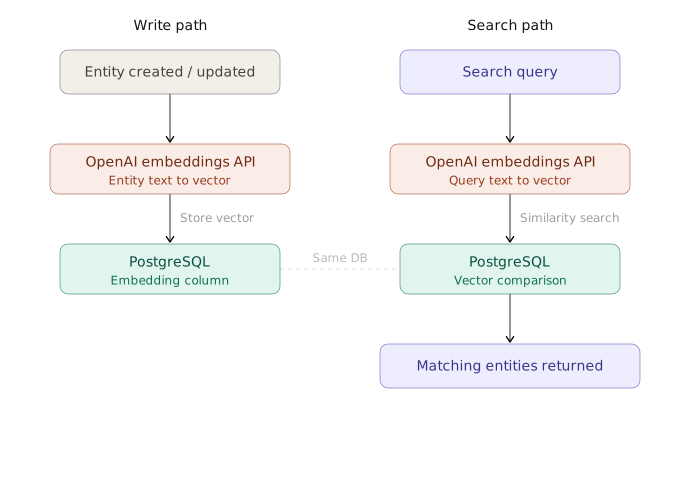
The `EmbeddingService` class creates the embeddings and runs vector search with the pgvector extension in Postgres. Its two main methods:
- `generateEntityEmbedding` – creates an embedding from an entity's string fields and writes the vector to its database row.
- `vectorSearch` – searches the stored embeddings for a query string and returns the most similar entries.
Both methods work with any entity type, `user` and `task` alike.
```ts showLineNumbers copy filename="src/modules/embedding/embedding-service.ts" source="examples/realtime-kanban"
import { openai } from '@ai-sdk/openai';
import { Prisma } from '@prisma/client';
import type { EntityType } from '@schemas/index';
import type { TaskType } from '@schemas/models/Task.schema';
import type { UserType } from '@schemas/models/User.schema';
import { embed } from 'ai';
import { capitalize, omit } from 'lodash';
import { BASE_KEYS } from '@/constants';
import DatabaseService from '../database/database-service';
export default class EmbeddingService {
static async generateEmbedding(value: string): Promise {
const { embedding } = await embed({
model: openai.embeddingModel('text-embedding-3-small'),
value,
});
return embedding;
}
static generateEntityEmbedding = async (
entityType: EntityType,
entityId: UserType['id'] | TaskType['id'],
) => {
const entity = await DatabaseService.prisma[
entityType as 'user'
].findUnique({
where: { id: entityId },
});
const capitalizedEntityType = capitalize(entityType);
if (!entity) throw new Error(`${capitalizedEntityType} not found`);
const embedding = await this.generateEmbedding(
Object.values(omit(entity, BASE_KEYS))
.filter((v) => typeof v === 'string')
.join(' ')
.trim()
.toLowerCase(),
);
await DatabaseService.prisma.$executeRawUnsafe(
`
UPDATE "${capitalizedEntityType}"
SET embedding = $1::vector
WHERE id = $2
`,
`[${embedding.join(',')}]`,
entityId,
);
return embedding;
};
static async vectorSearch(
entityType: EntityType,
query: string,
limit: number = 10,
similarityThreshold: number = 0.4,
) {
const queryEmbedding = await EmbeddingService.generateEmbedding(
query.trim().toLowerCase(),
);
const capitalizedEntityType = capitalize(entityType);
// find similar vectors and return entity IDs
const vectorResults = await DatabaseService.prisma.$queryRaw<
{ id: string; similarity: number }[]
>`
SELECT
id,
1 - (embedding <=> ${`[${queryEmbedding.join(',')}]`}::vector) as similarity
FROM ${Prisma.raw(`"${capitalizedEntityType}"`)}
WHERE embedding IS NOT NULL
AND 1 - (embedding <=> ${`[${queryEmbedding.join(',')}]`}::vector) > ${similarityThreshold}
ORDER BY embedding <=> ${`[${queryEmbedding.join(',')}]`}::vector
LIMIT ${limit}
`;
return DatabaseService.prisma[entityType as 'user'].findMany({
where: {
id: {
in: vectorResults.map((r) => r.id as string),
},
},
}) as Promise;
}
}
```
*[The code above is fetched from GitHub repository.](https://github.com/finom/vovk/blob/main/examples/realtime-kanban/src/modules/embedding/embedding-service.ts)*
---
Page: https://vovk.dev/realtime-ui/polling
# Realtime Database Polling
[State normalization](./state) and its backend code keep the UI up to date while the user works with the app through HTTP requests. They also cover the AI features, [Text Chat AI](./text-ai) and [Voice AI](./voice-ai), explained in later articles. The rule of thumb: data always goes through the entity registry.
Other users or third-party services can also change the database. One way to keep the UI in sync with the backend in real time is database polling over [JSON Lines](https://vovk.dev/jsonlines). The server sends updates to clients whenever the database changes, and the client reconnects automatically when the connection closes.
The component below is a polling example. It gets an update from the server every second. After 10 updates, the server closes the connection, and the client reconnects automatically. Database updates work the same way.
[View Polling example on examples.vovk.dev »](https://examples.vovk.dev/polling)
Expect a short delay (up to half a second) for the CORS preflight. The Network tab in DevTools shows it.
---
The video below shows polling at work. Browser tabs stand in for several users, but updates from any source, third-party services included, work the same way.
Video: https://vovk.dev/video/kanban_polling.mp4
## Redis DB as event bus
Polling the main Postgres database for changes would be inefficient. The app uses Redis as an event bus instead: each change to the main database writes a small event to Redis. The polling service reads these events every second and sends them to the clients that have the app open.
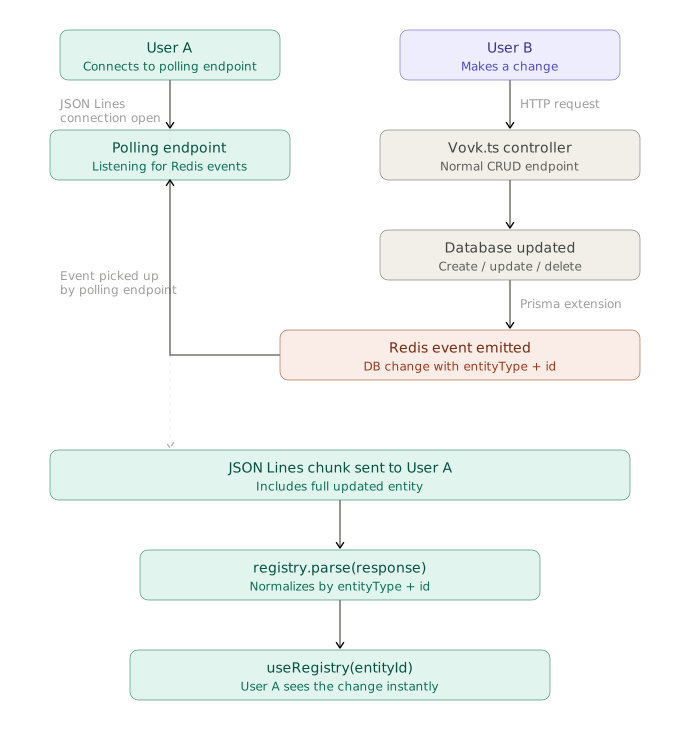
The app uses [Prisma](https://www.prisma.io/) as its ORM, so [Prisma Extensions](https://www.prisma.io/docs/orm/prisma-client/client-extensions) can hook into database operations and write the events to Redis. This is the job of the `DatabaseService` from the [Endpoints](./endpoints) article.
> [!IMPORTANT]
>
> The implementation has these limits:
> - Deletions must be explicit, even when the database deletes rows by cascade. See the [`UserService.deleteUser`](https://github.com/finom/vovk/blob/main/examples/realtime-kanban/src/modules/user/user-service.ts) method.
> - Every write operation must select the `updatedAt` field, or change detection fails.
> - To keep it simple, the only supported write operations are `create`, `update`, `upsert`, and `delete`. Read operations such as `find...` and `count` pass through unchanged and record no change. More complex operations need extra handling.
```ts showLineNumbers copy filename="src/modules/database/database-service.ts" source="examples/realtime-kanban" {24,133}
import { PrismaNeon } from '@prisma/adapter-neon';
import { Prisma, PrismaClient } from '@prisma/client';
import { HttpException, HttpStatus } from 'vovk';
import type { BaseEntity } from '@/types';
import DatabaseEventsService, {
type DBChange,
} from './database-events-service';
import './neon-local'; // Setup Neon for local development
export default class DatabaseService {
static get prisma() {
DatabaseService.#prisma ??= DatabaseService.getClient();
return DatabaseService.#prisma;
}
static #prisma: ReturnType | null = null;
private static getClient() {
const prisma = new PrismaClient({
adapter: new PrismaNeon({
connectionString: `${process.env.DATABASE_URL}`,
}),
});
DatabaseEventsService.beginEmitting();
return prisma
.$extends({
name: 'timestamps',
// Ensure createdAt and updatedAt are always ISO strings to match the generated Zod schemas
result: {
$allModels: {
createdAt: {
compute: (data: { createdAt: Date }) =>
data.createdAt.toISOString(),
},
updatedAt: {
compute: (data: { updatedAt: Date }) =>
data.updatedAt.toISOString(),
},
},
},
})
.$extends({
name: 'events',
// Emit database change events for create, update, and delete operations
query: {
$allModels: {
async $allOperations({ model, operation, args, query }) {
const allowedOperations = [
'create',
'update',
'delete',
'upsert',
'findMany',
'findUnique',
'findFirst',
'findUniqueOrThrow',
'findFirstOrThrow',
'count',
'aggregate',
'groupBy',
] as const;
type AllowedOperation = (typeof allowedOperations)[number];
if (!allowedOperations.includes(operation as AllowedOperation)) {
throw new Error(
`Unsupported database operation "${operation}" on model "${model}"`,
);
}
let result: BaseEntity | BaseEntity[];
try {
result = (await query(args)) as BaseEntity | BaseEntity[];
} catch (error) {
throw DatabaseService.toHttpException(error, model);
}
const now = new Date().toISOString();
let change: DBChange | null = null;
const makeChange = (
entity: BaseEntity,
type: DBChange['type'],
) => ({
id: entity.id,
entityType: entity.entityType,
date:
type === 'delete'
? now
: entity.updatedAt
? new Date(entity.updatedAt).toISOString()
: now,
type,
});
switch (operation as AllowedOperation) {
case 'create':
if ('entityType' in result)
change = makeChange(result, 'create');
break;
case 'update':
case 'upsert':
if ('entityType' in result)
change = makeChange(result, 'update');
break;
case 'delete':
if ('entityType' in result) {
change = makeChange(result, 'delete');
// Automatically add __isDeleted flag to deletion results
Object.assign(result, { __isDeleted: true });
}
break;
case 'findMany':
case 'findUnique':
case 'findFirst':
case 'findUniqueOrThrow':
case 'findFirstOrThrow':
case 'count':
case 'aggregate':
case 'groupBy':
// no events
break;
default:
console.warn(
`Unhandled Prisma operation: ${operation} for model: ${model}`,
);
break;
}
if (change) {
await DatabaseEventsService.createChanges([change]);
}
return result;
},
},
},
});
}
// a missing record, a taken unique value or a missing related record is the caller's error, not a 500
private static toHttpException(error: unknown, model: string) {
if (!(error instanceof Prisma.PrismaClientKnownRequestError)) return error;
switch (error.code) {
case 'P2025':
return new HttpException(HttpStatus.NOT_FOUND, `${model} not found`);
case 'P2002':
return new HttpException(
HttpStatus.CONFLICT,
`${model} with the same unique field already exists`,
);
case 'P2003':
return new HttpException(
HttpStatus.BAD_REQUEST,
`${model} refers to a record that doesn't exist`,
);
default:
return error;
}
}
}
```
*[The code above is fetched from GitHub repository.](https://github.com/finom/vovk/blob/main/examples/realtime-kanban/src/modules/database/database-service.ts)*
- The `getClient` method calls `DatabaseEventsService.beginEmitting(){:ts}` to start emitting events. `beginEmitting` runs a `setInterval` that connects to Redis and checks for new events. It emits each new event with [mitt](https://npmjs.com/package/mitt).
- `prisma.$extends` hooks into some of the Prisma model operations. When an operation changes data, it calls `await DatabaseEventsService.createChanges([change]){:ts}`, which stores a change entry in Redis. A change records a create, an update, or a delete:
```ts showLineNumbers copy
export type DBChange = {
id: string;
entityType: EntityType;
date: string;
type: 'create' | 'update' | 'delete';
};
```
The `date` field holds the time of the change, so clients fetch only the latest changes.
- For `create`, `update`, and `upsert`, it is the `updatedAt` field of the row (so every write operation must select this field).
- For `delete`, it is the current time.
The `delete` operation also adds an `__isDeleted` property. The frontend uses it to hide the entity: the registry item gets `enumerable: false` (see the [State](./state) page).
Besides `beginEmitting` and `createChanges`, `DatabaseEventsService` has an `emitter` (a `mitt` instance). The polling service (`DatabasePollService`, below) listens to it for new events. A private `connect` method opens the Redis connection.
```ts showLineNumbers copy filename="src/modules/database/database-events-service.ts" source="examples/realtime-kanban"
import type { EntityType } from '@prisma/client';
import mitt from 'mitt';
import { createClient } from 'redis';
export type DBChange = {
id: string;
entityType: EntityType;
date: string;
type: 'create' | 'update' | 'delete';
};
export default class DatabaseEventsService {
public static readonly DB_KEY = 'db_updates';
private static readonly INTERVAL = 1_000;
private static lastTimestamp = Date.now();
private static redisClient = createClient({
url: process.env.REDIS_URL,
});
public static emitter = mitt<{
[DatabaseEventsService.DB_KEY]: DBChange[];
}>();
// ensure Redis is connected
private static async connect() {
if (!DatabaseEventsService.redisClient.isOpen) {
await DatabaseEventsService.redisClient.connect();
DatabaseEventsService.redisClient.on('error', (err) => {
console.error('Redis Client Error', err);
});
}
}
// push one update into our ZSET, with score = timestamp
public static async createChanges(changes: DBChange[]) {
if (changes.length === 0) return;
await DatabaseEventsService.connect();
// build array of { score, value } objects
const entries = changes.map(({ id, entityType, type, date }) => ({
score: Date.now(),
value: JSON.stringify({ id, entityType, date, type }),
}));
// one multi(): batch ZADD, drop the entries older than the key's lifetime, EXPIRE
await DatabaseEventsService.redisClient
.multi()
.zAdd(DatabaseEventsService.DB_KEY, entries)
.zRemRangeByScore(
DatabaseEventsService.DB_KEY,
'-inf',
Date.now() - DatabaseEventsService.INTERVAL * 60,
)
.expire(
DatabaseEventsService.DB_KEY,
(DatabaseEventsService.INTERVAL * 60) / 1000,
)
.exec();
}
public static beginEmitting() {
setInterval(async () => {
await DatabaseEventsService.connect();
const now = Date.now();
// get everything with score ∈ (lastTimestamp, now]
const raw = await DatabaseEventsService.redisClient.zRangeByScore(
DatabaseEventsService.DB_KEY,
DatabaseEventsService.lastTimestamp + 1,
now,
);
DatabaseEventsService.lastTimestamp = now;
if (raw.length > 0) {
const updates = raw.map((s) => JSON.parse(s) as DBChange);
DatabaseEventsService.emitter.emit(
DatabaseEventsService.DB_KEY,
updates,
);
}
}, DatabaseEventsService.INTERVAL);
}
}
```
*[The code above is fetched from GitHub repository.](https://github.com/finom/vovk/blob/main/examples/realtime-kanban/src/modules/database/database-events-service.ts)*
## Polling controller and service
With the change entries in Redis and the emitter in place, a polling procedure can stream updates to clients in real time. `DatabasePollController` has a single [JSON Lines](https://vovk.dev/jsonlines) procedure. `DatabasePollService` gets a [JSONLinesResponder](https://vovk.dev/jsonlines#jsonlinesresponder) instance from the controller and sends data to clients through it. The service closes the connection after 30 seconds, so clients must reconnect. It removes its change listener then, or at the first change after the client has left.
```ts showLineNumbers copy filename="src/modules/database/database-poll-service.ts" source="examples/realtime-kanban"
import { forEach, groupBy } from 'lodash';
import type { JSONLinesResponder, VovkIteration } from 'vovk';
import DatabaseEventsService, {
type DBChange,
} from './database-events-service';
import type DatabasePollController from './database-poll-controller';
import DatabaseService from './database-service';
export default class PollService {
static poll(
responder: JSONLinesResponder<
VovkIteration
>,
) {
let asOldAs = new Date();
// 10 minutes ago; TODO: use latest update date from registry
asOldAs.setMinutes(asOldAs.getMinutes() - 10);
const onChanges = (changes: DBChange[]) => {
// the client left before the timeout
if (responder.isClosed) {
DatabaseEventsService.emitter.off(
DatabaseEventsService.DB_KEY,
onChanges,
);
return;
}
const deleted = changes.filter((change) => change.type === 'delete');
const createdOrUpdated = changes.filter(
(change) => change.type === 'create' || change.type === 'update',
);
for (const deletedEntity of deleted) {
void responder.send({
id: deletedEntity.id,
entityType: deletedEntity.entityType,
__isDeleted: true,
});
}
// group by entityType and date, so the date is maximum date for the given entity: { entityType: string, date: string }[]
forEach(groupBy(createdOrUpdated, 'entityType'), (changes) => {
const maxDateItem = changes.reduce(
(max, change) => {
const changeDate = new Date(change.date);
return changeDate.getTime() > new Date(max.date).getTime()
? change
: max;
},
{ date: new Date(0) } as unknown as DBChange,
);
if (new Date(maxDateItem.date).getTime() > asOldAs.getTime()) {
void DatabaseService.prisma[maxDateItem.entityType as 'user']
.findMany({
where: {
updatedAt: {
gt: asOldAs,
},
},
})
.then((entities) => {
for (const entity of entities) {
void responder.send(entity);
}
});
asOldAs = new Date(maxDateItem.date);
}
});
};
DatabaseEventsService.emitter.on(DatabaseEventsService.DB_KEY, onChanges);
setTimeout(() => {
DatabaseEventsService.emitter.off(
DatabaseEventsService.DB_KEY,
onChanges,
);
responder.close();
}, 30_000);
}
}
```
*[The code above is fetched from GitHub repository.](https://github.com/finom/vovk/blob/main/examples/realtime-kanban/src/modules/database/database-poll-service.ts)*
```ts showLineNumbers copy filename="src/modules/database/database-poll-controller.ts" source="examples/realtime-kanban"
import { EntityType } from '@prisma/client';
import { TaskSchema, UserSchema } from '@schemas/index';
import {
get,
JSONLinesResponder,
prefix,
procedure,
type VovkIteration,
} from 'vovk';
import { z } from 'zod';
import { sessionGuard } from '@/decorators/session-guard';
import DatabasePollService from './database-poll-service';
@prefix('poll')
export default class DatabasePollController {
@get()
@sessionGuard()
static poll = procedure({
preferTransformed: false,
iteration: z.union([
z.object({
id: z.uuid(),
entityType: z.enum(EntityType),
__isDeleted: z.boolean().optional(),
}),
UserSchema,
TaskSchema,
]),
}).handle(async (req) => {
const responder = new JSONLinesResponder<
VovkIteration
>(
req,
({ readableStream, headers }) =>
new Response(readableStream, { headers }),
);
void DatabasePollService.poll(responder);
return responder;
});
}
```
*[The code above is fetched from GitHub repository.](https://github.com/finom/vovk/blob/main/examples/realtime-kanban/src/modules/database/database-poll-controller.ts)*
- When `DatabaseEventsService.emitter` emits a `delete` change, the service sends an event with `id`, `entityType`, and `__isDeleted: true`, and the registry hides the entity.
- For an `update` or `create` change, the service fetches the full entity from Postgres (Redis stores only metadata) and sends it to clients.
## Client-side logic
On the client, for example in a React component, call `DatabasePollRPC.poll()` to get a stream of database events. Like any [JSON Lines](https://vovk.dev/jsonlines) RPC method, it returns an async iterable that you read in a `for await` loop. The server may close the connection, or the network may fail, so wrap the logic in a retry loop. The [fetcher](https://vovk.dev/imports#fetcher) is already [configured](./state#setting-up-the-fetcher), so the loop body can be empty: you don't handle the data yourself.
The frontend code also has an on/off switch, saved in `localStorage`, so users can turn polling on or off.
The `useDatabasePolling` hook implements this logic and returns the `[isPollingEnabled, setIsPollingEnabled, hasError]` state tuple:
```ts showLineNumbers copy filename="src/hooks/use-database-polling.ts" source="examples/realtime-kanban"
import { useEffect, useRef, useState } from 'react';
import { DatabasePollRPC } from '@/client';
/**
* Hook to manage database polling state.
* @example const [isPollingEnabled, setIsPollingEnabled, hasError] = useDatabasePolling(false);
*/
export default function useDatabasePolling(initialValue = false) {
const MAX_RETRIES = 5;
const [isPollingEnabled, setIsPollingEnabled] = useState(initialValue);
const [hasError, setHasError] = useState(false);
const abortRef = useRef<() => void>(null);
useEffect(() => {
const isEnabled = localStorage.getItem('isPollingEnabled');
setIsPollingEnabled(isEnabled === 'true');
}, []);
useEffect(() => {
localStorage.setItem('isPollingEnabled', isPollingEnabled.toString());
async function poll(retries = 0) {
setHasError(false);
if (!isPollingEnabled) {
abortRef.current?.();
return;
}
try {
while (true) {
console.log('Polling database for updates...');
const iterable = await DatabasePollRPC.poll();
abortRef.current = iterable.abortSilently;
for await (const iteration of iterable) {
console.log('New DB update:', iteration);
}
if (iterable.abortController.signal.aborted) {
console.log('Polling aborted with abortSilently');
break;
}
}
} catch (error) {
if (retries < MAX_RETRIES) {
console.error('Polling failed, retrying...', error);
await new Promise((resolve) => setTimeout(resolve, 2000));
return poll(retries + 1);
} else {
console.error(
'Max polling retries reached. Stopping polling.',
error,
);
setHasError(true);
}
}
}
void poll();
return () => {
abortRef.current?.();
};
}, [isPollingEnabled]);
return [isPollingEnabled, setIsPollingEnabled, hasError] as const;
}
```
*[The code above is fetched from GitHub repository.](https://github.com/finom/vovk/blob/main/examples/realtime-kanban/src/hooks/use-database-polling.ts)*
Usage:
```tsx copy
const [isPollingEnabled, setIsPollingEnabled, hasError] = useDatabasePolling(false);
```
---
Page: https://vovk.dev/realtime-ui/authentication
# Basic Authentication and Authorization for Password Protection
The app has simple authentication with an optional `PASSWORD` in the `.env` file. When the user enters the password, the app creates a session cookie that authorizes the next requests. The session's `userId` is a hash of the password, so changing the `PASSWORD` variable in production ends all sessions.
The flow is a simpler version of the one in the official [Next.js authentication documentation](https://nextjs.org/docs/app/guides/authentication). A [login page](https://github.com/finom/vovk/blob/main/examples/realtime-kanban/src/app/login/page.tsx) has a form that calls a [login server action](https://github.com/finom/vovk/blob/main/examples/realtime-kanban/src/app/actions/auth.ts). [src/lib/session.ts](https://github.com/finom/vovk/blob/main/examples/realtime-kanban/src/lib/session.ts) creates the session, and [src/lib/dal.ts](https://github.com/finom/vovk/blob/main/examples/realtime-kanban/src/lib/dal.ts) is the Data Access Layer (DAL).
The DAL file exports `verifySession`. [page.tsx](https://github.com/finom/vovk/blob/main/examples/realtime-kanban/src/app/page.tsx) calls it, and it redirects the user to the login page when the session is invalid.
```ts showLineNumbers copy filename="src/lib/dal.ts" source="examples/realtime-kanban"
import { cookies } from 'next/headers';
import { redirect } from 'next/navigation';
import { cache } from 'react';
import { decrypt, SESSION_USER_ID } from './session';
const getSession = async () => {
const cookie = (await cookies()).get('session')?.value;
const session = await decrypt(cookie);
return session;
};
export const isLoggedIn = async () => {
if (!process.env.PASSWORD) return true;
const session = await getSession();
return session?.userId === SESSION_USER_ID;
};
export const verifySession = cache(async () => {
if (!(await isLoggedIn())) {
redirect('/login');
}
});
```
*[The code above is fetched from GitHub repository.](https://github.com/finom/vovk/blob/main/examples/realtime-kanban/src/lib/dal.ts)*
```ts showLineNumbers copy filename="src/app/page.tsx"
import { verifySession } from "@/lib/dal";
export default async function Home() {
await verifySession();
// ...
```
The DAL also exports `isLoggedIn`. The `sessionGuard` [decorator](https://vovk.dev/decorator) uses it to check that the user is logged in before a procedure runs.
```ts showLineNumbers copy filename="src/decorators/session-guard.ts" source="examples/realtime-kanban"
import { createDecorator, HttpException, HttpStatus } from 'vovk';
import { isLoggedIn } from '@/lib/dal';
export const sessionGuard = createDecorator(async (req, next) => {
if (typeof req.url !== 'undefined' && !(await isLoggedIn())) {
throw new HttpException(HttpStatus.UNAUTHORIZED, 'Unauthorized');
}
return next();
});
```
*[The code above is fetched from GitHub repository.](https://github.com/finom/vovk/blob/main/examples/realtime-kanban/src/decorators/session-guard.ts)*
Every procedure of the root segment has the `sessionGuard` decorator. The `typeof req.url !== 'undefined'{:ts}` check tells HTTP requests apart from [`fn`](https://vovk.dev/fn) calls.
The Telegram webhook doesn't use `sessionGuard`, because Telegram sends no session cookie. It checks Telegram's secret token instead (see the [Telegram](./telegram) article). The MCP server has its own `MCP_ACCESS_KEY`. The `static` segment (`/api/static/openapi.json` and `/api/static/hello.json`) and the `/openapi` page have no check, so they stay public when `PASSWORD` is set.
---
Page: https://vovk.dev/realtime-ui/text-ai
# Text Chat AI Interface
The previous articles keep the component state in sync with the backend data, whatever method fetches it, while the user works with the UI. This page adds an AI chat, so users can work with the app in plain language.
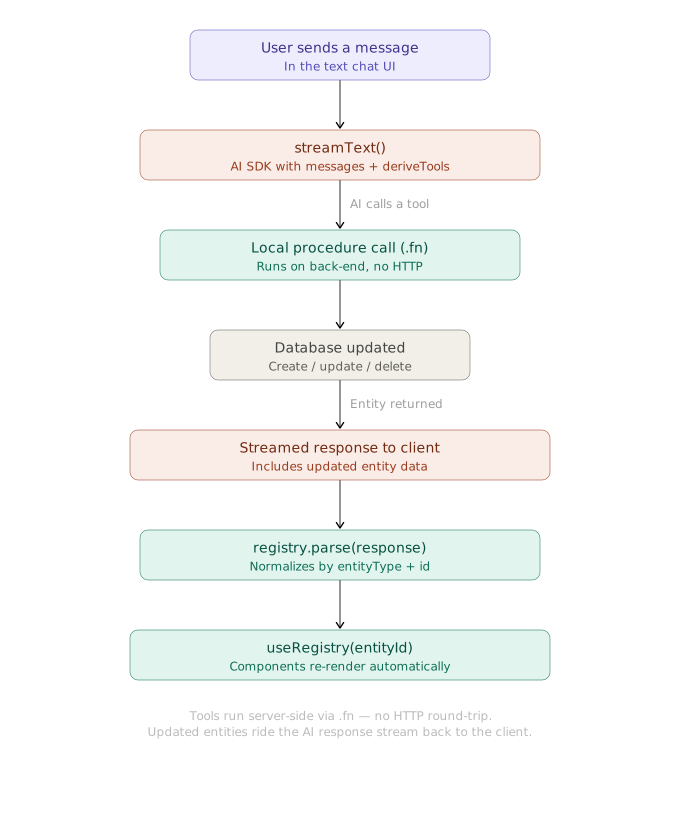
The chat uses the [AI SDK](https://ai-sdk.dev/) with function calling. The [deriveTools](https://vovk.dev/tools) function derives the AI tools from the backend controllers.
Video: https://vovk.dev/video/kanban_text_chat.mp4
## Backend Setup
On the backend, a procedure calls the AI SDK's `streamText` function with the `tools` and `stopWhen` options.
The procedures already follow the [rules of locally called procedures](https://vovk.dev/fn#rules): their handlers use only the `vovk` property of the request, for example `async ({ vovk }) => UserService.createUser(await vovk.body()){:ts}` (see the [API Endpoints](./endpoints) page). So `deriveTools` can turn the controllers into AI tools that run in the current backend context, without HTTP requests.
```ts showLineNumbers copy filename="src/modules/ai/ai-sdk-controller.ts" source="examples/realtime-kanban" {28-33,35-45,51-52}
import { openai } from '@ai-sdk/openai';
import {
convertToModelMessages,
createUIMessageStreamResponse,
stepCountIs,
streamText,
tool,
toUIMessageStream,
type UIMessage,
} from 'ai';
import { z } from 'zod';
import { deriveTools, operation, post, prefix, type VovkRequest } from 'vovk';
import { sessionGuard } from '@/decorators/session-guard';
import TaskController from '../task/task-controller';
import UserController from '../user/user-controller';
@prefix('ai-sdk')
export default class AiSdkController {
@operation({
summary: 'Function Calling',
description:
'Uses [@ai-sdk/openai](https://www.npmjs.com/package/@ai-sdk/openai) and ai packages to call UserController and TaskController functions based on the provided messages.',
})
@post('function-calling')
@sessionGuard()
static async functionCalling(req: VovkRequest<{ messages: UIMessage[] }>) {
const { messages } = await req.json();
const tools = deriveTools({
modules: {
UserController,
TaskController,
},
});
const toolSet = Object.fromEntries(
tools.map(({ name, execute, description, inputSchema }) => [
name,
tool({
execute,
description,
// the SDK takes Standard Schema as is; a procedure without input has no schema
inputSchema: inputSchema ?? z.object({}),
}),
]),
);
const result = streamText({
model: openai('gpt-5'),
instructions: 'You execute functions sequentially, one by one.',
messages: await convertToModelMessages(messages),
tools: toolSet,
stopWhen: stepCountIs(16),
onError: (e) => console.error('streamText error', e),
onFinish: ({ finishReason, toolCalls }) => {
if (finishReason === 'tool-calls') {
console.log('Tool calls finished', toolCalls);
}
},
});
// pass toolSet so tool parts keep the dynamic flag the old method set for us
return createUIMessageStreamResponse({
stream: toUIMessageStream({ stream: result.stream, tools: toolSet }),
});
}
}
```
*[The code above is fetched from GitHub repository.](https://github.com/finom/vovk/blob/main/examples/realtime-kanban/src/modules/ai/ai-sdk-controller.ts)*
The endpoint is `/api/ai-sdk/function-calling`.
## Frontend Setup
The frontend uses the AI SDK packages [ai](https://www.npmjs.com/package/ai) and [@ai-sdk/react](https://www.npmjs.com/package/@ai-sdk/react), and the [AI Elements](https://ai-sdk.dev/elements/) library. AI Elements has ready-made React components for AI interfaces, built on [shadcn/ui](https://ui.shadcn.com/).
```tsx showLineNumbers copy filename="src/components/expandable-chat-demo.tsx" {26}
'use client';
// ...
import { useChat } from '@ai-sdk/react';
import { useState } from 'react';
import { DefaultChatTransport } from 'ai';
import { AiSdkRPC } from '@/client';
import { Conversation, ConversationContent, ConversationEmptyState } from '@/components/ai-elements/conversation';
import useParseSDKToolCallOutputs from '@/hooks/use-parse-sdk-tool-call-outputs';
export function ExpandableChatDemo() {
const [input, setInput] = useState('');
const { messages, sendMessage, status } = useChat({
transport: new DefaultChatTransport({
api: AiSdkRPC.functionCalling.getURL(), // or "/api/ai-sdk/function-calling",
}),
onToolCall: (toolCall) => {
console.log('Tool call initiated:', toolCall);
},
});
const handleSubmit = (e: React.FormEvent) => {
// ...
};
useParseSDKToolCallOutputs(messages);
return (
// ...
{/* ... */}
// ...
);
}
```
[See the full code of the component](https://github.com/finom/vovk/blob/main/examples/realtime-kanban/src/components/expandable-chat-demo.tsx)
The main part is the `useParseSDKToolCallOutputs` hook. It takes the tool call outputs from the assistant messages and passes them to the registry's `parse` method, which updates the UI. The hook parses each tool call output only once: it keeps the parsed tool call IDs in a `Set`.
```ts showLineNumbers copy filename="src/hooks/use-parse-sdk-tool-call-outputs.ts" source="examples/realtime-kanban" {27}
import type { ToolUIPart, UIMessage } from 'ai';
import { useEffect, useRef } from 'react';
import { useRegistryStore } from '@/hooks/use-registry';
export default function useParseSDKToolCallOutputs(messages: UIMessage[]) {
const store = useRegistryStore();
const parsedToolCallIdsSetRef = useRef>(new Set());
useEffect(() => {
const partsToParse = messages.flatMap((msg) =>
msg.parts.filter((part) => {
return (
msg.role === 'assistant' &&
part.type.startsWith('tool-') &&
(part as ToolUIPart).state === 'output-available' &&
'toolCallId' in part &&
!parsedToolCallIdsSetRef.current.has(part.toolCallId)
);
}),
) as ToolUIPart[];
partsToParse.forEach((part) => {
parsedToolCallIdsSetRef.current.add(part.toolCallId);
});
if (partsToParse.length) {
store.getState().parse(partsToParse.map((part) => part.output));
}
}, [messages, store]);
}
```
*[The code above is fetched from GitHub repository.](https://github.com/finom/vovk/blob/main/examples/realtime-kanban/src/hooks/use-parse-sdk-tool-call-outputs.ts)*
Without the optimizations, the hook comes down to this:
```ts showLineNumbers copy
// ...
const store = useRegistryStore();
useEffect(() => {
store.getState().parse(messages);
}, [messages, store]);
// ...
```
The chat can now call your backend functions and update the UI from the results: the procedures return the updated data with its `id` and `entityType` fields, and the `__isDeleted` field for soft deletions.
---
Page: https://vovk.dev/realtime-ui/voice-ai
# WebRTC-based Realtime Voice AI
This page sets up a voice AI interface. It uses the OpenAI Realtime API with WebRTC to send and receive audio in real time. This time the tools don't come from controller methods that the AI SDK runs on the backend. They are derived from the generated [RPC modules](https://vovk.dev/typescript) and make authorized requests from the browser.
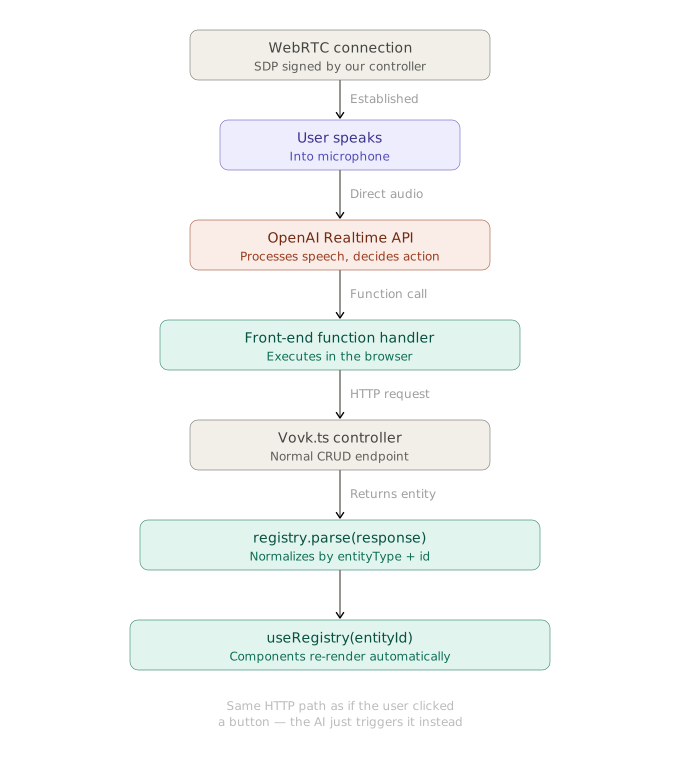
With WebRTC, audio goes directly between the client and the OpenAI Realtime API, not through your backend server. This keeps tool execution latency low.
## Backend Setup
The backend has a session endpoint, based on the official OpenAI article [Realtime API with WebRTC](https://platform.openai.com/docs/guides/realtime-webrtc). It takes the client's SDP offer and a `voice` query parameter, and returns the SDP answer from the OpenAI Realtime API.
```ts showLineNumbers copy filename="src/modules/realtime/realtime-controller.ts" source="examples/realtime-kanban"
import { HttpException, HttpStatus, post, prefix, procedure } from 'vovk';
import { z } from 'zod';
import { sessionGuard } from '@/decorators/session-guard';
@prefix('realtime')
export default class RealtimeController {
@post('session')
@sessionGuard()
static session = procedure({
query: z.object({
voice: z.enum(['ash', 'ballad', 'coral', 'sage', 'verse']),
}),
body: z.object({ sdp: z.string() }),
output: z.object({ sdp: z.string() }),
}).handle(async ({ vovk }) => {
const { voice } = vovk.query();
const { sdp: sdpOffer } = await vovk.body();
const sessionConfig = JSON.stringify({
type: 'realtime',
model: 'gpt-realtime',
audio: { output: { voice } },
});
const fd = new FormData();
fd.set('sdp', sdpOffer);
fd.set('session', sessionConfig);
try {
const r = await fetch('https://api.openai.com/v1/realtime/calls', {
method: 'POST',
headers: {
Authorization: `Bearer ${process.env.OPENAI_API_KEY}`,
},
body: fd,
});
// Send back the SDP we received from the OpenAI REST API
const sdp = await r.text();
return { sdp };
} catch (error) {
throw new HttpException(
HttpStatus.INTERNAL_SERVER_ERROR,
`Failed to generate token. ${String(error)}`,
);
}
});
}
```
*[The code above is fetched from GitHub repository.](https://github.com/finom/vovk/blob/main/examples/realtime-kanban/src/modules/realtime/realtime-controller.ts)*
## Frontend Setup
### WebRTC Audio Session Hook
The custom hook `useWebRTCAudioSession` manages the WebRTC session: it starts and stops it, handles the audio streams, and manages the data channel for function calling.
The hook takes the selected voice and the list of tools. It returns the session state (`isActive`, `isTalking`) and a function that turns the session on and off (`toggleSession`).
The main parts of the hook:
- the data channel's `onopen` handler, which sends a `session.update` message with the list of tools, so the OpenAI Realtime API knows which tools exist;
- the `onmessage` handler, which waits for function calls from the model (the `response.function_call_arguments.done` event), runs the matching tool, and sends back the result.
`onmessage` also sends the `response.create` message so the Realtime API answers, unless the result of the tool's `execute` function has the `__preventResponseCreate` flag set to `true`.
```ts showLineNumbers copy filename="src/hooks/use-web-rtc-audio-session.ts" source="examples/realtime-kanban" {87-139}
'use client';
import { useCallback, useEffect, useRef, useState } from 'react';
import type { StandardToolV0 } from 'standard-tool';
import { RealtimeRPC } from '@/client';
/**
* Hook to manage a real-time session with OpenAI's Realtime endpoints.
* @example const { isActive, isTalking, toggleSession } = useWebRTCAudioSession(voice, tools);
*/
export default function useWebRTCAudioSession(
voice: 'ash' | 'ballad' | 'coral' | 'sage' | 'verse',
tools: StandardToolV0[],
) {
const audioElement = useRef(null);
const [isActive, setIsActive] = useState(false);
// Data channel ref
const dcRef = useRef(null);
// Media stream ref for microphone
const mcRef = useRef(null);
// talking state + refs
const [isTalking, setIsTalking] = useState(false);
const remoteAnalyserRef = useRef(null);
const remoteMonitorIntervalRef = useRef(null);
const remoteAudioContextRef = useRef(null);
const startSession = useCallback(async () => {
// Create a peer connection
const pc = new RTCPeerConnection();
// Set up to play remote audio from the model
audioElement.current = document.createElement('audio');
audioElement.current.autoplay = true;
pc.ontrack = (e) => {
if (!audioElement.current) return;
audioElement.current.srcObject = e.streams[0];
// Simple audio activity monitor
try {
const audioCtx = new AudioContext();
remoteAudioContextRef.current = audioCtx;
const source = audioCtx.createMediaStreamSource(e.streams[0]);
const analyser = audioCtx.createAnalyser();
analyser.fftSize = 256;
source.connect(analyser);
remoteAnalyserRef.current = analyser;
remoteMonitorIntervalRef.current = window.setInterval(() => {
if (!remoteAnalyserRef.current) return;
const a = remoteAnalyserRef.current;
const data = new Uint8Array(a.fftSize);
a.getByteTimeDomainData(data);
let sum = 0;
for (let i = 0; i < data.length; i++) {
const v = (data[i] - 128) / 128;
sum += v * v;
}
const rms = Math.sqrt(sum / data.length);
setIsTalking(rms > 0.02); // simple threshold
}, 200);
} catch {
// ignore audio activity errors
}
};
// Add local audio track for microphone input in the browser
const ms = await navigator.mediaDevices.getUserMedia({
audio: true,
});
mcRef.current = ms;
pc.addTrack(ms.getTracks()[0]);
// Set up data channel for sending and receiving events
const dc = pc.createDataChannel('oai-events');
dcRef.current = dc;
// Start the session using the Session Description Protocol (SDP)
const offer = await pc.createOffer();
await pc.setLocalDescription(offer);
const { sdp } = await RealtimeRPC.session({
body: { sdp: offer.sdp ?? '' },
query: { voice },
});
await pc.setRemoteDescription({
type: 'answer',
sdp,
});
dc.onopen = () => {
const sessionUpdate = {
type: 'session.update',
session: {
type: 'realtime',
tools: tools.map(({ name, description, inputSchema }) => {
// OpenAI wants bare JSON schema, drop the $schema marker zod adds
const { $schema, ...parameters } =
inputSchema?.['~standard'].jsonSchema.input({
target: 'draft-2020-12',
}) ?? {};
return {
name,
description,
parameters: inputSchema ? parameters : undefined,
type: 'function',
};
}),
},
};
dc.send(JSON.stringify(sessionUpdate));
};
dc.onmessage = async (event) => {
const msg = JSON.parse(event.data);
// Handle function call completions
if (msg.type === 'response.function_call_arguments.done') {
const execute = tools.find((tool) => tool.name === msg.name)?.execute;
if (execute) {
const args = JSON.parse(msg.arguments);
const result = (await execute(args)) as {
__preventResponseCreate?: boolean;
};
// Respond with function output
const response = {
type: 'conversation.item.create',
item: {
type: 'function_call_output',
call_id: msg.call_id,
output: JSON.stringify(result),
},
};
dcRef.current?.send(JSON.stringify(response));
if (!result?.__preventResponseCreate) {
const responseCreate = {
type: 'response.create',
};
dcRef.current?.send(JSON.stringify(responseCreate));
}
}
}
};
setIsActive(true);
}, [tools, voice]);
const stopSession = useCallback(() => {
// Close data channel and peer connection
dcRef.current?.close();
dcRef.current = null;
// Stop microphone tracks
mcRef.current?.getTracks().forEach((track) => {
track.stop();
});
mcRef.current = null;
// Close remote audio context
remoteAudioContextRef.current?.close();
remoteAudioContextRef.current = null;
remoteAnalyserRef.current = null;
// Stop the audio immediately
if (audioElement.current) {
audioElement.current.srcObject = null;
audioElement.current = null;
}
// Clear monitoring interval
if (remoteMonitorIntervalRef.current) {
clearInterval(remoteMonitorIntervalRef.current);
remoteMonitorIntervalRef.current = null;
}
setIsTalking(false);
setIsActive(false);
}, []);
const toggleSession = useCallback(() => {
if (isActive) {
stopSession();
} else {
startSession();
}
}, [isActive, startSession, stopSession]);
// Cleanup on unmount
useEffect(() => {
return () => stopSession();
}, [stopSession]);
return {
startSession,
stopSession,
toggleSession,
isActive,
isTalking,
};
}
```
*[The code above is fetched from GitHub repository.](https://github.com/finom/vovk/blob/main/examples/realtime-kanban/src/hooks/use-web-rtc-audio-session.ts)*
### Client-side Tools
`useWebRTCAudioSession` gets the tools derived with `deriveTools({ modules: { UserRPC, TaskRPC } }){:ts}`, plus custom client-side tools made with `standardTool` from the [standard-tool](https://www.npmjs.com/package/standard-tool) package, for navigation, scrolling, and other UI actions. The `getCurrentTime` and `partyMode` tools come from [this repository](https://github.com/cameronking4/openai-realtime-api-nextjs), which inspired this demo.
The component is mounted in [layout.tsx](https://github.com/finom/vovk/blob/main/examples/realtime-kanban/src/app/layout.tsx), so its state and the WebRTC connection stay alive when you move between pages within this route. That is why you can move around the app by voice with the `navigateTo` tool, which uses the Next.js `useRouter` hook.
The functions of the client-side tools are in the [lib/tools](https://github.com/finom/vovk/tree/main/examples/realtime-kanban/src/lib/tools) folder.
```tsx showLineNumbers copy filename="src/components/real-time-demo.tsx" source="examples/realtime-kanban"
'use client';
import { useRouter } from 'next/navigation';
import { standardTool } from 'standard-tool';
import { deriveTools } from 'vovk';
import { TaskRPC, UserRPC } from '@/client';
import z from 'zod';
import useWebRTCAudioSession from '@/hooks/use-web-rtc-audio-session';
import { getCurrentTime } from '@/lib/tools/get-current-time';
import { getVisiblePageSection } from '@/lib/tools/get-visible-page-section';
import { partyMode } from '@/lib/tools/party-mode';
import { scroll } from '@/lib/tools/scroll';
import Floaty from './floaty';
import { useMemo } from 'react';
const RealTimeDemo = () => {
const router = useRouter();
const tools = useMemo(
() => [
...deriveTools({
modules: { TaskRPC, UserRPC },
}),
standardTool({
name: 'getCurrentTime',
description: "Gets the current time in the user's timezone",
outputSchema: z
.object({
time: z.string(),
timezone: z.string(),
message: z.string(),
})
.meta({ description: 'Current time info.' }),
execute: getCurrentTime,
}),
standardTool({
name: 'partyMode',
description: 'Triggers a confetti animation on the page',
execute: partyMode,
}),
standardTool({
name: 'navigateTo',
description:
'Navigates the user to a specified URL within the application.',
inputSchema: z.object({
url: z
.enum(['/', '/openapi'])
.meta({ description: 'The URL to navigate to.' }),
}),
outputSchema: z
.string()
.meta({ description: 'Navigation confirmation message.' }),
execute: async ({ url }: { url: string }) => {
router.push(url);
return `Navigating to ${url}`;
},
}),
standardTool({
name: 'scroll',
description: 'Scrolls the page up or down.',
inputSchema: z.object({
direction: z
.enum(['up', 'down'])
.meta({ description: 'The direction to scroll' }),
px: z.number().optional().meta({
description:
'The number of pixels to scroll. If not provided, scrolls by one viewport height.',
}),
}),
outputSchema: z.object({
message: z
.string()
.meta({ description: 'Scroll action confirmation message.' }),
__preventResponseCreate: z
.boolean()
.meta({ description: 'Flag to prevent response creation.' }),
}),
execute: scroll,
}),
standardTool({
name: 'getVisiblePageSection',
description: 'Gets the currently visible section of the page',
outputSchema: z
.string()
.meta({ description: 'Visible text content from the page.' }),
execute: getVisiblePageSection,
}),
],
[router.push],
);
const { isActive, isTalking, toggleSession } = useWebRTCAudioSession(
'ash',
tools,
);
return (
);
};
export default RealTimeDemo;
```
*[The code above is fetched from GitHub repository.](https://github.com/finom/vovk/blob/main/examples/realtime-kanban/src/components/real-time-demo.tsx)*
The code of the `Floaty` component is [in the repository](https://github.com/finom/vovk/blob/main/examples/realtime-kanban/src/components/floaty.tsx).
---
Page: https://vovk.dev/realtime-ui/mcp
# Setting up MCP server
With [Database Polling](./polling) and [State Normalization](./state) set up, the app accepts changes from outside systems. This page adds an MCP server, so MCP clients can work with the app.
The server uses `createMcpHandler` from the official MCP SDK, [`@modelcontextprotocol/server`](https://npmjs.com/package/@modelcontextprotocol/server), in a Next.js API route. Its `registerTool` takes a derived tool's `inputSchema` (a Standard Schema with JSON Schema) as is.
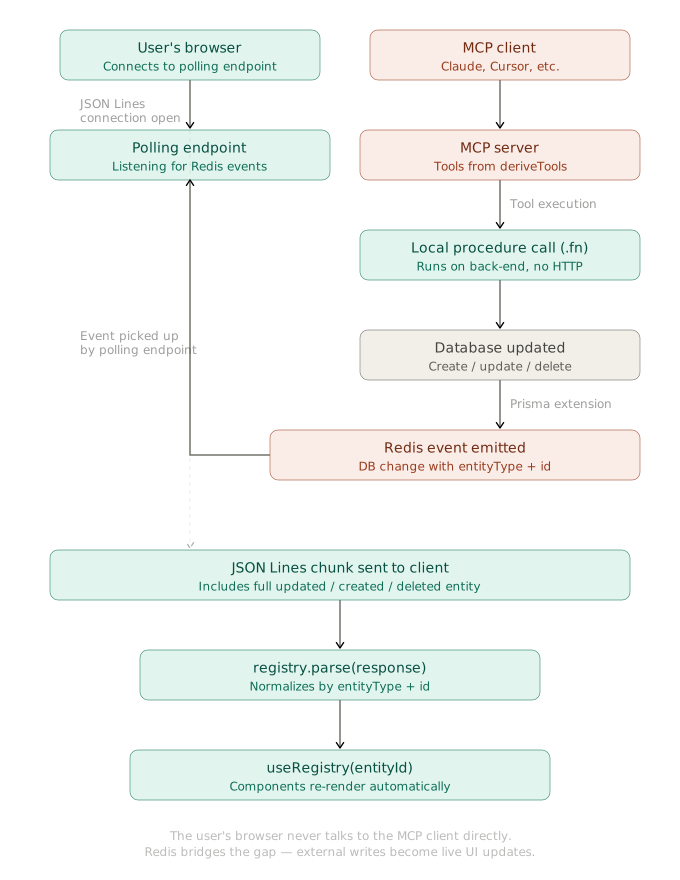
Video: https://vovk.dev/video/kanban_mcp.mp4
As on the other pages, the `deriveTools` function from the `vovk` package derives the server's tools from the controllers. See [Deriving AI Tools](https://vovk.dev/tools).
```ts filename="src/app/api/mcp/route.ts" source="examples/realtime-kanban"
import { createMcpHandler, McpServer } from '@modelcontextprotocol/server';
import { deriveTools, ToModelOutput } from 'vovk';
import TaskController from '@/modules/task/task-controller';
import UserController from '@/modules/user/user-controller';
const tools = deriveTools({
modules: {
UserController,
TaskController,
},
toModelOutput: ToModelOutput.MCP,
onExecute: (result, { name }) => console.log(`${name} executed`, result),
onError: (e, { name }) => console.error(`Error in ${name}`, e),
});
const handler = createMcpHandler(() => {
const server = new McpServer({ name: 'realtime-kanban', version: '1.0.0' });
tools.forEach(({ title, name, execute, description, inputSchema }) => {
server.registerTool(name, { title, description, inputSchema }, execute);
});
return server;
});
const authorizedHandler = (req: Request) => {
const { MCP_ACCESS_KEY } = process.env;
const accessKey = new URL(req.url).searchParams.get('mcp_access_key');
if (MCP_ACCESS_KEY && accessKey !== MCP_ACCESS_KEY) {
return new Response(
'Unable to authorize the MCP request: mcp_access_key query parameter is invalid',
{ status: 401 },
);
}
return handler.fetch(req);
};
export { authorizedHandler as GET, authorizedHandler as POST };
```
*[The code above is fetched from GitHub repository.](https://github.com/finom/vovk/blob/main/examples/realtime-kanban/src/app/api/mcp/route.ts)*
For simple protection, the server authorizes requests by the `mcp_access_key` query parameter. When the `MCP_ACCESS_KEY` environment variable is set, the parameter must match it.
The MCP server runs at the `/api/mcp` endpoint. MCP clients connect to `http://localhost:3000/api/mcp?mcp_access_key=your_access_key`. Replace `your_access_key` with your key, and `localhost` with your server address if needed.
## Running the MCP Inspector Locally
Start the MCP Inspector to try the MCP server. The app must be running locally.
```sh
npx @modelcontextprotocol/inspector
```
In the Inspector, set the server configuration, select a tool, and run it to see the result.
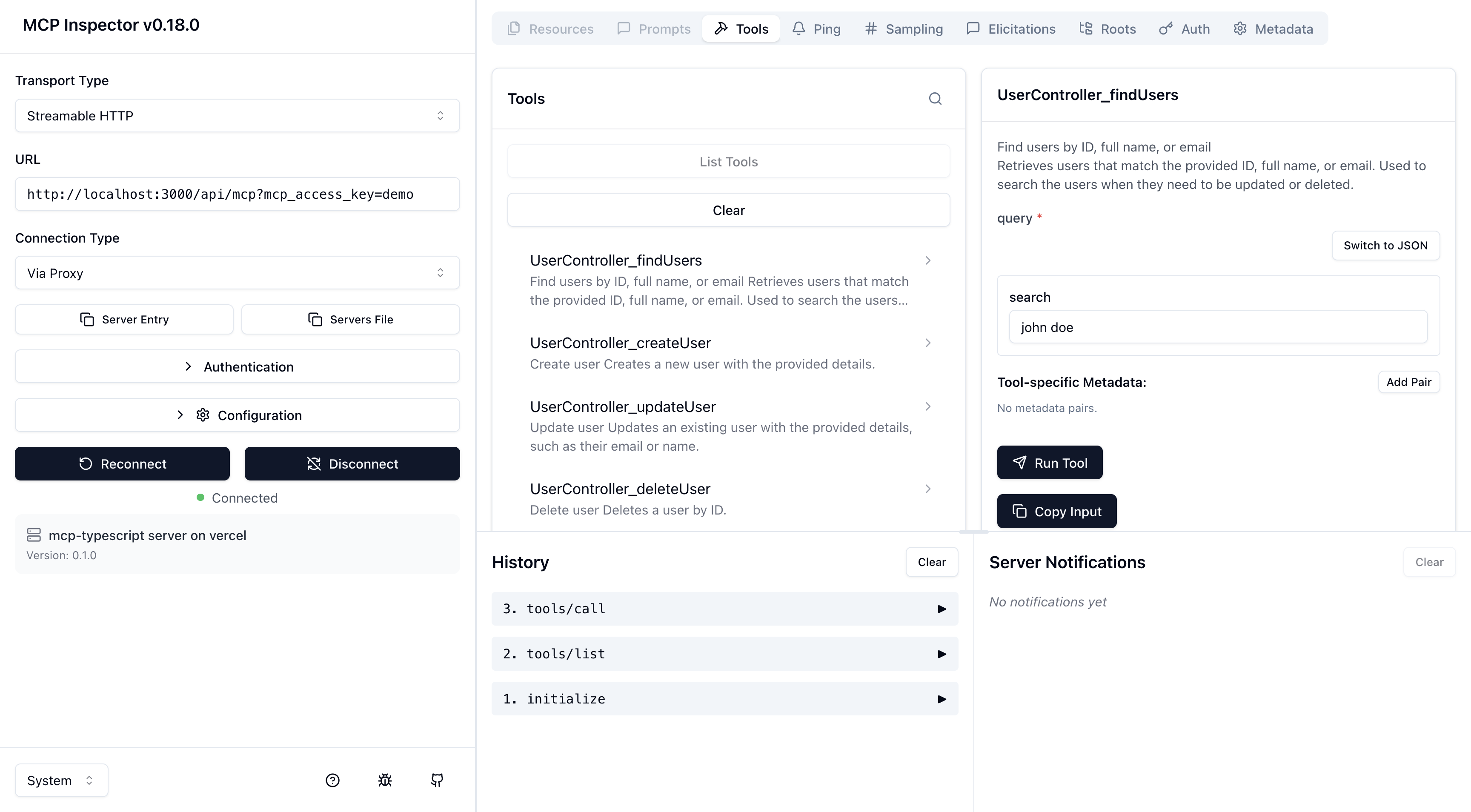
---
Page: https://vovk.dev/realtime-ui/telegram
# Telegram Bot with OpenAPI Mixins
Together, [State Normalization](./state), [Database Polling](./polling), and [Tool derivation](https://vovk.dev/tools) let any third-party source update the database and the UI in real time: API calls, MCP clients, bots, other users, and so on.
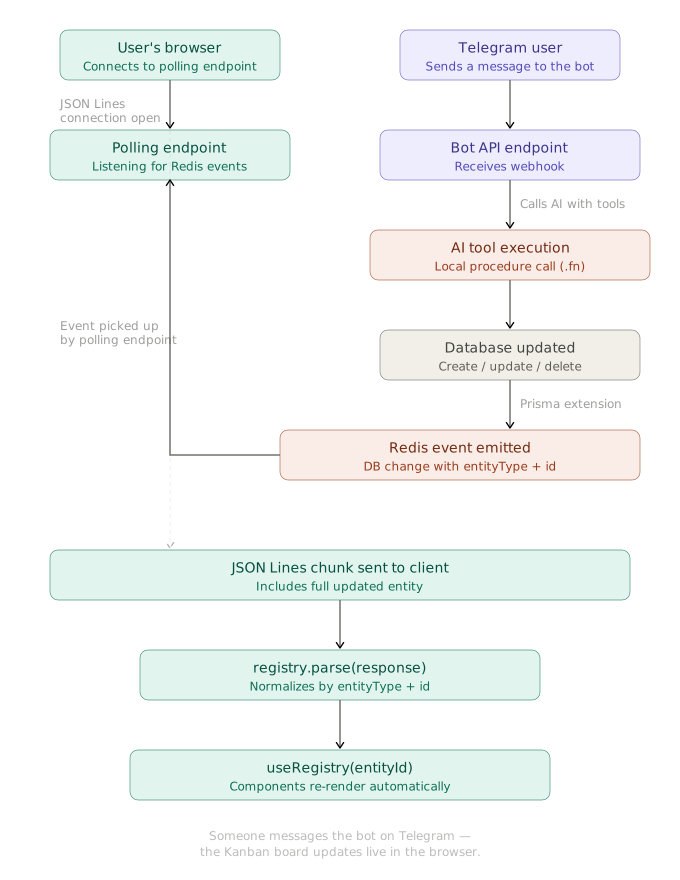
As a proof of concept, this article describes the Telegram bot. Users send it text or voice messages to create tasks and assign them to team members.
## Telegram API Mixin
The Telegram API client is built with [OpenAPI mixins](https://vovk.dev/mixins). It is a module with the fixed name `TelegramAPI` in the `telegram` pseudo-segment.
```ts showLineNumbers copy filename="vovk.config.mjs"
// @ts-check
/** @type {import('vovk').VovkConfig} */
const config = {
// ...
outputConfig: {
// ...
segments: {
telegram: {
openAPIMixin: {
source: {
url: 'https://raw.githubusercontent.com/sys-001/telegram-bot-api-versions/refs/heads/main/files/openapi/yaml/v183.yaml',
fallback: '.openapi-cache/telegram.yaml',
},
getModuleName: 'TelegramAPI',
getMethodName: ({ path }) => path.replace(/^\//, ''),
errorMessageKey: 'description',
},
},
},
},
};
export default config;
```
After `vovk dev` or `vovk generate`, you can import the `TelegramAPI` module from the generated client.
```ts
import { TelegramAPI } from '@/client';
await TelegramAPI.sendMessage({
body: {
chat_id: 123456789,
text: 'Hello from Realtime Kanban Telegram bot!',
},
apiRoot: 'https://api.telegram.org/bot',
});
```
The Telegram Bot API takes the bot token in the URL, so recreate the module with the `withDefaults` method to set the `apiRoot` once.
```ts
import { TelegramAPI as TelegramRawAPI } from '@/client';
const TelegramAPI = TelegramRawAPI.withDefaults({
apiRoot: 'https://api.telegram.org/bot',
});
```
## Segment, Controller and Procedure
A new segment, `bots`, holds the `TelegramController` under the `TelegramBot` key. The client doesn't need its schema, so the segment emits none: `emitSchema: false` in the `initSegment` call. With no schema emitted, the controller key can be any string.
```ts showLineNumbers copy filename="src/app/api/bots/[[...vovk]]/route.ts" source="examples/realtime-kanban"
import { initSegment } from 'vovk';
import TelegramController from '../../../../modules/telegram/telegram-controller';
const controllers = {
TelegramBot: TelegramController,
};
export type Controllers = typeof controllers;
export const { GET, POST, PATCH, PUT, HEAD, OPTIONS, DELETE } = initSegment({
segmentName: 'bots',
emitSchema: false, // Disable schema emission for bot endpoints
controllers,
});
```
*[The code above is fetched from GitHub repository.](https://github.com/finom/vovk/blob/main/examples/realtime-kanban/src/app/api/bots/[[...vovk]]/route.ts)*
The `TelegramController` class has a single `handle` procedure. It serves the `/api/bots/telegram/bot` endpoint, which the Telegram webhook calls for each incoming message.
```ts showLineNumbers copy filename="src/modules/telegram/telegram-controller.ts" source="examples/realtime-kanban"
import { post, prefix } from 'vovk';
import { telegramGuard } from '@/decorators/telegram-guard';
import TelegramService from './telegram-service';
@prefix('telegram')
export default class TelegramController {
@post('bot')
@telegramGuard()
static handle = TelegramService.handle.bind(TelegramService);
}
```
*[The code above is fetched from GitHub repository.](https://github.com/finom/vovk/blob/main/examples/realtime-kanban/src/modules/telegram/telegram-controller.ts)*
The app's `PASSWORD` doesn't cover this endpoint, because Telegram sends no session cookie. The `telegramGuard` decorator checks the `X-Telegram-Bot-Api-Secret-Token` header instead. The endpoint answers `404` until both `TELEGRAM_BOT_TOKEN` and `TELEGRAM_WEBHOOK_SECRET` are set, and `401` to a request whose header doesn't hold the secret.
```ts showLineNumbers copy filename="src/decorators/telegram-guard.ts" source="examples/realtime-kanban"
import { timingSafeEqual } from 'node:crypto';
import { createDecorator, HttpException, HttpStatus } from 'vovk';
// Telegram sends the secret_token given to setWebhook in this header with every update
export const telegramGuard = createDecorator(async (req, next) => {
const secret = process.env.TELEGRAM_WEBHOOK_SECRET;
if (!process.env.TELEGRAM_BOT_TOKEN || !secret) {
throw new HttpException(HttpStatus.NOT_FOUND, 'Not found');
}
const given = Buffer.from(
req.headers.get('x-telegram-bot-api-secret-token') ?? '',
);
const expected = Buffer.from(secret);
if (given.length !== expected.length || !timingSafeEqual(given, expected)) {
throw new HttpException(HttpStatus.UNAUTHORIZED, 'Unauthorized');
}
return next();
});
```
*[The code above is fetched from GitHub repository.](https://github.com/finom/vovk/blob/main/examples/realtime-kanban/src/decorators/telegram-guard.ts)*
Telegram sends the header once you register the webhook with the same secret as `secret_token`. The secret can hold 1 to 256 characters: `A-Z`, `a-z`, `0-9`, `_` and `-`.
```sh
curl "https://api.telegram.org/bot$TELEGRAM_BOT_TOKEN/setWebhook" \
-d "url=https://your-app.example.com/api/bots/telegram/bot" \
-d "secret_token=$TELEGRAM_WEBHOOK_SECRET"
```
## Service
The `TelegramService` class holds the main logic: it handles incoming messages, generates AI responses with the Vercel AI SDK, updates the database through derived tools, and sends text or voice messages back to the user.
```ts showLineNumbers copy filename="src/modules/telegram/telegram-service.ts"
// ...
export default class TelegramService {
// ...
private static async generateAIResponse(
chatId: number,
userMessage: string,
systemPrompt: string
): Promise<{ botResponse: string; messages: ModelMessage[] }> {
// Get chat history
const history = await this.getChatHistory(chatId);
const messages = [...this.formatHistoryForVercelAI(history), { role: 'user', content: userMessage } as const];
const tools = deriveTools({
modules: {
UserController,
TaskController,
},
});
// Generate a response using Vercel AI SDK
const { text } = await generateText({
model: vercelOpenAI('gpt-5'),
instructions: systemPrompt,
messages,
stopWhen: stepCountIs(16),
tools: {
...Object.fromEntries(
tools.map(({ name, execute, description, inputSchema }) => [
name,
tool({
execute,
description,
// the SDK takes Standard Schema as is; a procedure without input has no schema
inputSchema: inputSchema ?? z.object({}),
}),
])
),
},
});
const botResponse = text || "I couldn't generate a response.";
// Add user message to history
await this.addToHistory(chatId, 'user', userMessage);
// Add assistant response to history
await this.addToHistory(chatId, 'assistant', botResponse);
messages.push({
role: 'assistant',
content: botResponse,
});
return { botResponse, messages };
}
private static async sendTextMessage(chatId: number, text: string): Promise {
await TelegramAPI.sendMessage({
body: {
chat_id: chatId,
text: text,
parse_mode: 'html',
},
});
}
private static async sendVoiceMessage(chatId: number, text: string): Promise {
// ...
}
// ...
}
```
The full `TelegramService` is too long for this page. See it in the [GitHub repository](https://github.com/finom/vovk/blob/main/examples/realtime-kanban/src/modules/telegram/telegram-service.ts).