---
title: "Vovk.ts Realtime UI Context"
description: "Tutorial and reference for building real-time UIs with Vovk.ts."
see_also:
label: "Vovk.ts Docs Context"
url: https://vovk.dev/context/docs.md
chars: 104438
est_tokens: 26110
---
Page: https://vovk.dev/realtime-ui
# Realtime Kanban — AI-native UI updates with Vovk.ts
**Realtime UI** is a streaming-first architecture for Next.js that keeps the UI in perfect sync with the back-end using only JSON Lines and Vovk.ts.
This series walks through **Realtime Kanban** — the reference app that implements it — showing how users, bots, AI agents, and MCP clients can all update the board in real time with almost zero extra code.
AI-friendly context for all articles in this series is available [here](https://vovk.dev/context/realtime-ui.md).
## See it in action
### AI agent managing the board via MCP
Claude connects to the Kanban board through an [MCP server](https://vovk.dev/realtime-ui/mcp) and creates, moves, and deletes cards autonomously.
Video: https://vovk.dev/video/kanban_mcp.mp4
### Multi-user collaboration with live polling
Multiple users edit the same board simultaneously — changes propagate in real time through [database polling](https://vovk.dev/realtime-ui/polling) and [normalized state](https://vovk.dev/realtime-ui/state).
Video: https://vovk.dev/video/kanban_polling.mp4
### Chat-driven board updates with function calling
A built-in [text chat interface](https://vovk.dev/realtime-ui/text-ai) lets users manage cards through natural language, powered by OpenAI function calling.
Video: https://vovk.dev/video/kanban_text_chat.mp4
---
Page: https://vovk.dev/realtime-ui/overview
# Realtime UI Overview
YouTube: https://www.youtube.com/embed/lQ-F6U_1niw
This series walks through **Realtime Kanban**, a full‑stack reference app that demonstrates a **Realtime UI** architecture. The app behaves like a standard web application, but it’s also designed to be operated by **AI agents** via text or voice, and by **MCP clients**—including navigation and workflow automation—while keeping both front‑end and back‑end code short and easy to follow.
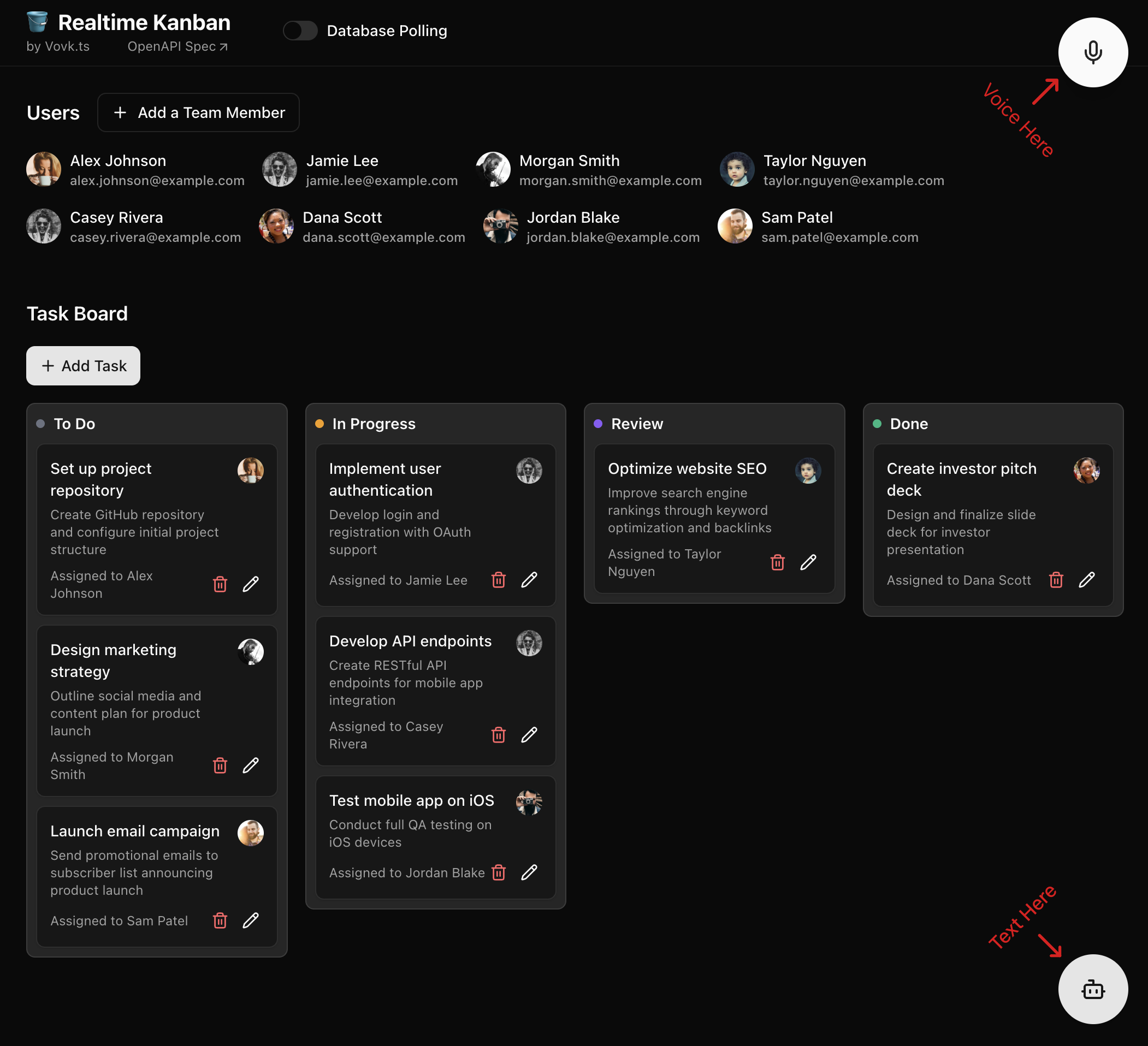
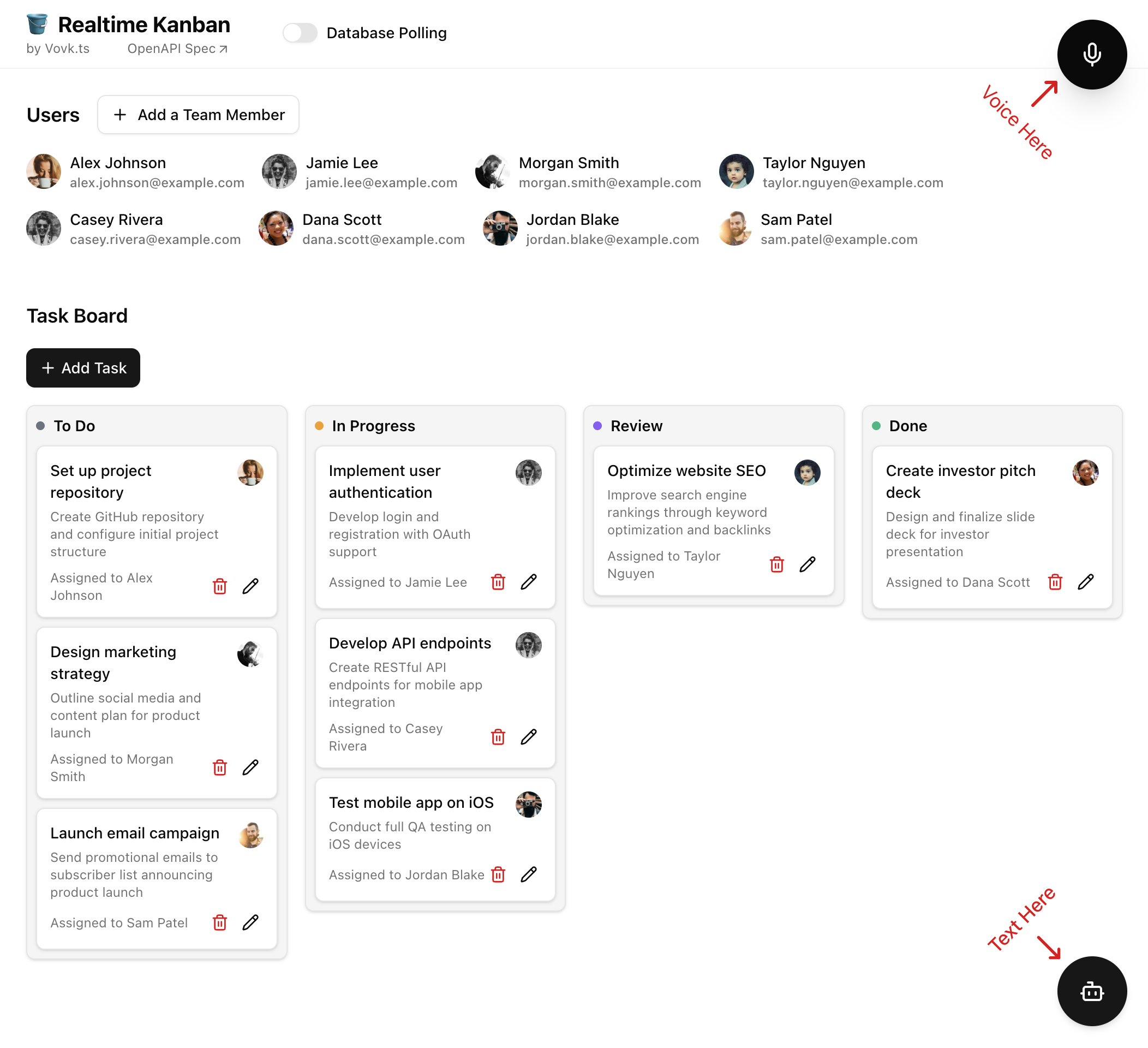
The app is intentionally minimal—just **Users** and **Tasks**—with lightweight features like password protection instead of full auth management. This makes it easy to reproduce, study, and adapt for your own projects.
Key building blocks:
- **Entity-driven state normalization (front end)** with [Zustand](https://github.com/pmndrs/zustand): back-end responses are parsed through an entity registry that updates a normalized store, so components can read entities by ID and re-render with minimal wiring.
- **Database schema as the source of truth**: Postgres + Prisma define structure and drive Zod schemas via [prisma-zod-generator](https://www.npmjs.com/package/prisma-zod-generator). The same schemas validate back-end procedure inputs to keep the codebase DRY.
- **Database polling events** via Redis, exposed as [JSON Lines](https://vovk.dev/jsonlines) streaming endpoints: changes from users, MCP clients, or bots propagate to the UI without manual refreshes.
- **Text-based AI chat** using the Vercel [AI SDK](https://ai-sdk.dev/docs/introduction) and [AI Elements](https://ai-sdk.dev/elements): existing controllers are reused to define AI tools, and results flow back through the entity registry pipeline.
- **Voice interface** with the [OpenAI Realtime API](https://platform.openai.com/docs/guides/realtime) + WebRTC: the agent performs authorized HTTP requests through generated RPC modules; responses update the UI through the same entity registry flow. The example also includes client-side tools for in-app navigation.
- **MCP server**: procedures run locally on the back end and trigger polling events, updating front-end state through the entity registry.
- **External updates** (Telegram bot): manage tasks through text/voice inside Telegram, showing how the same app can be controlled from multiple surfaces.
You can [run the app locally](./run) with Docker Compose or deploy it to any Node.js platform (for example, [Vercel](./deploy)).
---
Page: https://vovk.dev/realtime-ui/run
# Running the Project Locally
The Realtime Kanban app is available in the [GitHub repository](https://github.com/finom/realtime-kanban) and can be run locally.
Clone the repository and install the dependencies:
```bash copy
git clone https://github.com/finom/realtime-kanban.git && cd realtime-kanban
```
```sh
npm i
```
Create a `.env` file in the root directory and add your OpenAI API key and database connection strings:
```env filename=".env"
OPENAI_API_KEY=change_me
DATABASE_URL="postgresql://postgres:password@localhost:5432/realtime-kanban-db?schema=public"
DATABASE_URL_UNPOOLED="postgresql://postgres:password@localhost:5432/realtime-kanban-db?schema=public"
REDIS_URL=redis://localhost:6379
```
Run Docker containers and the development server:
```bash copy
docker-compose up -d
```
```sh
npm run dev
```
Open [http://localhost:3000](http://localhost:3000) in your browser to see the result. The UI should be self-explanatory. Users and tasks can be created with the UI (click “+ Add Team Member”, etc.), or by clicking one of the floating AI-related buttons: Text or Voice.
The variables in the `.env` file are used as follows:
- `OPENAI_API_KEY` – your OpenAI API key, required for AI features.
- `DATABASE_URL` – the database connection string for Prisma ORM, used to instantiate the Prisma client in [DatabaseService.ts](https://github.com/finom/realtime-kanban/blob/main/src/modules/database/DatabaseService.ts).
- `DATABASE_URL_UNPOOLED` – the database connection string for direct connections, used for migrations in [prisma.config.ts](https://github.com/finom/realtime-kanban/blob/main/prisma.config.ts).
- `REDIS_URL` – the Redis connection string for realtime features, explained in more detail in the [Polling](./polling) article.
You can also define additional env variables in `.env`:
- `PASSWORD` – a simple password protection for the app. It’s described in more detail in the [Authentication](./authentication) article.
- `MCP_ACCESS_KEY` – a simple authorization key for the MCP server using the `?mcp_access_key=your_key` query param. If this variable is not set, no authorization is required. See the [MCP](./mcp) article for details.
- `TELEGRAM_BOT_TOKEN` – enables the Telegram bot integration. See the [Telegram Integration](./telegram) article for more information.
---
Page: https://vovk.dev/realtime-ui/deploy
# Deploying to Vercel
You can use any hosting provider that supports Node.js applications, but for simplicity we’re going to use [Vercel](https://vercel.com/), as it requires minimal effort to deploy the app for a quick demo. We’re going to set up two Vercel integrations: [Neon](https://vercel.com/integrations/neon) for Postgres/PGVector database hosting and [Redis](https://vercel.com/integrations/redis) for Redis hosting. Neon is used as the main database, while Redis is used as a database event bus for real-time features described in the [Polling](./polling) article, and as temporary storage for messages consumed by the demo [Telegram bot](./telegram).
**Note:** Vovk.ts is not affiliated with Vercel, Telegram, or Neon in any way.
To deploy the app with this setup, create a new project in Vercel, link it to a fork of the GitHub repository, and add the integrations mentioned above (both are available on the free plan).
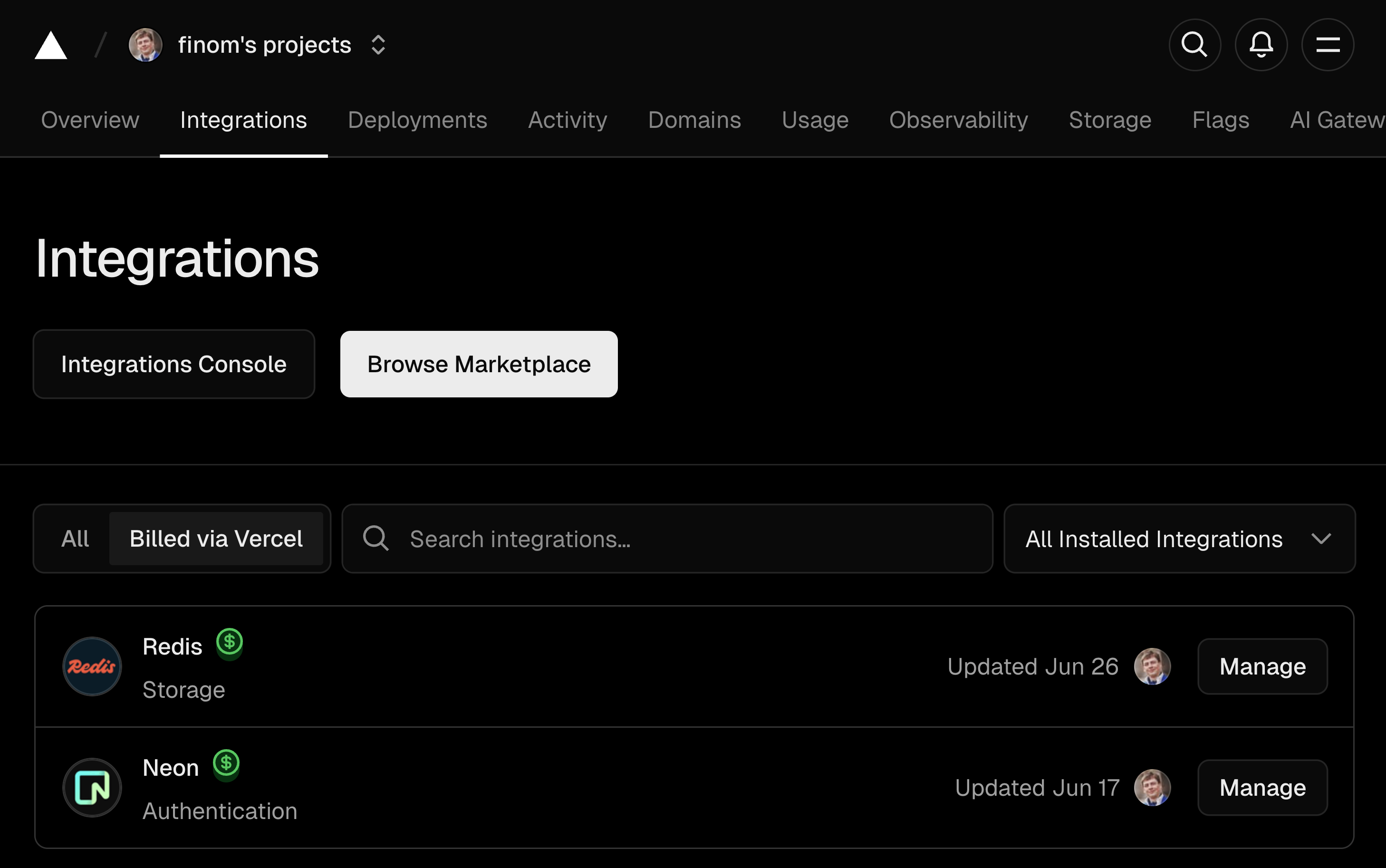
Add `OPENAI_API_KEY` to the project environment variables. Other variables such as `DATABASE_URL` and `REDIS_URL` are created automatically by the integrations.
It’s also recommended to add a `PASSWORD` variable to enable simple (and free) password protection for the app. You can set it to any desired value.
For MCP protection, you can also add the `MCP_ACCESS_KEY` variable to enable basic authorization for the MCP server using the `?mcp_access_key=your_key` query param. If this variable is not set, no authorization is required.
Finally, for Telegram bot integration, you can add the `TELEGRAM_BOT_TOKEN` variable if you want to use the Telegram bot feature. See the [Telegram integration](./telegram) article for more details.
If you run into issues, check the [.env.template](https://github.com/finom/realtime-kanban/blob/main/.env.template) file for reference.
---
Page: https://vovk.dev/realtime-ui/state
# Entity-driven state normalization with Zustand registry
Entity-driven state normalization is the most efficient way to manage application state in complex apps that deal with a lot of interconnected data. Instead of passing raw data to components or storing responses as-is in state, extracting entities and storing them in a centralized registry gives you a single source of truth, O(1) lookups by ID, and automatic updates everywhere an entity is referenced. Components subscribe to specific entities by their IDs; when an entity is updated, all components that use it re-render automatically.
The demo above shows the same user entity rendered in four different places: the header greeting, the sidebar, the page title, and the form input. When you update the name and hit Save, every component reflects the change instantly — because they all read from the same entity in the registry.
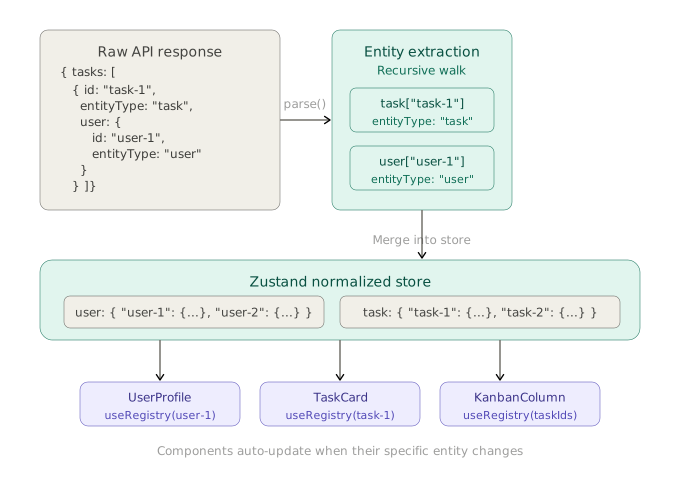
Here's how this works under the hood: raw API responses are passed through a `parse` method that recursively extracts entities, normalizes them into flat dictionaries keyed by ID, and merges them into a Zustand store. Components subscribe to specific entities by ID and re-render only when their data changes.
An item in the registry can be used in any component as follows:
```ts showLineNumbers copy
export const UserProfile = ({ userId }: { userId: User['id'] }) => {
const userProfile = useRegistry(useShallow(state => state.user[userId]));
return {userProfile.fullName}
}
```
Arrays of entities can be derived by mapping over the IDs:
```ts showLineNumbers copy
export const UserList = ({ userIds }: { userIds: User['id'][] }) => {
const users = useRegistry(
useShallow((state) => userIds.map((id) => state.user[id])),
);
return {users.map((u) => - {u.fullName}
)}
}
```
The implementation explained below also considers soft deletions, where deleted entities are marked as non-enumerable without actually removing them from the state. This prevents errors in components that might still reference them.
```ts showLineNumbers copy
export const UserList = ({ userIds }: { userIds: User['id'][] }) => {
const users = useRegistry(
useShallow(({ user: { ...userReg } }) => userIds.filter((id) => id in userReg).map((id) => userReg[id]))
);
return {users.map((u) => - {u.fullName}
)}
}
```
## Prior art and portability
The idea of normalizing front-end state into flat entity maps originates from the Redux ecosystem. [`normalizr`](https://github.com/paularmstrong/normalizr) (originally created by Dan Abramov) introduced declarative schema-based normalization of nested JSON, and Redux Toolkit's [`createEntityAdapter`](https://redux-toolkit.js.org/api/createEntityAdapter) later provided built-in CRUD reducers and selectors for normalized state. The approach described here applies the same core principle — flat entity dictionaries keyed by ID — but relies on convention (`id` + `entityType`) instead of upfront schema definitions.
While this article uses [Zustand](https://github.com/pmndrs/zustand), the pattern itself is not tied to it. The core requirements from a state library are: a centralized store that holds plain objects, the ability to update state and trigger selective re-renders, and a subscription mechanism so components only re-render when their specific entity changes. Any library that provides these can host the same registry. Compatible alternatives include [Jotai](https://jotai.org/) (where each entity map could be an atom) and [Valtio](https://valtio.dev/) (using proxy-based reactivity for automatic fine-grained subscriptions). The `getEntitiesFromData` extraction function and the `parse` logic are completely library-agnostic — only the store creation and subscription wiring need to be adapted.
## Implementing `useRegistry` hook
The application state is normalized and stores entities in a dictionary by their IDs. The registry exposes a `parse` method that accepts any data and extracts entities from it, storing them in the registry. This method is used to process all incoming data from the server so that all components using this data are updated automatically.
```ts showLineNumbers copy
useRegistry.getState().parse(data);
```
### Defining entity types
The pattern relies on a simple contract: every entity in your data has an `id` field and an `entityType` field that identifies what kind of entity it is. In a real project, `EntityType` can be pulled from `@prisma/client`, generated from your schema, or imported from wherever your source of truth lives. Here we list it explicitly for documentation purposes:
```ts showLineNumbers copy filename="src/types.ts"
enum EntityType {
user = 'user',
task = 'task',
}
interface BaseEntity {
id: string;
createdAt: string | Date;
updatedAt: string | Date;
entityType: EntityType;
}
```
Entity IDs should be **branded strings** rather than plain `string` types. This prevents accidentally passing a user ID where a task ID is expected — a common source of bugs in apps with many entity types. With Zod, you can define a branded ID schema per entity:
```ts showLineNumbers copy
import { z } from 'zod';
const UserIdSchema = z.string().brand<'user'>();
const TaskIdSchema = z.string().brand<'task'>();
type UserId = z.infer; // string & { __brand: 'user' }
type TaskId = z.infer; // string & { __brand: 'task' }
```
Without Zod, you can achieve the same with a simple TypeScript utility type:
```ts showLineNumbers copy
type BrandedId = string & { readonly __brand: T };
type UserId = BrandedId<'user'>;
type TaskId = BrandedId<'task'>;
```
Either way, your entity interfaces then use the branded type for `id` instead of bare `string`, making it a compile-time error to mix up IDs across entity types.
> In the Realtime UI project, `EntityType` is imported from `@prisma/client` and the entity types (including branded IDs) are generated via a Zod generator, as described in the [Database](./database) article.
### The registry hook
The `useRegistry` hook, built with the Zustand library, implements a `Registry` interface that describes the shape of the registry state: the `parse` method and entity maps such as `user` and `task`.
```ts showLineNumbers copy filename="src/hooks/useRegistry.ts" repository="finom/realtime-kanban"
import { EntityType } from '@prisma/client';
import type { TaskType } from '@schemas/models/Task.schema';
import type { UserType } from '@schemas/models/User.schema';
import fastDeepEqual from 'fast-deep-equal';
import { create } from 'zustand';
import type { BaseEntity } from '../types';
interface Registry {
[EntityType.user]: Record;
[EntityType.task]: Record;
parse: (data: unknown) => void;
}
export function getEntitiesFromData(
data: unknown,
entities: Partial<{
[key in EntityType]: Record;
}> = {},
depth = 0,
) {
const MAX_DEPTH = 10;
if (depth > MAX_DEPTH) return entities as Partial>;
if (Array.isArray(data)) {
data.forEach((item) => {
getEntitiesFromData(item, entities, depth + 1);
});
} else if (typeof data === 'object' && data !== null) {
Object.values(data).forEach((value) => {
getEntitiesFromData(value, entities, depth + 1);
});
if ('entityType' in data && 'id' in data) {
const entityType = data.entityType as EntityType;
const id = (data as BaseEntity).id;
entities[entityType] ??= {};
entities[entityType][id] = data as BaseEntity;
}
}
return entities as Partial>;
}
const useRegistry = create((set) => ({
[EntityType.user]: {},
[EntityType.task]: {},
parse: (data) => {
const entities = getEntitiesFromData(data);
set((state) => {
const newState: Record = {};
let isChanged = false;
Object.entries(entities).forEach(([entityType, entityMap]) => {
const type = entityType as EntityType;
const descriptors = Object.getOwnPropertyDescriptors(state[type] ?? {});
let areDescriptorsChanged = false;
Object.values(entityMap).forEach((entity) => {
const descriptorValue = descriptors[entity.id]?.value;
const value = { ...descriptorValue, ...entity };
const isCurrentChanged = !fastDeepEqual(descriptorValue, value);
descriptors[entity.id] = isCurrentChanged
? ({
value,
configurable: true,
writable: false,
enumerable: !('__isDeleted' in entity),
} satisfies PropertyDescriptor)
: descriptors[entity.id];
areDescriptorsChanged ||= isCurrentChanged;
});
newState[type] = areDescriptorsChanged
? Object.defineProperties({}, descriptors)
: state[type];
isChanged ||= areDescriptorsChanged;
});
return isChanged ? { ...state, ...newState } : state;
});
},
}));
export default useRegistry;
```
*[The code above is fetched from GitHub repository.](https://github.com/finom/realtime-kanban/blob/main/src/hooks/useRegistry.ts)*
## `getEntitiesFromData` function explained
`getEntitiesFromData` is a recursive function that extracts entities from any data structure based on the presence of `entityType` and `id` properties. For each discovered `entityType`, it builds a record whose keys are entity IDs and whose values are the entity objects themselves. Nested entities (like `user` inside `task`) are extracted alongside their parents in a single pass, so one call normalizes the entire response. Let's say the server returns the following response:
```json {6,10,16,20}
{
"tasks": [
{
"id": "task-1",
"title": "Task 1",
"entityType": "task",
"user": {
"id": "user-1",
"fullName": "John Doe",
"entityType": "user"
}
},
{
"id": "task-2",
"title": "Task 2",
"entityType": "task",
"user": {
"id": "user-2",
"fullName": "Jane Doe",
"entityType": "user"
}
}
]
}
```
The function walks through the entire structure and produces a normalized intermediate shape (without mutating the original objects):
```ts showLineNumbers copy
{
"task": {
"task-1": { "id": "task-1", "title": "Task 1", "entityType": "task", "user": { /* unchanged */ } },
"task-2": { "id": "task-2", "title": "Task 2", "entityType": "task", "user": { /* unchanged */ } }
},
"user": {
"user-1": { "id": "user-1", "fullName": "John Doe", "entityType": "user" },
"user-2": { "id": "user-2", "fullName": "Jane Doe", "entityType": "user" }
}
}
```
## `parse` method explained
The `parse` method accepts any data, extracts entities from it, and stores them in the registry. Instead of simply extending the state with new entities, it uses `Object.getOwnPropertyDescriptors` to get the property descriptors of the existing entities. This allows us to check whether an entity already exists in state and, if it does, compare it with the new entity using the [fast-deep-equal](https://www.npmjs.com/package/fast-deep-equal) library. If the entities are equal, we don't update state; otherwise, we create a new property descriptor with the updated entity. This helps avoid unnecessary re-renders of components that consume this entity.
### Soft deletions via `__isDeleted` property
The `__isDeleted` property is used to mark entities as deleted without actually removing them from the state, which avoids errors in components that might still reference them.
The key mechanism here is JavaScript property descriptors. When a property is defined with `enumerable: false`, it becomes invisible to `Object.values`, `Object.keys`, and `{ ...spread }` operations — but it can still be accessed directly by key. This means consumers iterating over entities won't see deleted ones, while components that still hold a reference to the ID won't crash:
```ts showLineNumbers copy
const obj = Object.defineProperties({}, {
'task-1': { value: { id: 'task-1', title: 'Task 1' }, enumerable: true, configurable: true },
'task-2': { value: { id: 'task-2', title: 'Task 2' }, enumerable: false, configurable: true },
});
Object.keys(obj); // ['task-1'] — task-2 is invisible to iteration
obj['task-2']; // { id: 'task-2', title: 'Task 2' } — but still accessible by ID
```
This approach was chosen over alternatives like maintaining a separate `deletedIds` Set or filtering on a boolean flag because it requires zero awareness from consuming components — they don't need to add any filter logic, the deleted entities simply disappear from enumeration.
Once `__isDeleted` is received as part of an entity, the property descriptor is marked as non-enumerable automatically. To soft-delete an entity, the server needs to send an object like this:
```json
{
"id": "task-1",
"entityType": "task",
"__isDeleted": true
}
```
---
## Summary
With this pattern in place you get three things: centralized entity storage with automatic extraction from any response shape, zero-config normalization via `parse` that deduplicates and diff-checks all incoming data, and soft deletes that hide entities from iteration without breaking components that still reference them by ID.
Each time data is received from any source, it goes through the registry's `parse` method, and all components that reference that data by ID are updated automatically.
```ts showLineNumbers copy
import { useRegistry } from "@/hooks/useRegistry";
const resp = await fetch('/api/some-endpoint');
const data = await resp.json();
useRegistry.getState().parse(data);
```
To make this automatic, we'll create a custom fetcher that calls the `parse` method for each response, as described in the [next article](./fetcher).
---
Page: https://vovk.dev/realtime-ui/fetcher
# Setting up the `fetcher`
The next piece of the puzzle is to create a `fetcher` function that the application will use to request data from the server. You can find more details about it in the [imports](https://vovk.dev/imports#fetcher) article.

The fetcher is going to implement a `transformResponse` function that processes all incoming data by passing it to the registry’s `parse` method.
In the simplest form, when we expect JSON responses only, the function looks like this:
```ts showLineNumbers copy filename="src/lib/fetcher.ts"
import { createFetcher } from "vovk";
import { useRegistry } from "@/hooks/useRegistry";
export const fetcher = createFetcher({
transformResponse: (data) => {
const state = useRegistry.getState();
state.parse(data);
return data;
},
});
```
On each RPC method call, the `transformResponse` function is invoked with the response data, which is then passed to the registry’s `parse` method.
```ts showLineNumbers copy
import { UserRPC } from "vovk-client";
const users = await UserRPC.getUsers(); // transformResponse is called internally
```
This also works with React Query, where `useQuery` doesn't require to read the `data` property anymore:
```ts showLineNumbers copy
import { useQuery } from "@tanstack/react-query";
import { UserRPC } from "vovk-client";
// ...
useQuery({
queryKey: UserRPC.getUsers.queryKey(),
queryFn: () => UserRPC.getUsers(),
})
// ...
const users = useRegistry(
useShallow((state) => userIds.map((id) => state.user[id])),
);
```
Because our app also supports [JSONLines](https://vovk.dev/jsonlines) responses for streaming data, we’re going to enhance the function a bit with another `if` check.
It’s also useful to have an option to bypass the registry for specific requests, so we’re going to add a `bypassRegistry` option to the fetcher config. It’s declared as a `createFetcher` generic parameter and used as an option in the second argument of `transformResponse`. It can be used as follows: `await UserRPC.getUsers({ bypassRegistry: true }){:ts}`. You can extend this options object over time if needed.
```ts showLineNumbers copy filename="src/lib/fetcher.ts" repository="finom/realtime-kanban"
import { createFetcher, HttpStatus } from 'vovk';
import useRegistry from '@/hooks/useRegistry';
export const fetcher = createFetcher<{ bypassRegistry?: boolean }>({
transformResponse: async (data, { bypassRegistry }) => {
if (bypassRegistry) {
return data;
}
const state = useRegistry.getState();
if (
data &&
typeof data === 'object' &&
Symbol.asyncIterator in data &&
'onIterate' in data &&
typeof data.onIterate === 'function'
) {
data.onIterate(state.parse); // handle each item in the async iterable
return data;
}
state.parse(data); // parse regular JSON data
return data;
},
onError: (error) => {
if (error.statusCode === HttpStatus.UNAUTHORIZED) {
document.location.href = '/login';
}
},
});
```
*[The code above is fetched from GitHub repository.](https://github.com/finom/realtime-kanban/blob/main/src/lib/fetcher.ts)*
Declare the fetcher in the [config](https://vovk.dev/config). It replaces the default `fetcher` imported by the generated [client](https://vovk.dev/typescript).
```ts showLineNumbers copy filename="vovk.config.mjs"
// @ts-check
/** @type {import('vovk').VovkConfig} */
const config = {
outputConfig: {
imports: {
// ...
fetcher: './src/lib/fetcher.ts',
},
},
};
export default config;
```
That’s it. From now on, each request is processed by the registry’s `parse` method, and manual response handling is not required.
---
Page: https://vovk.dev/realtime-ui/database
# Designing the Database with Prisma and Zod Generator
[Application state normalization](./state) relies on the ability to extract entities from data structures returned by the server, based on the presence of `entityType` and `id` properties. Therefore, the database schema should be designed so that each table includes an `entityType` column with a fixed value representing the entity type.
In the database we’re going to have two tables: `User` and `Task`. The `entityType` column will be set to either `user` or `task`—lowercased entity names in singular form—via the `EntityType` enum. Each table has this column with a default value (ideally, this column should be read-only).
We’re also going to use [prisma-zod-generator](https://www.npmjs.com/package/prisma-zod-generator?activeTab=readme) to generate Zod schemas from our Prisma models. This allows us to define Zod models automatically and keeps our server-side code concise.
```ts showLineNumbers copy filename="prisma/schema.prisma" repository="finom/realtime-kanban"
// This is your Prisma schema file,
// learn more about it in the docs: https://pris.ly/d/prisma-schema
generator client {
provider = "prisma-client-js"
output = "./generated/client"
}
generator zod {
provider = "prisma-zod-generator"
config = "./zod-generator.config.json"
}
datasource db {
provider = "postgresql"
}
model User {
/// @zod.brand<'user'>()
id String @id @default(uuid())
/// @zod.custom.use(z.literal('user'))
entityType EntityType @default(user)
/// @zod.meta({ description: "Timestamp when the user was created", examples: ["2023-01-01T00:00:00.000Z"] })
createdAt DateTime @default(now())
/// @zod.meta({ description: "Timestamp when the user was last updated", examples: ["2023-01-01T00:00:00.000Z"] })
updatedAt DateTime @default(now()) @updatedAt
/// @zod.meta({ examples: ["John Doe"], description: "Full name of the user" })
fullName String
/// @zod.meta({ examples: ["john.doe@example.com"], description: "Email address of the user" })
email String @unique
/// @zod.meta({ examples: ["https://example.com/image.jpg"], description: "Profile image URL of the user" })
imageUrl String?
tasks Task[]
embedding Unsupported("vector(1536)")?
}
model Task {
/// @zod.brand<'task'>()
id String @id @default(uuid())
/// @zod.custom.use(z.literal('task'))
entityType EntityType @default(task)
/// @zod.meta({ description: "Timestamp when the task was created", examples: ["2023-01-01T00:00:00.000Z"] })
createdAt DateTime @default(now())
/// @zod.meta({ description: "Timestamp when the task was last updated", examples: ["2023-01-01T00:00:00.000Z"] })
updatedAt DateTime @default(now()) @updatedAt
/// @zod.meta({ examples: ["Implement authentication"], description: "Title of the task" })
title String
/// @zod.meta({ examples: ["Implement user authentication using JWT"], description: "Description of the task" })
description String
/// @zod.meta({ examples: ["TODO"], description: "Status of the task" })
status TaskStatus @default(TODO)
/// @zod.brand<'user'>().meta({ examples: ["a3bb189e-8bf9-3888-9912-ace4e6543002"], description: "ID of the user who owns the task" })
userId String
user User @relation(fields: [userId], references: [id], onDelete: Cascade)
embedding Unsupported("vector(1536)")?
}
enum EntityType {
user
task
}
enum TaskStatus {
TODO
IN_PROGRESS
IN_REVIEW
DONE
}
```
*[The code above is fetched from GitHub repository.](https://github.com/finom/realtime-kanban/blob/main/prisma/schema.prisma)*
Notice the triple-slash comments. Because React components and other app logic work with entity IDs, we need to distinguish IDs of different entity types for type safety in React components and other places. For that, [branded](https://zod.dev/api?id=branded-types) types are a good fit.
We’re also using literal types for `entityType` columns and defining `examples` and `descriptions` for better OpenAPI documentation generation and for [AI tools](https://vovk.dev/tools).
That’s it. Each time you run `npx prisma generate`, the Zod schemas are generated automatically in the `prisma/generated/schemas` folder with all the necessary type information.
For easier access to the generated schemas, we add a path mapping to `tsconfig.json`:
```json filename="tsconfig.json"
{
"compilerOptions": {
"paths": {
"@schemas/*": ["./prisma/generated/schemas/*"],
},
},
}
```
---
Page: https://vovk.dev/realtime-ui/endpoints
# Setting Up API Endpoints
This article describes how to set up API endpoints/procedures for `User` and `Task` entities with full CRUD operations. The OpenAPI documentation generated from these procedures can be explored [here](https://kanban.vovk.dev/openapi).
## Preparations
For the sake of shorter code, we create a reusable constant `BASE_FIELDS` that is used to omit `id`, `entityType`, `createdAt`, and `updatedAt` fields from the Zod models, and a `BASE_KEYS` array that contains the keys of these fields for use with `lodash.omit`. This helps us build proper create/update Zod models and omit these fields from entity objects when we need to construct input objects.
```ts showLineNumbers copy filename="src/constants.ts"
import type { BaseEntity } from './types';
export const BASE_FIELDS = {
id: true,
entityType: true,
createdAt: true,
updatedAt: true,
} as const satisfies { readonly [key in keyof BaseEntity]: true };
export const BASE_KEYS = Object.keys(BASE_FIELDS) as (keyof BaseEntity)[];
```
For example, here’s how the `UpdateUserSchema` can be created by omitting the base fields from the generated `UserSchema`:
```ts showLineNumbers copy
import { UserSchema } from '@schemas/index';
import { BASE_FIELDS } from '@/constants';
const UpdateUserSchema = UserSchema.omit(BASE_FIELDS); // fullName and email fields only
```
## Implementing Controllers and Services
The controllers declare full CRUD operations for `User` and `Task` entities, implemented as follows:
- Each method is decorated with the [@operation](https://vovk.dev/openapi) decorator that describes the operation, including `summary` and `description`.
- Each method is created with the [procedure](https://vovk.dev/procedure) function that implements request validation and schema emission.
- Each method uses the `sessionGuard` decorator to protect the endpoints, as described in the [Authentication](./authentication) article.
- The “get all” endpoints use the `x-tool['hidden']` operation option implemented with the `@operation.tool()` decorator to exclude them from being used as AI tools. Instead, the tools use search endpoints that rely on OpenAI Embeddings to simulate more realistic scenarios.
The services implement the actual business logic for each procedure, including database operations and vector generation/search via OpenAI embeddings.
- Database requests are invoked using `DatabaseService.prisma`, where the `prisma` property is a regular Prisma client instance with [extensions](https://www.prisma.io/docs/orm/prisma-client/client-extensions). This is explained in more detail in the [Database Polling](./polling) article.
- Deletion operations return the `__isDeleted` property to help the frontend reconcile state properly for soft deletions (see the [State](./state) page). The property is added by a Prisma client extension when `DatabaseService.prisma.xxx.delete` methods are invoked.
- To trigger database events on task deletions, tasks are deleted explicitly, even though `ON DELETE CASCADE` is configured at the database level.
- Creations and updates are followed by `EmbeddingService.generateEntityEmbedding` calls, and the search endpoints use `EmbeddingService.vectorSearch` to perform vector search using OpenAI embeddings and pgvector. For details, see the [Embeddings](./embeddings) article.
- The controller procedures use [req.vovk](https://vovk.dev/req-vovk) to access request data such as `params`, `query`, and `body`, because we want to call these methods directly from code (not only through HTTP requests) via the [fn](https://vovk.dev/fn) interface for SSR/PPR and AI tool execution.
```ts showLineNumbers copy filename="src/modules/user/UserController.ts" repository="finom/realtime-kanban"
import { TaskSchema, UserSchema } from '@schemas/index';
import { del, get, operation, post, prefix, procedure, put } from 'vovk';
import { z } from 'zod';
import { BASE_FIELDS } from '@/constants';
import { sessionGuard } from '@/decorators/sessionGuard';
import UserService from './UserService';
@prefix('users')
export default class UserController {
@operation.tool({
hidden: true,
})
@operation({
summary: 'Get all users',
description: 'Retrieves a list of all users.',
})
@get()
@sessionGuard()
static getUsers = procedure({
output: UserSchema.array(),
}).handle(UserService.getUsers);
@operation({
summary: 'Find users by ID, full name, or email',
description:
'Retrieves users that match the provided ID, full name, or email. Used to search the users when they need to be updated or deleted.',
})
@get('search')
@sessionGuard()
static findUsers = procedure({
query: z.object({
search: z.string().meta({
description: 'Search term for users',
examples: ['john.doe', 'Jane'],
}),
}),
output: UserSchema.array(),
}).handle(({ vovk }) => UserService.findUsers(vovk.query().search));
@operation({
summary: 'Create user',
description: 'Creates a new user with the provided details.',
})
@post()
@sessionGuard()
static createUser = procedure({
body: UserSchema.omit(BASE_FIELDS),
output: UserSchema,
}).handle(async ({ vovk }) => UserService.createUser(await vovk.body()));
@operation({
summary: 'Update user',
description:
'Updates an existing user with the provided details, such as their email or name.',
})
@put('{id}')
@sessionGuard()
static updateUser = procedure({
body: UserSchema.omit(BASE_FIELDS).partial(),
params: UserSchema.pick({ id: true }),
output: UserSchema,
}).handle(async ({ vovk }) =>
UserService.updateUser(vovk.params().id, await vovk.body()),
);
@operation({
summary: 'Delete user',
description: 'Deletes a user by ID.',
})
@del('{id}')
@sessionGuard()
static deleteUser = procedure({
params: UserSchema.pick({ id: true }),
output: UserSchema.partial().extend({
__isDeleted: z.literal(true),
tasks: TaskSchema.partial()
.extend({ __isDeleted: z.literal(true) })
.array(),
}),
}).handle(async ({ vovk }) => UserService.deleteUser(vovk.params().id));
}
```
*[The code above is fetched from GitHub repository.](https://github.com/finom/realtime-kanban/blob/main/src/modules/user/UserController.ts)*
```ts showLineNumbers copy filename="src/modules/user/UserService.ts" repository="finom/realtime-kanban"
import { EntityType } from '@prisma/client';
import type { TaskType } from '@schemas/models/Task.schema';
import type { UserType } from '@schemas/models/User.schema';
import type { VovkBody, VovkOutput, VovkParams } from 'vovk';
import DatabaseService from '../database/DatabaseService';
import EmbeddingService from '../embedding/EmbeddingService';
import TaskService from '../task/TaskService';
import type UserController from './UserController';
export default class UserService {
static getUsers = () =>
DatabaseService.prisma.user.findMany() as Promise;
static findUsers = (search: string) =>
EmbeddingService.vectorSearch(EntityType.user, search);
static createUser = async (
data: VovkBody,
) => {
const user = await DatabaseService.prisma.user.create({
data: {
...data,
imageUrl: `https://i.pravatar.cc/300?u=${data.email}`,
},
});
await EmbeddingService.generateEntityEmbedding(
user.entityType,
user.id as UserType['id'],
);
return user as UserType;
};
static updateUser = async (
id: VovkParams['id'],
data: VovkBody,
) => {
const user = await DatabaseService.prisma.user.update({
where: { id },
data,
});
await EmbeddingService.generateEntityEmbedding(user.entityType, id);
return user as UserType;
};
static deleteUser = async (
id: VovkParams['id'],
) => {
// Even though we have `ON DELETE CASCADE`, we need to delete tasks explicitly to trigger DB events
const tasksToDelete = await DatabaseService.prisma.task.findMany({
where: { userId: id },
select: { id: true },
});
// 1) Explicitly delete the user's tasks (fires DB events)
// 2) Delete the user record
// 3) Return a single payload that merges task deletion results with the user deletion result,
// preserving __isDeleted flags so the UI can reconcile in one update
return Object.assign(
{
tasks: await Promise.all(
tasksToDelete.map((t) =>
TaskService.deleteTask(t.id as TaskType['id']),
),
),
},
await DatabaseService.prisma.user.delete({
where: { id },
select: { id: true, entityType: true },
}),
) as VovkOutput;
};
}
```
*[The code above is fetched from GitHub repository.](https://github.com/finom/realtime-kanban/blob/main/src/modules/user/UserService.ts)*
```ts showLineNumbers copy filename="src/modules/task/TaskController.ts" repository="finom/realtime-kanban"
import { TaskSchema, UserSchema } from '@schemas/index';
import { del, get, operation, post, prefix, procedure, put } from 'vovk';
import { z } from 'zod';
import { BASE_FIELDS } from '@/constants';
import { sessionGuard } from '@/decorators/sessionGuard';
import TaskService from './TaskService';
@prefix('tasks')
export default class TaskController {
@operation.tool({
hidden: true,
})
@operation({
summary: 'Get all tasks',
description: 'Retrieves a list of all tasks.',
})
@get()
@sessionGuard()
static getTasks = procedure({
output: TaskSchema.array(),
}).handle(TaskService.getTasks);
@operation({
summary: 'Find tasks by ID, title or description',
description:
'Retrieves tasks that match the provided ID, title, or description. Used to search the tasks when they need to be updated or deleted.',
})
@get('search')
@sessionGuard()
static findTasks = procedure({
query: z.object({
search: z.string().meta({
description: 'Search term for tasks',
examples: ['bug', 'feature'],
}),
}),
output: TaskSchema.array(),
}).handle(async ({ vovk }) => TaskService.findTasks(vovk.query().search));
@operation({
summary: 'Get tasks assigned to a specific user',
description: 'Retrieves all tasks associated with a specific user ID.',
})
@get('by-user/{userId}')
@sessionGuard()
static getTasksByUserId = procedure({
params: z.object({ userId: UserSchema.shape.id }),
output: TaskSchema.array(),
}).handle(async ({ vovk }) =>
TaskService.getTasksByUserId(vovk.params().userId),
);
@operation({
summary: 'Create a new task',
description:
'Creates a new task with the provided details, such as its title and description.',
})
@post()
@sessionGuard()
static createTask = procedure({
body: TaskSchema.omit(BASE_FIELDS),
output: TaskSchema,
}).handle(async ({ vovk }) => TaskService.createTask(await vovk.body()));
@operation({
summary: 'Update task',
description:
'Updates an existing task with the provided details, such as its title or description.',
})
@put('{id}')
@sessionGuard()
static updateTask = procedure({
body: TaskSchema.omit(BASE_FIELDS).partial(),
params: TaskSchema.pick({ id: true }),
output: TaskSchema,
}).handle(async ({ vovk }) =>
TaskService.updateTask(vovk.params().id, await vovk.body()),
);
@operation({
summary: 'Delete task',
description: 'Deletes a task by ID.',
})
@del('{id}')
@sessionGuard()
static deleteTask = procedure({
params: TaskSchema.pick({ id: true }),
output: TaskSchema.partial().extend({
__isDeleted: z.literal(true),
}),
}).handle(async ({ vovk }) => TaskService.deleteTask(vovk.params().id));
}
```
*[The code above is fetched from GitHub repository.](https://github.com/finom/realtime-kanban/blob/main/src/modules/task/TaskController.ts)*
```ts showLineNumbers copy filename="src/modules/task/TaskService.ts" repository="finom/realtime-kanban"
import { EntityType } from '@prisma/client';
import type { TaskType } from '@schemas/models/Task.schema';
import type { UserType } from '@schemas/models/User.schema';
import type { VovkBody, VovkOutput, VovkParams } from 'vovk';
import DatabaseService from '../database/DatabaseService';
import EmbeddingService from '../embedding/EmbeddingService';
import type TaskController from './TaskController';
export default class TaskService {
static getTasks = () =>
DatabaseService.prisma.task.findMany() as Promise;
static findTasks = (search: string) =>
EmbeddingService.vectorSearch(EntityType.task, search);
static getTasksByUserId = (userId: UserType['id']) =>
DatabaseService.prisma.task.findMany({
where: { userId },
}) as Promise;
static createTask = async (
data: VovkBody,
) => {
const task = await DatabaseService.prisma.task.create({ data });
await EmbeddingService.generateEntityEmbedding(
task.entityType,
task.id as TaskType['id'],
);
return task as TaskType;
};
static updateTask = async (
id: VovkParams['id'],
data: VovkBody,
) => {
const task = await DatabaseService.prisma.task.update({
where: { id },
data,
});
await EmbeddingService.generateEntityEmbedding(task.entityType, id);
return task as TaskType;
};
static deleteTask = (
id: VovkParams['id'],
) =>
DatabaseService.prisma.task.delete({
where: { id },
select: { id: true, entityType: true },
// TODO: __isDeleted incompatibility
}) as unknown as Promise>;
}
```
*[The code above is fetched from GitHub repository.](https://github.com/finom/realtime-kanban/blob/main/src/modules/task/TaskService.ts)*
---
Page: https://vovk.dev/realtime-ui/embeddings
# Vector Search via Embedding
Because database entries can be numerous and too large to fit into the prompt directly, we need a way to represent them in a more compact form for AI tools to use. To achieve this, we do two things:
1. “Get all” endpoints are excluded from being derived as AI tools by using the `@operation.tool({ hidden: true }){:ts}` decorator.
2. Vector embeddings are generated for each user and task entry when they are created or updated. These embeddings use an OpenAI embeddings model and are stored in the database using [pgvector](https://github.com/pgvector/pgvector), described as `Unsupported("vector(1536)")` in the Prisma schema under the `embedding` column for each model. See the [Database](./database) article for more details.
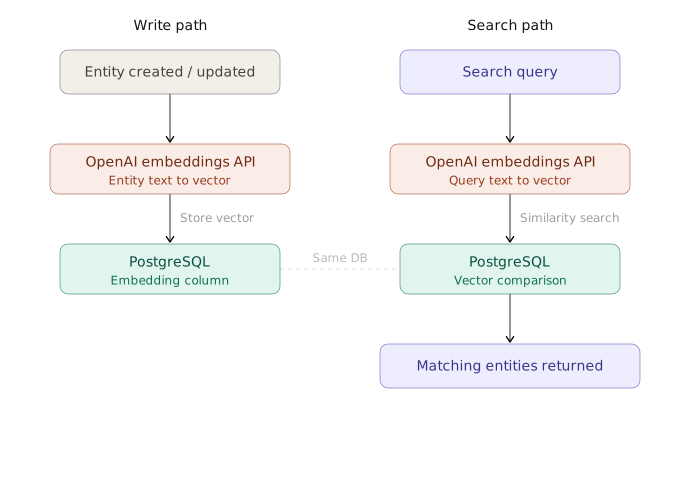
The `EmbeddingService` class implements the logic of generating embeddings and performing vector search using the pgvector extension in Postgres, exposing two main methods:
- `generateEntityEmbedding` – generates an embedding for a given entity based on its string fields and updates the database entry with the generated vector.
- `vectorSearch` – performs vector search for a given query string and returns the most similar entries based on the stored embeddings.
Both methods are entity-type agnostic and work with both `user` and `task` entity types.
```ts showLineNumbers copy filename="src/modules/embedding/EmbeddingService.ts" repository="finom/realtime-kanban"
import { openai } from '@ai-sdk/openai';
import { Prisma } from '@prisma/client';
import type { EntityType } from '@schemas/index';
import type { TaskType } from '@schemas/models/Task.schema';
import type { UserType } from '@schemas/models/User.schema';
import { embed } from 'ai';
import { capitalize, omit } from 'lodash';
import { BASE_KEYS } from '@/constants';
import DatabaseService from '../database/DatabaseService';
export default class EmbeddingService {
static async generateEmbedding(value: string): Promise {
const { embedding } = await embed({
model: openai.embeddingModel('text-embedding-3-small'),
value,
});
return embedding;
}
static generateEntityEmbedding = async (
entityType: EntityType,
entityId: UserType['id'] | TaskType['id'],
) => {
const entity = await DatabaseService.prisma[
entityType as 'user'
].findUnique({
where: { id: entityId },
});
const capitalizedEntityType = capitalize(entityType);
if (!entity) throw new Error(`${capitalizedEntityType} not found`);
const embedding = await this.generateEmbedding(
Object.values(omit(entity, BASE_KEYS))
.filter((v) => typeof v === 'string')
.join(' ')
.trim()
.toLowerCase(),
);
await DatabaseService.prisma.$executeRawUnsafe(
`
UPDATE "${capitalizedEntityType}"
SET embedding = $1::vector
WHERE id = $2
`,
`[${embedding.join(',')}]`,
entityId,
);
return embedding;
};
static async vectorSearch(
entityType: EntityType,
query: string,
limit: number = 10,
similarityThreshold: number = 0.4,
) {
const queryEmbedding = await EmbeddingService.generateEmbedding(
query.trim().toLowerCase(),
);
const capitalizedEntityType = capitalize(entityType);
// find similar vectors and return entity IDs
const vectorResults = await DatabaseService.prisma.$queryRaw<
{ id: string; similarity: number }[]
>`
SELECT
id,
1 - (embedding <=> ${`[${queryEmbedding.join(',')}]`}::vector) as similarity
FROM ${Prisma.raw(`"${capitalizedEntityType}"`)}
WHERE embedding IS NOT NULL
AND 1 - (embedding <=> ${`[${queryEmbedding.join(',')}]`}::vector) > ${similarityThreshold}
ORDER BY embedding <=> ${`[${queryEmbedding.join(',')}]`}::vector
LIMIT ${limit}
`;
return DatabaseService.prisma[entityType as 'user'].findMany({
where: {
id: {
in: vectorResults.map((r) => r.id as string),
},
},
}) as Promise;
}
}
```
*[The code above is fetched from GitHub repository.](https://github.com/finom/realtime-kanban/blob/main/src/modules/embedding/EmbeddingService.ts)*
---
Page: https://vovk.dev/realtime-ui/polling
# Realtime Database Polling
[State normalization](./state), a custom [fetcher](./fetcher), and the corresponding backend implementation keep the UI updated while the user interacts with the app by making HTTP requests. The implementation also covers AI features such as [Text Chat AI](./text-ai) and [Voice AI](./voice-ai), explained in later articles. The rule of thumb is that data should always be processed by the entity registry.
But what if the database is changed by other users or third-party services? How do we keep the UI in sync with backend data in real time? One way is to implement database polling powered by [JSONLines](https://vovk.dev/jsonlines). The server sends updates to clients whenever the database changes, and the client reconnects automatically when the connection is closed.
The component below demonstrates a simple polling example that receives incremental updates from the server every second. After 10 updates, the server closes the connection, and the client reconnects automatically. We can use the same approach to receive database updates in real time by having the server send updates whenever the database changes.
[View Polling example on examples.vovk.dev »](https://examples.vovk.dev/polling)
A small delay (up to half a second) is expected due to the CORS preflight. See the Network tab in DevTools for details.
---
Here's a video demonstration of the polling in action. While it uses different browser tabs to simulate multiple users, the same logic applies to real-time updates from any source, including third-party services.
Video: https://vovk.dev/video/kanban_polling.mp4
## Redis DB as event bus
While we could poll the main Postgres database for changes, that approach is inefficient. Instead, we use Redis as an event bus: whenever the main database changes, we write a small event to the Redis database. Our polling service reads these events every second and sends them to clients with the app open.
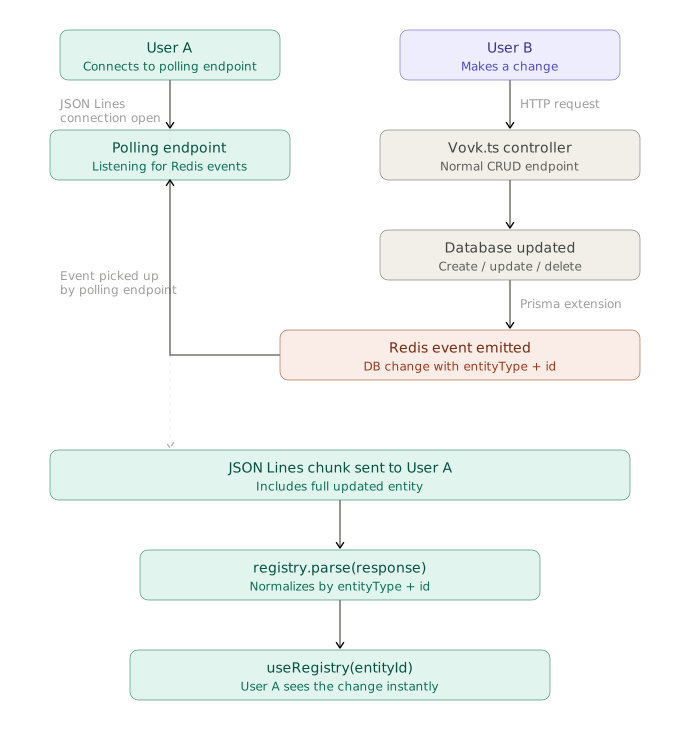
Because we use [Prisma](https://www.prisma.io/) as our ORM, we can use [Prisma Extensions](https://www.prisma.io/docs/orm/prisma-client/client-extensions) to hook into database operations and write events to Redis. This is where the `DatabaseService` mentioned in the [Endpoints](./endpoints) article comes into play.
> [!IMPORTANT]
>
> The existing implementation has the following limitations:
> - Deletions need to be explicit, even if cascade deletions are handled automatically by the database. See the [`UserController.deleteUser`](https://github.com/finom/realtime-kanban/blob/main/src/modules/user/UserService.ts) method for more details.
> - All write operations must select the `updatedAt` field for change detection to work properly.
> - The list of supported write operations is limited to `create`, `update`, `upsert`, and `delete` for simplicity. Read operations are passed through as-is. For more complex operations, additional handling or abstraction is required.
```ts showLineNumbers copy filename="src/modules/database/DatabaseService.ts" repository="finom/realtime-kanban" {20,124}
import { PrismaNeon } from '@prisma/adapter-neon';
import { PrismaClient } from '@prisma/client';
import type { BaseEntity } from '@/types';
import DatabaseEventsService, { type DBChange } from './DatabaseEventsService';
import './neon-local'; // Setup Neon for local development
export default class DatabaseService {
static get prisma() {
DatabaseService.#prisma ??= DatabaseService.getClient();
return DatabaseService.#prisma;
}
static #prisma: ReturnType | null = null;
private static getClient() {
const prisma = new PrismaClient({
adapter: new PrismaNeon({
connectionString: `${process.env.DATABASE_URL}`,
}),
});
DatabaseEventsService.beginEmitting();
return prisma
.$extends({
name: 'timestamps',
// Ensure createdAt and updatedAt are always ISO strings to match the generated Zod schemas
result: {
$allModels: {
createdAt: {
compute: (data: { createdAt: Date }) =>
data.createdAt.toISOString(),
},
updatedAt: {
compute: (data: { updatedAt: Date }) =>
data.updatedAt.toISOString(),
},
},
},
})
.$extends({
name: 'events',
// Emit database change events for create, update, and delete operations
query: {
$allModels: {
async $allOperations({ model, operation, args, query }) {
const allowedOperations = [
'create',
'update',
'delete',
'upsert',
'findMany',
'findUnique',
'findFirst',
'findUniqueOrThrow',
'findFirstOrThrow',
'count',
'aggregate',
'groupBy',
] as const;
type AllowedOperation = (typeof allowedOperations)[number];
if (!allowedOperations.includes(operation as AllowedOperation)) {
throw new Error(
`Unsupported database operation "${operation}" on model "${model}"`,
);
}
const result = (await query(args)) as BaseEntity | BaseEntity[];
const now = new Date().toISOString();
let change: DBChange | null = null;
const makeChange = (
entity: BaseEntity,
type: DBChange['type'],
) => ({
id: entity.id,
entityType: entity.entityType,
date:
type === 'delete'
? now
: entity.updatedAt
? new Date(entity.updatedAt).toISOString()
: now,
type,
});
switch (operation as AllowedOperation) {
case 'create':
if ('entityType' in result)
change = makeChange(result, 'create');
break;
case 'update':
case 'upsert':
if ('entityType' in result)
change = makeChange(result, 'update');
break;
case 'delete':
if ('entityType' in result) {
change = makeChange(result, 'delete');
// Automatically add __isDeleted flag to deletion results
Object.assign(result, { __isDeleted: true });
}
break;
case 'findMany':
case 'findUnique':
case 'findFirst':
case 'findUniqueOrThrow':
case 'findFirstOrThrow':
case 'count':
case 'aggregate':
case 'groupBy':
// no events
break;
default:
console.warn(
`Unhandled Prisma operation: ${operation} for model: ${model}`,
);
break;
}
if (change) {
await DatabaseEventsService.createChanges([change]);
}
return result;
},
},
},
});
}
}
```
*[The code above is fetched from GitHub repository.](https://github.com/finom/realtime-kanban/blob/main/src/modules/database/DatabaseService.ts)*
- The `getClient` method calls `DatabaseEventsService.beginEmitting(){:ts}` to start emitting events. The `beginEmitting` function runs a `setInterval` that connects to Redis and periodically checks for new events. When a new event is found, it emits it via [mitt](https://npmjs.com/package/mitt).
- `prisma.$extends` hooks into some of the Prisma model operations, determines whether an operation modifies data, and if so calls `await DatabaseEventsService.createChanges([change]){:ts}` to persist a change entry in Redis. The change captures creates, updates, and deletions:
```ts showLineNumbers copy
export type DBChange = {
id: string;
entityType: EntityType;
date: string;
type: 'create' | 'update' | 'delete';
};
```
The `date` field indicates when the change occurred to help clients fetch only the latest changes.
- For `create`, `update`, and `upsert` operations, it uses the `updatedAt` DB field (all write operations must select this field).
- For `delete` operations, it uses the current time.
The `delete` operation also adds an `__isDeleted` property. The frontend checks this property to hide the deleted entity by setting `enumerable: false` on the entity registry item (see the [State](./state) page).
Operations like `find...` and `count` do not trigger changes and are passed through as-is.
In addition to `beginEmitting` and `createChanges`, `DatabaseEventsService` provides a `connect` method and an `emitter` (a `mitt` instance). These are used by the polling service (`DatabasePollService`, discussed next) to be notified about new events.
```ts showLineNumbers copy filename="src/modules/database/DatabaseEventsService.ts" repository="finom/realtime-kanban"
import type { EntityType } from '@prisma/client';
import mitt from 'mitt';
import { createClient } from 'redis';
export type DBChange = {
id: string;
entityType: EntityType;
date: string;
type: 'create' | 'update' | 'delete';
};
export default class DatabaseEventsService {
public static readonly DB_KEY = 'db_updates';
private static readonly INTERVAL = 1_000;
private static lastTimestamp = Date.now();
private static redisClient = createClient({
url: process.env.REDIS_URL,
});
public static emitter = mitt<{
[DatabaseEventsService.DB_KEY]: DBChange[];
}>();
// ensure Redis is connected
private static async connect() {
if (!DatabaseEventsService.redisClient.isOpen) {
await DatabaseEventsService.redisClient.connect();
DatabaseEventsService.redisClient.on('error', (err) => {
console.error('Redis Client Error', err);
});
}
}
// push one update into our ZSET, with score = timestamp
public static async createChanges(changes: DBChange[]) {
if (changes.length === 0) return;
await DatabaseEventsService.connect();
// build array of { score, value } objects
const entries = changes.map(({ id, entityType, type, date }) => ({
score: Date.now(),
value: JSON.stringify({ id, entityType, date, type }),
}));
// one multi(): batch ZADD + EXPIRE
await DatabaseEventsService.redisClient
.multi()
.zAdd(DatabaseEventsService.DB_KEY, entries)
.expire(
DatabaseEventsService.DB_KEY,
(DatabaseEventsService.INTERVAL * 60) / 1000,
)
.exec();
}
public static beginEmitting() {
setInterval(async () => {
await DatabaseEventsService.connect();
const now = Date.now();
// get everything with score ∈ (lastTimestamp, now]
const raw = await DatabaseEventsService.redisClient.zRangeByScore(
DatabaseEventsService.DB_KEY,
DatabaseEventsService.lastTimestamp + 1,
now,
);
DatabaseEventsService.lastTimestamp = now;
if (raw.length > 0) {
const updates = raw.map((s) => JSON.parse(s) as DBChange);
DatabaseEventsService.emitter.emit(
DatabaseEventsService.DB_KEY,
updates,
);
}
}, DatabaseEventsService.INTERVAL);
}
}
```
*[The code above is fetched from GitHub repository.](https://github.com/finom/realtime-kanban/blob/main/src/modules/database/DatabaseEventsService.ts)*
## Polling controller and service
With Redis change entries and the change emitter in place, we can implement a polling endpoint that streams updates to clients in real time. The `DatabasePollController` exposes a single [JSONLines](https://vovk.dev/jsonlines) endpoint, and `DatabasePollService` uses a [JSONLinesResponder](https://vovk.dev/jsonlines#jsonlinesresponder) instance (received from the controller) to send data to clients. The service closes the connection safely after 30 seconds, so clients should reconnect.
```ts showLineNumbers copy filename="src/modules/database/DatabasePollService.ts" repository="finom/realtime-kanban"
import { forEach, groupBy } from 'lodash';
import type { JSONLinesResponder, VovkIteration } from 'vovk';
import DatabaseEventsService, { type DBChange } from './DatabaseEventsService';
import type DatabasePollController from './DatabasePollController';
import DatabaseService from './DatabaseService';
export default class PollService {
static poll(
responder: JSONLinesResponder<
VovkIteration
>,
) {
setTimeout(() => responder.close(), 30_000);
let asOldAs = new Date();
// 10 minutes ago; TODO: use latest update date from registry
asOldAs.setMinutes(asOldAs.getMinutes() - 10);
DatabaseEventsService.emitter.on(
DatabaseEventsService.DB_KEY,
(changes) => {
const deleted = changes.filter((change) => change.type === 'delete');
const createdOrUpdated = changes.filter(
(change) => change.type === 'create' || change.type === 'update',
);
for (const deletedEntity of deleted) {
void responder.send({
id: deletedEntity.id,
entityType: deletedEntity.entityType,
__isDeleted: true,
});
}
// group by entityType and date, so the date is maximum date for the given entity: { entityType: string, date: string }[]
forEach(groupBy(createdOrUpdated, 'entityType'), (changes) => {
const maxDateItem = changes.reduce(
(max, change) => {
const changeDate = new Date(change.date);
return changeDate.getTime() > new Date(max.date).getTime()
? change
: max;
},
{ date: new Date(0) } as unknown as DBChange,
);
if (new Date(maxDateItem.date).getTime() > asOldAs.getTime()) {
void DatabaseService.prisma[maxDateItem.entityType as 'user']
.findMany({
where: {
updatedAt: {
gt: asOldAs,
},
},
})
.then((entities) => {
for (const entity of entities) {
void responder.send(entity);
}
});
asOldAs = new Date(maxDateItem.date);
}
});
},
);
}
}
```
*[The code above is fetched from GitHub repository.](https://github.com/finom/realtime-kanban/blob/main/src/modules/database/DatabasePollService.ts)*
```ts showLineNumbers copy filename="src/modules/database/DatabasePollController.ts" repository="finom/realtime-kanban"
import { EntityType } from '@prisma/client';
import { TaskSchema, UserSchema } from '@schemas/index';
import {
get,
JSONLinesResponder,
prefix,
procedure,
type VovkIteration,
} from 'vovk';
import { z } from 'zod';
import { sessionGuard } from '@/decorators/sessionGuard';
import DatabasePollService from './DatabasePollService';
@prefix('poll')
export default class DatabasePollController {
@get()
@sessionGuard()
static poll = procedure({
preferTransformed: false,
iteration: z.union([
z.object({
id: z.uuid(),
entityType: z.enum(EntityType),
__isDeleted: z.boolean().optional(),
}),
UserSchema,
TaskSchema,
]),
}).handle(async (req) => {
const responder = new JSONLinesResponder<
VovkIteration
>(
req,
({ readableStream, headers }) =>
new Response(readableStream, { headers }),
);
void DatabasePollService.poll(responder);
return responder;
});
}
```
*[The code above is fetched from GitHub repository.](https://github.com/finom/realtime-kanban/blob/main/src/modules/database/DatabasePollController.ts)*
- When a `delete` DB change is emitted via `DatabaseEventsService.emitter`, the service sends an event with `id`, `entityType`, and `__isDeleted: true`. The frontend uses `__isDeleted` to hide the entity by making it non-enumerable in the registry.
- When an `update` or `create` change is emitted, the service fetches the full entity from Postgres (since Redis stores only metadata) and sends it to clients.
## Client-side logic
On the client side (for example, in a React component), call `DatabasePollRPC.poll()` to receive a stream of database events. As with any [JSONLines](https://vovk.dev/jsonlines) RPC method, it returns an async iterable that you can consume in a `for await` loop. Because the server may close the connection or a network error may occur, wrap the logic in a retry loop. Since the [fetcher](https://vovk.dev/imports#fetcher) is already [configured](./fetcher), the loop body can be empty—you do not need to handle data manually.
The frontend code, besides the polling logic, also includes an on/off toggle persisted to `localStorage`, so users can enable or disable polling as needed.
Here’s the `useDatabasePolling` hook that implements the described logic, returning the `[isPollingEnabled, setIsPollingEnabled, hasError]` state tuple:
```ts showLineNumbers copy filename="src/hooks/useDatabasePolling.ts" repository="finom/realtime-kanban"
import { useEffect, useRef, useState } from 'react';
import { DatabasePollRPC } from 'vovk-client';
/**
* Hook to manage database polling state.
* @example const [isPollingEnabled, setIsPollingEnabled, hasError] = useDatabasePolling(false);
*/
export default function useDatabasePolling(initialValue = false) {
const MAX_RETRIES = 5;
const [isPollingEnabled, setIsPollingEnabled] = useState(initialValue);
const [hasError, setHasError] = useState(false);
const abortRef = useRef<() => void>(null);
useEffect(() => {
const isEnabled = localStorage.getItem('isPollingEnabled');
setIsPollingEnabled(isEnabled === 'true');
}, []);
useEffect(() => {
localStorage.setItem('isPollingEnabled', isPollingEnabled.toString());
async function poll(retries = 0) {
setHasError(false);
if (!isPollingEnabled) {
abortRef.current?.();
return;
}
try {
while (true) {
console.log('Polling database for updates...');
const iterable = await DatabasePollRPC.poll();
abortRef.current = iterable.abortSilently;
for await (const iteration of iterable) {
console.log('New DB update:', iteration);
}
if (iterable.abortController.signal.aborted) {
console.log('Polling aborted with abortSilently');
break;
}
}
} catch (error) {
if (retries < MAX_RETRIES) {
console.error('Polling failed, retrying...', error);
await new Promise((resolve) => setTimeout(resolve, 2000));
return poll(retries + 1);
} else {
console.error(
'Max polling retries reached. Stopping polling.',
error,
);
setHasError(true);
}
}
}
void poll();
return () => {
abortRef.current?.();
};
}, [isPollingEnabled]);
return [isPollingEnabled, setIsPollingEnabled, hasError] as const;
}
```
*[The code above is fetched from GitHub repository.](https://github.com/finom/realtime-kanban/blob/main/src/hooks/useDatabasePolling.ts)*
Usage:
```tsx copy
const [isPollingEnabled, setIsPollingEnabled, hasError] = useDatabasePolling(false);
```
From now on, when the database is changed by other users or third-party services, the frontend receives updates in real time and the entity registry is updated accordingly, keeping the UI in sync with the backend data.
---
Page: https://vovk.dev/realtime-ui/authentication
# Basic Authentication and Authorization for Password Protection
The app implements a simple authentication mechanism with an optional `PASSWORD` stored in the `.env` file. Once the user enters the password, a session cookie is created that authorizes the user for subsequent requests. The `userId` is a hashed version of the password, which allows all sessions to be invalidated by changing the `PASSWORD` env variable in production.
The authentication flow is a simplified version of the solution provided in the official [Next.js authentication documentation](https://nextjs.org/docs/app/guides/authentication). It implements a [login page](https://github.com/finom/realtime-kanban/blob/main/src/app/login/page.tsx) with a form that invokes a [login server action](https://github.com/finom/realtime-kanban/blob/main/src/app/actions/auth.ts). The session is created in [src/lib/session.ts](https://github.com/finom/realtime-kanban/blob/main/src/lib/session.ts), and the Data Access Layer file is defined in [src/lib/dal.ts](https://github.com/finom/realtime-kanban/blob/main/src/lib/dal.ts).
The DAL file exports the `verifySession` function, which is invoked in [page.tsx](https://github.com/finom/realtime-kanban/blob/main/src/app/page.tsx) and redirects the user to the login page if the session is invalid.
```ts showLineNumbers copy filename="src/lib/dal.ts" repository="finom/realtime-kanban"
import crypto from 'node:crypto';
import { cookies } from 'next/headers';
import { redirect } from 'next/navigation';
import { cache } from 'react';
import { decrypt } from './session';
const getSession = async () => {
const cookie = (await cookies()).get('session')?.value;
const session = await decrypt(cookie);
return session;
};
export const isLoggedIn = async () => {
if (!process.env.PASSWORD) return true;
const session = await getSession();
const userId = crypto
.createHash('md5')
.update(process.env.PASSWORD)
.digest('hex');
return session?.userId === userId;
};
export const verifySession = cache(async () => {
if (!(await isLoggedIn())) {
redirect('/login');
}
});
```
*[The code above is fetched from GitHub repository.](https://github.com/finom/realtime-kanban/blob/main/src/lib/dal.ts)*
```ts showLineNumbers copy filename="src/app/page.tsx"
import { verifySession } from "@/lib/dal";
export default async function Home() {
await verifySession();
// ...
```
It also exports the `isLoggedIn` function, which is used by the `sessionGuard` [decorator](https://vovk.dev/decorator) to check if the user is logged in when invoking procedures.
```ts showLineNumbers copy filename="src/decorators/sessionGuard.ts" repository="finom/realtime-kanban"
import { createDecorator, HttpException, HttpStatus } from 'vovk';
import { isLoggedIn } from '@/lib/dal';
export const sessionGuard = createDecorator(async (req, next) => {
if (typeof req.url !== 'undefined' && !(await isLoggedIn())) {
throw new HttpException(HttpStatus.UNAUTHORIZED, 'Unauthorized');
}
return next();
});
```
*[The code above is fetched from GitHub repository.](https://github.com/finom/realtime-kanban/blob/main/src/decorators/sessionGuard.ts)*
The `sessionGuard` decorator is applied to all procedures. The `typeof req.url !== 'undefined'{:ts}` check is required to distinguish between HTTP requests and [`fn`](https://vovk.dev/fn) invocations.
---
Page: https://vovk.dev/realtime-ui/text-ai
# Text Chat AI Interface
In the previous articles, we set up the backend and frontend to automatically synchronize component state with backend data, independent of the data-fetching method, while the user interacts with the app via UI elements. On this page we’re going to make the UI AI-powered, allowing users to interact with the application using natural language.
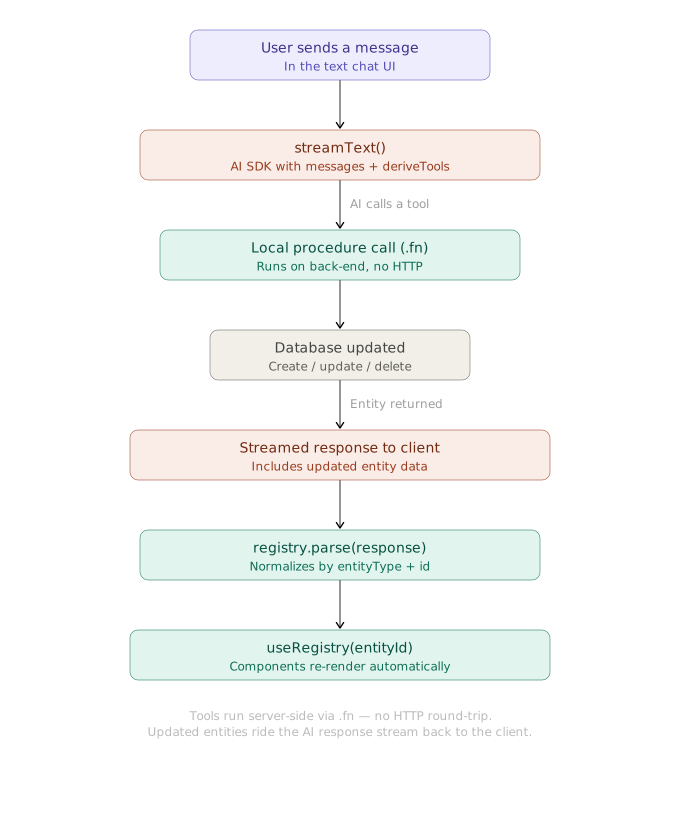
We’re going to set up a text AI chat via the [AI SDK](https://ai-sdk.dev/), adding function-calling capabilities and deriving AI tools from the backend controllers via the [deriveTools](https://vovk.dev/tools) function.
Video: https://vovk.dev/video/kanban_text_chat.mp4
## Backend Setup
For the backend setup, we need to create a procedure powered by the AI SDK, adding `tools` and `stopWhen` options to the `streamText` function.
Because the procedures already follow the [rules of locally called procedures](https://vovk.dev/fn#rules)—their handlers use only the `vovk` property of the request, for example `async ({ vovk }) => UserService.createUser(await vovk.body()){:ts}` (see the [API Endpoints](./endpoints) page)—we can use the `deriveTools` function to create AI tools from the controllers and call them in the current backend context without performing HTTP requests.
```ts showLineNumbers copy filename="src/modules/ai/AiSdkController.ts" repository="finom/realtime-kanban" {26-31,37-46}
import { openai } from '@ai-sdk/openai';
import {
convertToModelMessages,
jsonSchema,
stepCountIs,
streamText,
tool,
type UIMessage,
} from 'ai';
import { deriveTools, operation, post, prefix, type VovkRequest } from 'vovk';
import { sessionGuard } from '@/decorators/sessionGuard';
import TaskController from '../task/TaskController';
import UserController from '../user/UserController';
@prefix('ai-sdk')
export default class AiSdkController {
@operation({
summary: 'Function Calling',
description:
'Uses [@ai-sdk/openai](https://www.npmjs.com/package/@ai-sdk/openai) and ai packages to call UserController and TaskController functions based on the provided messages.',
})
@post('function-calling')
@sessionGuard()
static async functionCalling(req: VovkRequest<{ messages: UIMessage[] }>) {
const { messages } = await req.json();
const { tools } = deriveTools({
modules: {
UserController,
TaskController,
},
});
return streamText({
model: openai('gpt-5'),
system: 'You execute functions sequentially, one by one.',
messages: await convertToModelMessages(messages),
tools: Object.fromEntries(
tools.map(({ name, execute, description, parameters }) => [
name,
tool({
execute,
description,
inputSchema: jsonSchema(parameters),
}),
]),
),
stopWhen: stepCountIs(16),
onError: (e) => console.error('streamText error', e),
onFinish: ({ finishReason, toolCalls }) => {
if (finishReason === 'tool-calls') {
console.log('Tool calls finished', toolCalls);
}
},
}).toUIMessageStreamResponse();
}
}
```
*[The code above is fetched from GitHub repository.](https://github.com/finom/realtime-kanban/blob/main/src/modules/ai/AiSdkController.ts)*
The resulting endpoint is served at `/api/ai-sdk/tools`.
## Frontend Setup
On the frontend we’re going to use the AI SDK, represented by the [ai](https://www.npmjs.com/package/ai) and [@ai-sdk/react](https://www.npmjs.com/package/@ai-sdk/react) packages, as well as the [AI Elements](https://ai-sdk.dev/elements/) library. AI Elements provides pre-built React components for building AI-powered user interfaces, built on top of [shadcn/ui](https://ui.shadcn.com/).
```tsx showLineNumbers copy filename="src/components/ExpandableChatDemo.tsx" {27}
'use client';
// ...
import { useChat } from '@ai-sdk/react';
import { useState } from 'react';
import { DefaultChatTransport } from 'ai';
import { AiSdkRPC } from 'vovk-client';
import { Conversation, ConversationContent, ConversationEmptyState } from '@/components/ai-elements/conversation';
import { useRegistry } from '@/hooks/useRegistry';
import useParseSDKToolCallOutputs from '@/hooks/useParseSDKToolCallOutputs';
export function ExpandableChatDemo() {
const [input, setInput] = useState('');
const { messages, sendMessage, status } = useChat({
transport: new DefaultChatTransport({
api: AiSdkRPC.functionCalling.getURL(), // or "/api/ai-sdk/tools",
}),
onToolCall: (toolCall) => {
console.log('Tool call initiated:', toolCall);
},
});
const handleSubmit = (e: React.FormEvent) => {
// ...
};
useParseSDKToolCallOutputs(messages);
return (
// ...
{/* ... */}
// ...
);
}
```
[Check the full code for the component here](https://github.com/finom/realtime-kanban/blob/main/src/components/ExpandableChatDemo.tsx)
The key part of the code is the `useParseSDKToolCallOutputs` hook, which extracts tool call outputs from assistant messages and passes them to the registry’s `parse` method. The registry processes the results and triggers UI updates accordingly. The hook also ensures that each tool call output is parsed only once by keeping track of parsed tool call IDs in a `Set`.
```ts showLineNumbers copy filename="src/hooks/useParseSDKToolCallOutputs.ts" repository="finom/realtime-kanban" {26}
import type { ToolUIPart, UIMessage } from 'ai';
import { useEffect, useRef } from 'react';
import useRegistry from '@/hooks/useRegistry';
export default function useParseSDKToolCallOutputs(messages: UIMessage[]) {
const parsedToolCallIdsSetRef = useRef>(new Set());
useEffect(() => {
const partsToParse = messages.flatMap((msg) =>
msg.parts.filter((part) => {
return (
msg.role === 'assistant' &&
part.type.startsWith('tool-') &&
(part as ToolUIPart).state === 'output-available' &&
'toolCallId' in part &&
!parsedToolCallIdsSetRef.current.has(part.toolCallId)
);
}),
) as ToolUIPart[];
partsToParse.forEach((part) => {
parsedToolCallIdsSetRef.current.add(part.toolCallId);
});
if (partsToParse.length) {
useRegistry.getState().parse(partsToParse.map((part) => part.output));
}
}, [messages]);
}
```
*[The code above is fetched from GitHub repository.](https://github.com/finom/realtime-kanban/blob/main/src/hooks/useParseSDKToolCallOutputs.ts)*
Without optimizations, the code can be reduced to this small snippet:
```ts showLineNumbers copy
// ...
useEffect(() => {
useRegistry.getState().parse(messages);
}, [messages]);
// ...
```
That’s it: now you have a fully functional AI text chat interface that can call your backend functions and update the UI based on the results. The procedures return updated data that includes `id` and `entityType` fields, as well as the `__isDeleted` field for soft deletions.
---
Page: https://vovk.dev/realtime-ui/voice-ai
# WebRTC-based Realtime Voice AI
For a JARVIS-like experience, we're going to set up a voice AI interface that uses the OpenAI Realtime API with WebRTC to send and receive audio data in real time. This time, instead of controller methods executed by the AI SDK on the backend, we're going to derive tools from the generated [RPC modules](https://vovk.dev/typescript) to make authorized requests directly in the browser.
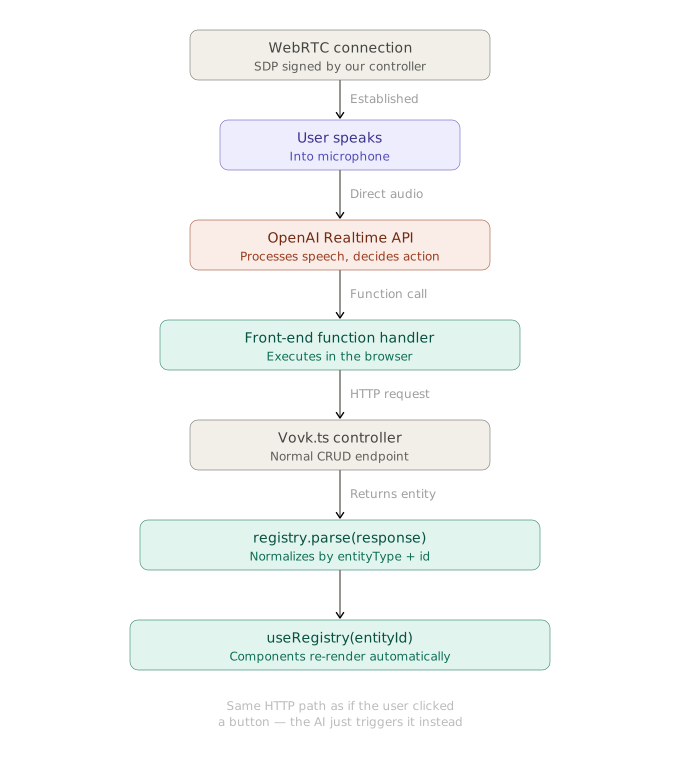
Since we're going to use WebRTC, audio data is sent and received directly between the client and the OpenAI Realtime API, without passing through our backend server. This makes tool execution extremely low-latency.
## Backend Setup
On the backend, we're going to create a session endpoint implemented using the official OpenAI article [Realtime API with WebRTC](https://platform.openai.com/docs/guides/realtime-webrtc). The endpoint accepts the SDP offer from the client and a voice-selection query parameter, then returns the SDP answer from the OpenAI Realtime API.
```ts showLineNumbers copy filename="src/modules/realtime/RealtimeController.ts" repository="finom/realtime-kanban"
import { HttpException, HttpStatus, post, prefix, procedure } from 'vovk';
import { z } from 'zod';
import { sessionGuard } from '@/decorators/sessionGuard';
@prefix('realtime')
export default class RealtimeController {
@post('session')
@sessionGuard()
static session = procedure({
query: z.object({
voice: z.enum(['ash', 'ballad', 'coral', 'sage', 'verse']),
}),
body: z.object({ sdp: z.string() }),
output: z.object({ sdp: z.string() }),
}).handle(async ({ vovk }) => {
const voice = vovk.query().voice;
const { sdp: sdpOffer } = await vovk.body();
const sessionConfig = JSON.stringify({
type: 'realtime',
model: 'gpt-realtime',
audio: { output: { voice } },
});
const fd = new FormData();
fd.set('sdp', sdpOffer);
fd.set('session', sessionConfig);
try {
const r = await fetch('https://api.openai.com/v1/realtime/calls', {
method: 'POST',
headers: {
Authorization: `Bearer ${process.env.OPENAI_API_KEY}`,
},
body: fd,
});
// Send back the SDP we received from the OpenAI REST API
const sdp = await r.text();
return { sdp };
} catch (error) {
throw new HttpException(
HttpStatus.INTERNAL_SERVER_ERROR,
`Failed to generate token. ${String(error)}`,
);
}
});
}
```
*[The code above is fetched from GitHub repository.](https://github.com/finom/realtime-kanban/blob/main/src/modules/realtime/RealtimeController.ts)*
## Frontend Setup
### WebRTC Audio Session Hook
Next, we're going to create a custom hook `useWebRTCAudioSession` that manages the WebRTC session: starting and stopping it, handling audio streams, and managing the data channel for function calling.
The hook accepts the selected voice and the tools list as parameters. It returns the session state (`isActive`, `isTalking`) and a function to toggle the session (`toggleSession`).
The crucial parts of the hook are:
- the `onopen` event handler of the data channel, where we send a `session.update` message with the tools list to inform the OpenAI Realtime API about the available tools, and
- the `onmessage` event handler, where we listen for function call requests from the model via the `response.function_call_arguments.done` event, execute the corresponding tool, and send back the results.
The `onmessage` handler also takes care of sending the `response.create` message to make the Realtime API respond, unless the tool execution result contains the `__preventResponseCreate` flag set to `true`, returned from the tool’s `execute` function.
```ts showLineNumbers copy filename="src/hooks/useWebRTCAudioSession.ts" repository="finom/realtime-kanban" {87-132}
'use client';
import { useCallback, useEffect, useRef, useState } from 'react';
import type { VovkTool } from 'vovk';
import { RealtimeRPC } from 'vovk-client';
/**
* Hook to manage a real-time session with OpenAI's Realtime endpoints.
* @example const { isActive, isTalking, handleStartStopClick } = useWebRTCAudioSession(voice, tools);
*/
export default function useWebRTCAudioSession(
voice: 'ash' | 'ballad' | 'coral' | 'sage' | 'verse',
tools: VovkTool[],
) {
const audioElement = useRef(null);
const [isActive, setIsActive] = useState(false);
// Data channel ref
const dcRef = useRef(null);
// Media stream ref for microphone
const mcRef = useRef(null);
// talking state + refs
const [isTalking, setIsTalking] = useState(false);
const remoteAnalyserRef = useRef(null);
const remoteMonitorIntervalRef = useRef(null);
const remoteAudioContextRef = useRef(null);
const startSession = useCallback(async () => {
// Create a peer connection
const pc = new RTCPeerConnection();
// Set up to play remote audio from the model
audioElement.current = document.createElement('audio');
audioElement.current.autoplay = true;
pc.ontrack = (e) => {
if (!audioElement.current) return;
audioElement.current.srcObject = e.streams[0];
// Simple audio activity monitor
try {
const audioCtx = new AudioContext();
remoteAudioContextRef.current = audioCtx;
const source = audioCtx.createMediaStreamSource(e.streams[0]);
const analyser = audioCtx.createAnalyser();
analyser.fftSize = 256;
source.connect(analyser);
remoteAnalyserRef.current = analyser;
remoteMonitorIntervalRef.current = window.setInterval(() => {
if (!remoteAnalyserRef.current) return;
const a = remoteAnalyserRef.current;
const data = new Uint8Array(a.fftSize);
a.getByteTimeDomainData(data);
let sum = 0;
for (let i = 0; i < data.length; i++) {
const v = (data[i] - 128) / 128;
sum += v * v;
}
const rms = Math.sqrt(sum / data.length);
setIsTalking(rms > 0.02); // simple threshold
}, 200);
} catch {
// ignore audio activity errors
}
};
// Add local audio track for microphone input in the browser
const ms = await navigator.mediaDevices.getUserMedia({
audio: true,
});
mcRef.current = ms;
pc.addTrack(ms.getTracks()[0]);
// Set up data channel for sending and receiving events
const dc = pc.createDataChannel('oai-events');
dcRef.current = dc;
// Start the session using the Session Description Protocol (SDP)
const offer = await pc.createOffer();
await pc.setLocalDescription(offer);
const { sdp } = await RealtimeRPC.session({
body: { sdp: offer.sdp ?? '' },
query: { voice },
});
await pc.setRemoteDescription({
type: 'answer',
sdp,
});
dc.onopen = () => {
const sessionUpdate = {
type: 'session.update',
session: {
type: 'realtime',
tools: tools.map(({ name, description, parameters, type }) => ({
name,
description,
parameters,
type,
})),
},
};
dc.send(JSON.stringify(sessionUpdate));
};
dc.onmessage = async (event) => {
const msg = JSON.parse(event.data);
// Handle function call completions
if (msg.type === 'response.function_call_arguments.done') {
const execute = tools.find((tool) => tool.name === msg.name)?.execute;
if (execute) {
const args = JSON.parse(msg.arguments);
const result = (await execute(args)) as {
__preventResponseCreate?: boolean;
};
// Respond with function output
const response = {
type: 'conversation.item.create',
item: {
type: 'function_call_output',
call_id: msg.call_id,
output: JSON.stringify(result),
},
};
dcRef.current?.send(JSON.stringify(response));
if (!result?.__preventResponseCreate) {
const responseCreate = {
type: 'response.create',
};
dcRef.current?.send(JSON.stringify(responseCreate));
}
}
}
};
setIsActive(true);
}, [tools, voice]);
const stopSession = useCallback(() => {
// Close data channel and peer connection
dcRef.current?.close();
dcRef.current = null;
// Stop microphone tracks
mcRef.current?.getTracks().forEach((track) => {
track.stop();
});
mcRef.current = null;
// Close remote audio context
remoteAudioContextRef.current?.close();
remoteAudioContextRef.current = null;
remoteAnalyserRef.current = null;
// Stop the audio immediately
if (audioElement.current) {
audioElement.current.srcObject = null;
audioElement.current = null;
}
// Clear monitoring interval
if (remoteMonitorIntervalRef.current) {
clearInterval(remoteMonitorIntervalRef.current);
remoteMonitorIntervalRef.current = null;
}
setIsTalking(false);
setIsActive(false);
}, []);
const toggleSession = useCallback(() => {
if (isActive) {
stopSession();
} else {
startSession();
}
}, [isActive, startSession, stopSession]);
// Cleanup on unmount
useEffect(() => {
return () => stopSession();
}, [stopSession]);
return {
startSession,
stopSession,
toggleSession,
isActive,
isTalking,
};
}
```
*[The code above is fetched from GitHub repository.](https://github.com/finom/realtime-kanban/blob/main/src/hooks/useWebRTCAudioSession.ts)*
### Client-side Tools
The `useWebRTCAudioSession` hook accepts a tools list derived via `deriveTools({ modules: { UserRPC, TaskRPC } }){:ts}`, and also custom client-side tools created with `createTool` for navigation, scrolling, and other UI interactions. The `getCurrentTime` and `partyMode` tools were borrowed from [this repository](https://github.com/cameronking4/openai-realtime-api-nextjs), which was used as an inspiration for this demo.
Since the component is mounted in [layout.tsx](https://github.com/finom/realtime-kanban/blob/main/src/app/layout.tsx), the component state and WebRTC connection persist across page navigations within this route. This allows you to navigate the app via voice commands using the `navigateTo` tool, which in turn uses Next.js `useRouter` hook.
The client-side tool execution functions are located in the [lib/tools](https://github.com/finom/realtime-kanban/tree/main/src/lib/tools) folder for better organization.
```ts showLineNumbers copy filename="src/components/RealTimeDemo.tsx" repository="finom/realtime-kanban"
'use client';
import { useRouter } from 'next/navigation';
import { createTool, deriveTools } from 'vovk';
import { TaskRPC, UserRPC } from 'vovk-client';
import z from 'zod';
import useWebRTCAudioSession from '@/hooks/useWebRTCAudioSession';
import { getCurrentTime } from '@/lib/tools/getCurrentTime';
import { getVisiblePageSection } from '@/lib/tools/getVisiblePageSection';
import { partyMode } from '@/lib/tools/partyMode';
import { scroll } from '@/lib/tools/scroll';
import Floaty from './Floaty';
import { useMemo } from 'react';
const RealTimeDemo = () => {
const router = useRouter();
const tools = useMemo(
() => [
...deriveTools({
modules: { TaskRPC, UserRPC },
}).tools,
createTool({
name: 'getCurrentTime',
description: "Gets the current time in the user's timezone",
outputSchema: z
.object({
time: z.string(),
timezone: z.string(),
message: z.string(),
})
.meta({ description: 'Current time info.' }),
execute: getCurrentTime,
}),
createTool({
name: 'partyMode',
description: 'Triggers a confetti animation on the page',
execute: partyMode,
}),
createTool({
name: 'navigateTo',
description:
'Navigates the user to a specified URL within the application.',
inputSchema: z.object({
url: z
.enum(['/', '/openapi'])
.meta({ description: 'The URL to navigate to.' }),
}),
outputSchema: z
.string()
.meta({ description: 'Navigation confirmation message.' }),
execute: async ({ url }: { url: string }) => {
router.push(url);
return `Navigating to ${url}`;
},
}),
createTool({
name: 'scroll',
description: 'Scrolls the page up or down.',
inputSchema: z.object({
direction: z
.enum(['up', 'down'])
.meta({ description: 'The direction to scroll' }),
px: z.number().optional().meta({
description:
'The number of pixels to scroll. If not provided, scrolls by one viewport height.',
}),
}),
outputSchema: z.object({
message: z
.string()
.meta({ description: 'Scroll action confirmation message.' }),
__preventResponseCreate: z
.boolean()
.meta({ description: 'Flag to prevent response creation.' }),
}),
execute: scroll,
}),
createTool({
name: 'getVisiblePageSection',
description: 'Gets the currently visible section of the page',
outputSchema: z
.string()
.meta({ description: 'Visible text content from the page.' }),
execute: getVisiblePageSection,
}),
],
[router.push],
);
const { isActive, isTalking, toggleSession } = useWebRTCAudioSession(
'ash',
tools,
);
return (
);
};
export default RealTimeDemo;
```
*[The code above is fetched from GitHub repository.](https://github.com/finom/realtime-kanban/blob/main/src/components/RealTimeDemo.tsx)*
The code for the `Floaty` component is not shown here for brevity, but you can find it [in the repository](https://github.com/finom/realtime-kanban/blob/main/src/components/Floaty.tsx).
With that, you now have a fully functional Realtime Voice AI interface that can interact with your application using natural language via voice, powered by OpenAI's Realtime API.
---
Page: https://vovk.dev/realtime-ui/mcp
# Setting up MCP server
[Database Polling](./polling) and [State Normalization](./state) are set up, so the app is ready to accept changes made by external systems. Let’s now set up the MCP server to allow MCP clients to interact with our application.
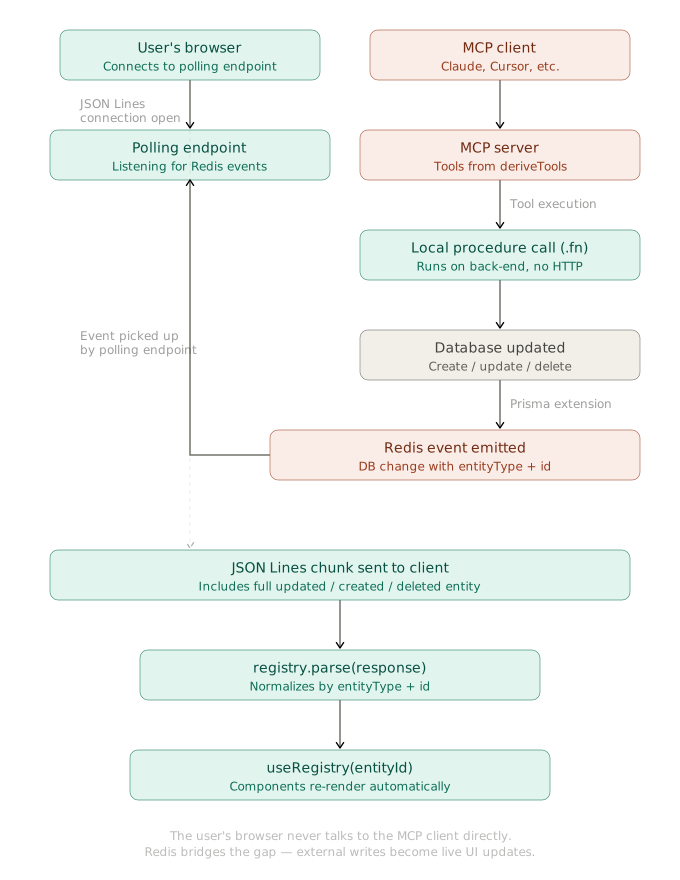
Video: https://vovk.dev/video/kanban_mcp.mp4
The tools, as usual, are derived from the controllers using the `deriveTools` function from the `vovk` package. For more details, see [Deriving AI Tools](https://vovk.dev/tools).
```ts filename="src/app/api/mcp/route.ts" repository="finom/realtime-kanban"
import { createMcpHandler } from 'mcp-handler';
import { deriveTools, ToModelOutput } from 'vovk';
import type z from 'zod';
import TaskController from '@/modules/task/TaskController';
import UserController from '@/modules/user/UserController';
const { tools } = deriveTools({
modules: {
UserController,
TaskController,
},
toModelOutput: ToModelOutput.MCP,
onExecute: (result, { name }) => console.log(`${name} executed`, result),
onError: (e, { name }) => console.error(`Error in ${name}`, e),
});
const handler = createMcpHandler(
(server) => {
tools.forEach(({ title, name, execute, description, inputSchemas }) => {
server.registerTool(
name,
{
title,
description,
inputSchema: inputSchemas as Partial<
Record<'body' | 'query' | 'params', z.ZodTypeAny>
>,
},
execute,
);
});
},
{},
{ basePath: '/api' },
);
const authorizedHandler = (req: Request) => {
const { MCP_ACCESS_KEY } = process.env;
const accessKey = new URL(req.url).searchParams.get('mcp_access_key');
if (MCP_ACCESS_KEY && accessKey !== MCP_ACCESS_KEY) {
return new Response(
'Unable to authorize the MCP request: mcp_access_key query parameter is invalid',
{ status: 401 },
);
}
return handler(req);
};
export { authorizedHandler as GET, authorizedHandler as POST };
```
*[The code above is fetched from GitHub repository.](https://github.com/finom/realtime-kanban/blob/main/src/app/api/mcp/route.ts)*
For simple protection, we use the `mcp_access_key` query parameter to authorize requests. It’s compared against the `MCP_ACCESS_KEY` environment variable when that variable is set.
The MCP server is now set up at the `/api/mcp` endpoint and can be accessed by MCP clients via the URL `http://localhost:3000/api/mcp?mcp_access_key=your_access_key` (replace `your_access_key` with the actual key, and `localhost` with your server address if needed).
## Running the MCP Inspector Locally
Run the following command to start the MCP Inspector, which allows you to interact with the MCP server we just set up. The app needs to be running locally.
```sh
npx @modelcontextprotocol/inspector
```
Update the server configuration in the Inspector, select a tool, and run it to see the results.
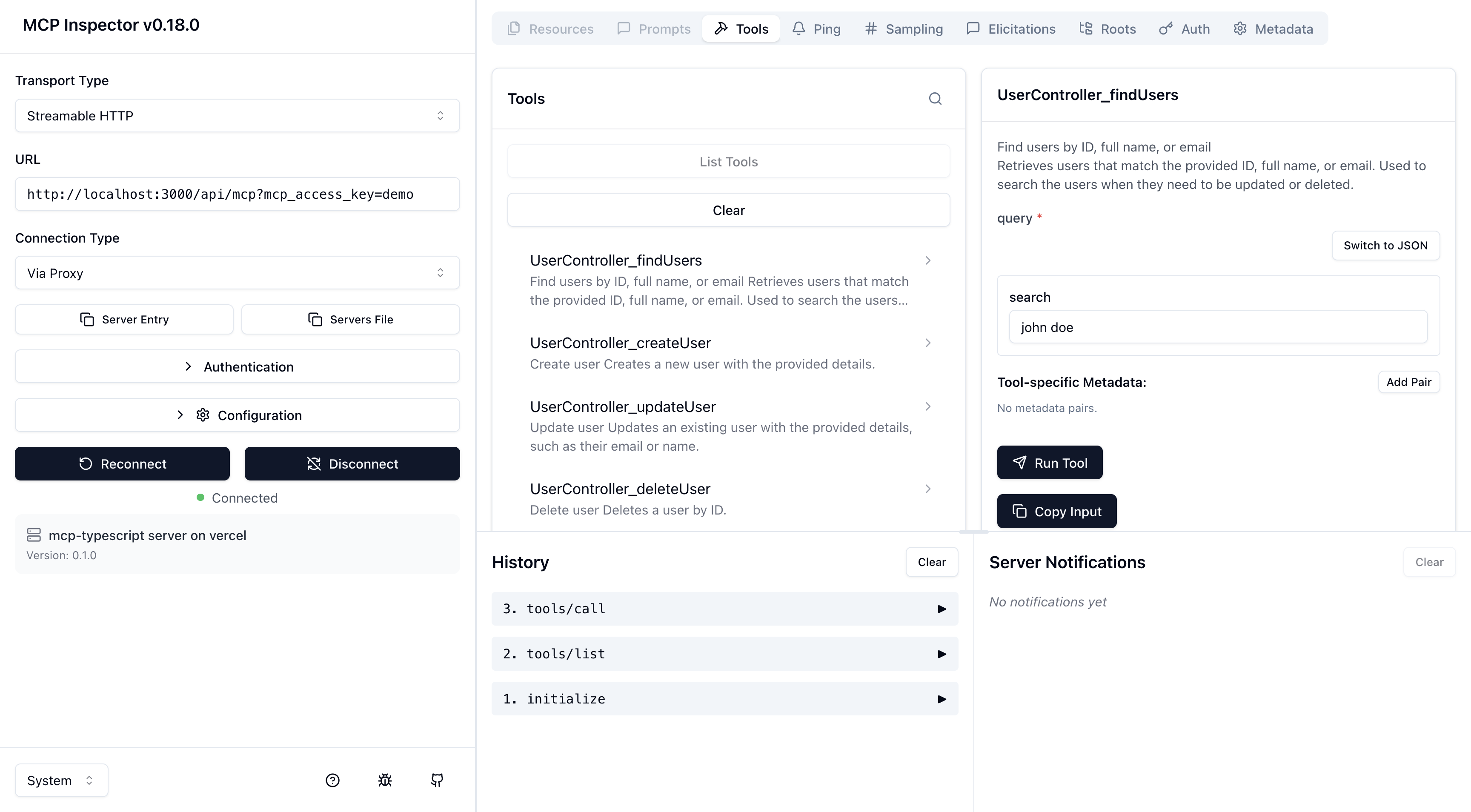
---
Page: https://vovk.dev/realtime-ui/telegram
# Telegram Bot with OpenAPI Mixins
A combination of three features—[State Normalization](./state), [Database Polling](./polling), and [Tool derivation](https://vovk.dev/tools)—enables real-time database and UI updates from any third-party source of changes: API calls, MCP clients, bots, interactions by other users, and so on.
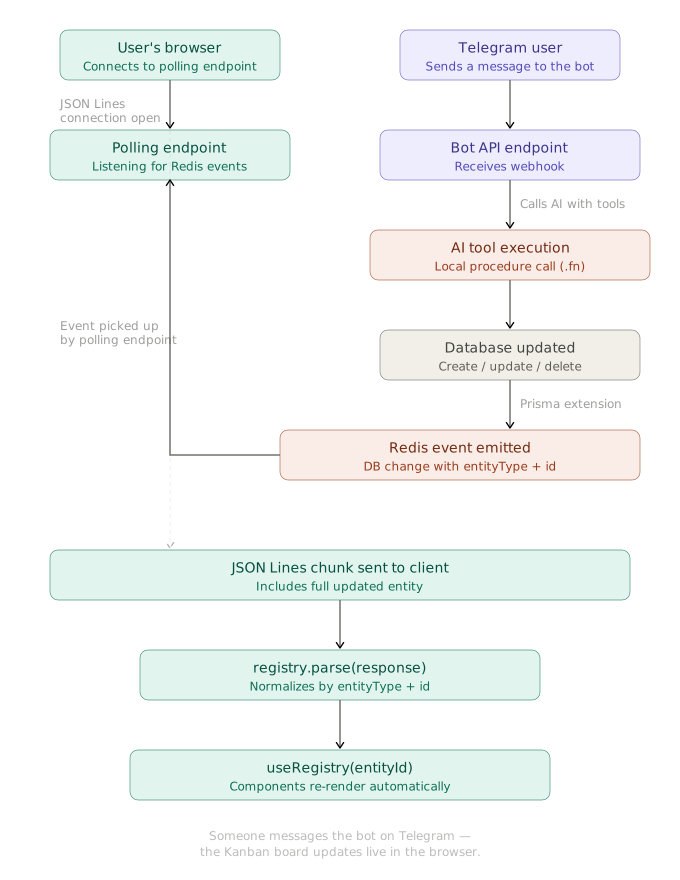
As a proof of concept, this article briefly describes the Telegram bot integration, which allows users to create tasks and assign them to team members by sending text or voice messages to the bot.
## Telegram API Mixin
The Telegram API library is implemented with [OpenAPI mixins](https://vovk.dev/mixins) and used as a module with a hard-coded name `TelegramAPI` in the `telegram` pseudo-segment.
```ts showLineNumbers copy filename="vovk.config.mjs"
// @ts-check
/** @type {import('vovk').VovkConfig} */
const config = {
// ...
outputConfig: {
// ...
segments: {
telegram: {
openAPIMixin: {
source: {
url: 'https://raw.githubusercontent.com/sys-001/telegram-bot-api-versions/refs/heads/main/files/openapi/yaml/v183.yaml',
fallback: '.openapi-cache/telegram.yaml',
},
getModuleName: 'TelegramAPI',
getMethodName: ({ path }) => path.replace(/^\//, ''),
errorMessageKey: 'description',
},
},
},
},
};
export default config;
```
After running `vovk dev` or `vovk generate`, the `TelegramAPI` module is available for import from the generated client library.
```ts
import { TelegramAPI } from 'vovk-client';
await TelegramAPI.sendMessage({
body: {
chat_id: 123456789,
text: 'Hello from Realtime Kanban Telegram bot!',
},
apiRoot: 'https://api.telegram.org/bot',
});
```
Because the Telegram Bot API requires authentication via the bot token in the URL, the API module can be recreated with the `withDefaults` method to set the `apiRoot` permanently.
```ts
import { TelegramAPI as TelegramRawAPI } from 'vovk-client';
const TelegramAPI = TelegramRawAPI.withDefaults({
apiRoot: 'https://api.telegram.org/bot',
});
```
## Segment, Controller and Procedure
We’re going to create a new segment called `bots` that contains a `TelegramController` under the `TelegramBot` key. The segment isn’t going to emit any schema, as it’s not needed on the client side; this is configured by setting `emitSchema: false` in the `initSegment` call. Because the schema is not emitted, the controller key name can be any string.
```ts showLineNumbers copy filename="src/app/api/bots/[[...vovk]]/route.ts" repository="finom/realtime-kanban"
import { initSegment } from 'vovk';
import TelegramController from '../../../../modules/telegram/TelegramController';
const controllers = {
TelegramBot: TelegramController,
};
export type Controllers = typeof controllers;
export const { GET, POST, PATCH, PUT, HEAD, OPTIONS, DELETE } = initSegment({
segmentName: 'bots',
emitSchema: false, // Disable schema emission for bot endpoints
controllers,
});
```
*[The code above is fetched from GitHub repository.](https://github.com/finom/realtime-kanban/blob/main/src/app/api/bots/[[...vovk]]/route.ts)*
The `TelegramController` class contains a single `handle` procedure, implementing the `/api/bots/telegram/bot` endpoint, which is called by the Telegram webhook for each incoming message.
```ts showLineNumbers copy filename="src/modules/telegram/TelegramController.ts" repository="finom/realtime-kanban"
import { post, prefix } from 'vovk';
import TelegramService from './TelegramService';
@prefix('telegram')
export default class TelegramController {
@post('bot')
static handle = TelegramService.handle.bind(TelegramService);
}
```
*[The code above is fetched from GitHub repository.](https://github.com/finom/realtime-kanban/blob/main/src/modules/telegram/TelegramController.ts)*
## Service
The `TelegramService` class contains the main logic for handling incoming messages, generating AI responses with the Vercel AI SDK, updating the database via derived tools, and sending text or voice messages back to the user.
```ts showLineNumbers copy filename="src/modules/telegram/TelegramService.ts"
// ...
export default class TelegramService {
// ...
private static async generateAIResponse(
chatId: number,
userMessage: string,
systemPrompt: string
): Promise<{ botResponse: string; messages: ModelMessage[] }> {
// Get chat history
const history = await this.getChatHistory(chatId);
const messages = [...this.formatHistoryForVercelAI(history), { role: 'user', content: userMessage } as const];
const { tools } = deriveTools({
modules: {
UserController,
TaskController,
},
});
// Generate a response using Vercel AI SDK
const { text } = await generateText({
model: vercelOpenAI('gpt-5'),
system: systemPrompt,
messages,
stopWhen: stepCountIs(16),
tools: {
...Object.fromEntries(
tools.map(({ name, execute, description, parameters }) => [
name,
tool({
execute,
description,
inputSchema: jsonSchema(parameters as JSONSchema7),
}),
])
),
},
});
const botResponse = text || "I couldn't generate a response.";
// Add user message to history
await this.addToHistory(chatId, 'user', userMessage);
// Add assistant response to history
await this.addToHistory(chatId, 'assistant', botResponse);
messages.push({
role: 'assistant',
content: botResponse,
});
return { botResponse, messages };
}
private static async sendTextMessage(chatId: number, text: string): Promise {
await TelegramAPI.sendMessage({
body: {
chat_id: chatId,
text: text,
parse_mode: 'html',
},
});
}
private static async sendVoiceMessage(chatId: number, text: string): Promise {
// ...
}
// ...
}
```
You can explore the full implementation of `TelegramService` in the [GitHub repository](https://github.com/finom/realtime-kanban/blob/main/src/modules/telegram/TelegramService.ts), as it’s too long to fit here.
Now the app is ready to receive incoming messages from Telegram users, process them with AI, update the database and UI, and respond back to users.